ENGLISH
23SETTINGS
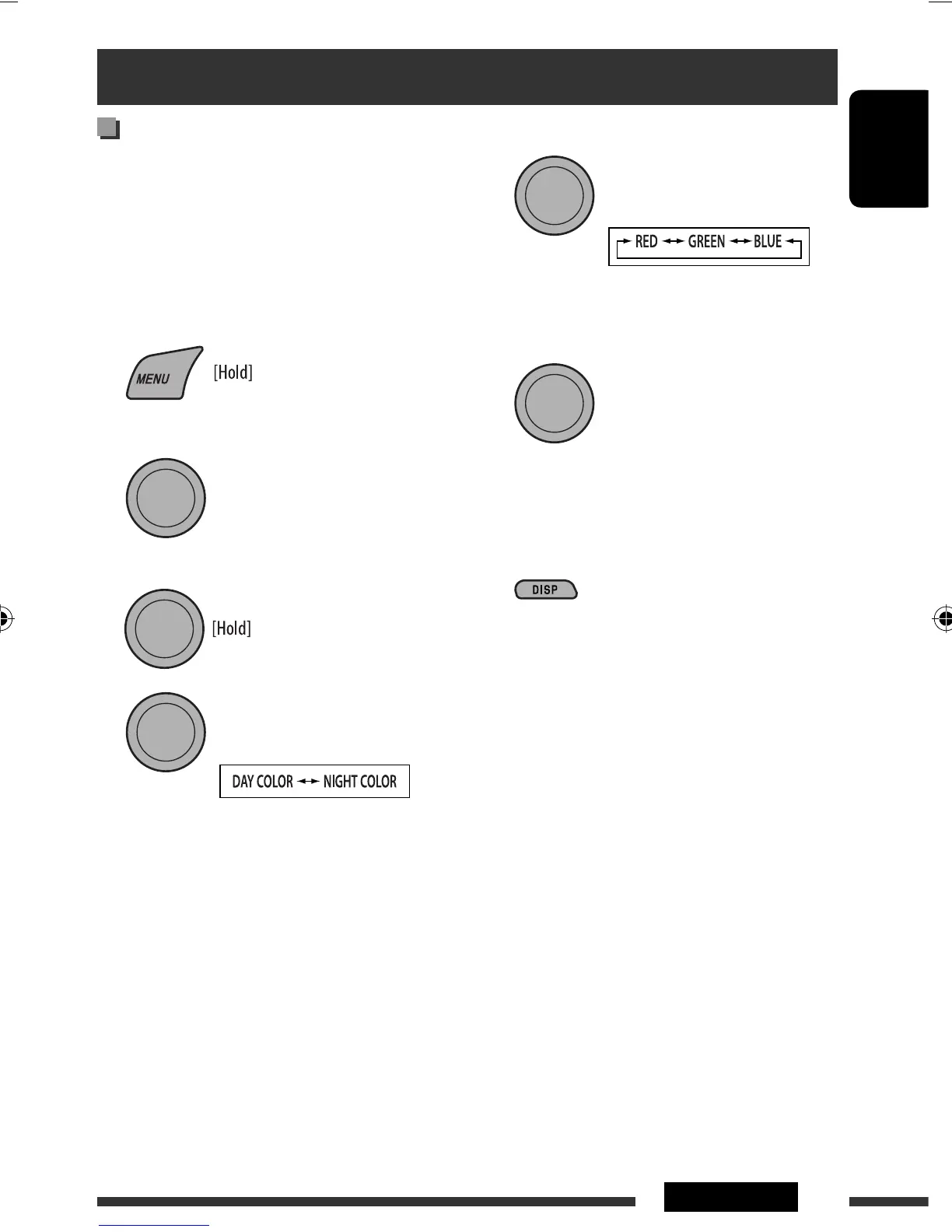
Creating your own color
—USER Color
You can create your own colors—“DAY COLOR” or
“NIGHT COLOR.”
DAY COLOR: Used when “DIMMER” is set to
“DIMMER OFF.”
NIGHT COLOR: Used when “DIMMER” is set to
“DIMMER ON.”
1
2
Select “COLOR” = “USER.”
3 While “USER” is shown on the display...
4
[Turn] = [Press]
5 Select a primary color.
6 Adjust the level (00 to 31) of the selected
primary color.
7 Repeat steps 5 and 6 to adjust other primary
colors.
8 Exit from the setting.
• If no operation is done for about 30 seconds, the
operation will be canceled.
[Turn] = [Press]
[Turn] = [Press]
[Turn] = [Press]
Color settings
EN22-27_KD-R406_001A_5.indd 23EN22-27_KD-R406_001A_5.indd 23 22/8/08 2:46:29 PM22/8/08 2:46:29 PM



 To Next Page
 Loading...