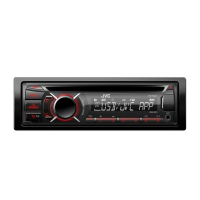
This document describes the JVC KD-R646, KD-R446, KD-R445, and KD-R444 CD receivers, which are car audio units designed for playing CDs, USB devices, and iPod/iPhone devices, as well as receiving AM/FM/SW radio broadcasts. The KD-R646 model includes additional illumination features.
Function Description:
The JVC CD receivers serve as a central audio system for vehicles, offering multiple playback sources and sound customization options. They are capable of playing standard audio CDs, MP3/WMA files from CDs and USB mass storage devices, and audio from iPod/iPhone devices. The units also feature an AM/FM/SW tuner for radio reception. An auxiliary input allows connection of portable audio players, and the KD-R646 model supports a Bluetooth adapter (KS-BTA100, sold separately) for wireless audio streaming. Sound settings include a preset equalizer, bass boost, loudness control, fader/balance adjustments, and advanced sound customization through a Pro EQ with adjustable frequency, level, and Q for Bass, Middle, and Treble. Subwoofer output control (level and LPF) and high-pass filter (HPF) for front/rear speakers are also available. The KD-R646 model offers extensive display and button illumination customization.
Important Technical Specifications:
Audio Amplifier:
- Maximum Power Output: 50 W per channel
- Continuous Power Output (RMS): 20 W per channel into 4Ω, 40 Hz to 20,000 Hz at less than 1% total harmonic distortion
- Load Impedance: 4Ω (4Ω to 8Ω allowance)
- Frequency Response: 40 Hz to 20,000 Hz
- Signal-to-Noise Ratio: 70 dB
- Line-Out, Subwoofer-Out Level/Impedance: 4.8 V/10 kΩ load (full scale)
- Output Impedance: ≤ 600 Ω
Tuner:
- FM Frequency Range: 87.5 MHz to 108.0 MHz (50 kHz step)
- FM Usable Sensitivity: 9.3 dBf (0.8 µV/75 Ω)
- FM 50 dB Quieting Sensitivity: 16.3 dBf (1.8 µV/75 Ω)
- FM Alternate Channel Selectivity: 65 dB (at 400 kHz)
- FM Frequency Response: 40 Hz to 15,000 Hz
- FM Stereo Separation: 40 dB
- AM Frequency Range: MW 531 kHz to 1,611 kHz (9 kHz step), SW1 2,940 kHz to 7,735 kHz (5 kHz step), SW2 9,500 kHz to 10,135 kHz / 11,580 kHz to 18,135 kHz (5 kHz step)
- AM Sensitivity/Selectivity: 20 µV/40 dB
CD Player:
- Signal Detection System: Non-contact optical pickup (semiconductor laser)
- Number of Channels: 2 channels (stereo)
- Frequency Response: 5 Hz to 20,000 Hz
- Signal-to-Noise Ratio: 98 dB
- Wow and Flutter: Below measurable limit
- Playable Discs: CD-DA, CD-R/RW with MP3/WMA files. Unplayable discs include non-round discs, dirty/colored discs, unfinalized discs, 8 cm CDs, and the non-DVD side of DualDiscs.
- Playable Files: MP3 (.mp3) and WMA (.wma) with bit rates from 8 kbps to 320 kbps (MP3) and 32 kbps to 192 kbps (WMA). Supports various sampling frequencies and Variable Bit Rate (VBR) files.
- Maximum Characters for File/Folder Name: 64 characters (ISO 9660 Level 1 and 2, Romeo, Windows long file name), 32 characters (Joliet).
USB:
- USB Standard: USB 1.1, USB 2.0
- Data Transfer Rate (Full Speed): Max. 12 Mbps
- Compatible Devices: Mass storage class
- Compatible File Systems: FAT 32/16/12
- Playable Audio Formats: MP3/WMA
- Maximum Supply Current: DC 5 V ⎓ 1 A
- Maximum Number of Characters: Folder names: 63, File names: 63, MP3 Tag: 60, WMA Tag: 60.
- Maximum Files/Folders: 65,025 files, 255 folders (including unsupported files), 8 hierarchies.
- USB Hubs/Multi Card Readers: Not supported.
- Cable Length: Abnormal playback may occur with cables longer than 5 m.
General:
- Power Requirements (Operating Voltage): DC 14.4 V (11 V to 16 V allowance)
- Grounding System: Negative ground
- Allowable Operating Temperature: 0°C to +40°C
- Installation Size (approx.): 182 mm (W) × 53 mm (H) × 159 mm (D)
- Panel Size (approx.): KD-R646: 188 mm (W) × 59 mm (H) × 10 mm (D); KD-R446/KD-R445/KD-R444: 188 mm (W) × 59 mm (H) × 13 mm (D)
- Weight (excluding accessories): 1.2 kg
Usage Features:
- Basic Operations: Turn on/off, adjust volume (knob or remote), mute/pause, select source (CD, USB, iPod, AUX, FM, AM, SW1, SW2), change display information (DISP button).
- Radio: Automatic and manual station search, store up to 18 FM and 6 AM/SW stations, select stored stations. Features like SSM (Strong Station Memory), MONO/STEREO reception, IF BAND (AUTO/WIDE), and Radio Timer are available.
- CD/USB/iPod: Select tracks/files, select folders (MP3/WMA), reverse/fast-forward, select from lists (MP3/WMA, JVC Playlist Creator/Music Control files, iPod playlists/artists/albums/songs/podcasts/genres/composers). Repeat play (track, folder, all, one) and random play (all, folder, song, album) options. iPod/iPhone control modes: HEAD MODE (unit controls playback), IPOD MODE (unit and iPod/iPhone control), EXT MODE (iPod/iPhone controls playback).
- Auxiliary Input: Connect portable audio players via a 3.5 mm stereo mini plug.
- Bluetooth (KD-R646 only): Connect KS-BTA100 adapter for BT AUDIO source.
- Illumination (KD-R646 only): Customize display and button illumination color (29 preset colors or user-defined), brightness (00-31), and scrolling effects. Separate day/night settings.
- Audio Settings: Preset equalizers (FLAT, NATURAL, DYNAMIC, VOCAL BOOST, BASS BOOST, USER), store custom sound settings (Bass, Mid, Treble levels), Fader/Balance, Bass Boost, Loudness (LOW/HIGH), Volume Adjust for each source, L/O Mode (Subwoofer/Rear), Subwoofer On/Off, Subwoofer LPF (THROUGH, 55Hz, 85Hz, 120Hz), Subwoofer Level, HPF (100Hz, 120Hz, 150Hz, OFF), BEEP (keypress tone), TEL MUTING, AMP GAIN (LOW POWER/HIGH POWER).
- JVC Playlist Creator / JVC Music Control: Supports PC and Android applications for creating databases to search audio files by title, album, or artist name.
- Safety Features: Warning against operating functions that distract from driving, caution for volume settings, general safety notes (backup data, no metallic objects, condensation), and remote control battery handling.
- Installation: Detailed instructions for in-dash mounting, wiring connections, and removal. Includes a parts list.
- Troubleshooting: Provides remedies for common issues like no sound, radio reception problems, display errors, disc ejection issues, and device compatibility. A reset function is available.
Maintenance Features:
- Cleaning the unit: Wipe dirt off the faceplate with a dry silicon or soft cloth.
- Cleaning the connector: Detach the faceplate and clean the connector with a cotton swab gently.
- Handling discs: Do not touch the recording surface, avoid tape/accessories, clean from center outward with a dry silicon or soft cloth (no solvents), pull out horizontally, remove burrs from the center hole and disc edge.

 Need help?
 General

 To Next Page