RADIO
Default:
XX
r---
-
--
---
---··----·
·
--------------·-·
--
·
~---
·
-
------·----------
-
-··--
·
-----
-·
--
-------·-··
---·--
·
·-··
·
-·-
·
---
-
·-
-
--
·
·-·-
--··--
---
1
SSM SSM
01
-
06
I
SSM
07.-
12
I
SSM
13
- 18:
Automatically
pre
s
et
s
up
!
to
18
stations
for
FM.
"
SSM
" s
tops
flashing
when
the
first
6 s
tations
ar
e
! • s
tored
.
Select
SSM
07 - 12 I
SSM
13
-
18
to
store
the
following
12
i
stations.
i-
·
--
·----------
··
·
··
-
---··-·
---
---··
·
···
···
·--
-----.
··-··
---·--
-···
··
·---·
-·-··
·
··
-
-···
···
-··
·-
..
.
---
·
····
··-
--·---·
,·
·· .
...
-
-·
--··-··
··
.-
-·
····
--·
·-----
....
..
..
... .
..
.
!
IF
BAND
AUTO
:
Increases
the
tuner
selectivity
to
reduce
interference
noises
from
adjacent
FM
s
tations
. (
Stereo
effect
may
be
lost.)
;
WIDE:
Subjects
to
interference
noises
from
adjacent
fM
stations,
but
sound
quality
will
not
:
be
degraded
and
the
stereo
effect
will
remain.
.
~---------
-
-------~--------------........'....------
·
----------------
1
MONO
Displayed
only
.
when
the
source
is
FM
.
ON:
Improves
the
FM
reception
,
but
the
stereo
effect
will
be
lost.
;
t
OFF:
Cancels.
~
~·
---.
-
-----·--·--------·------------------
-----
-----------
----···--·-··
---------
:
AREA AREA
US:
For
North
/
Central/South
America
;
AM
/
FM
intervals
:
!
10
kHz
/
200
kHz
. ;
AREA
SA
:
For
some
South
American
·
countries
,
AM
/
!
FM
interval
s:
10kHz
/
50
kHz
.;
AREA
~U
:
For
any
other
areas
,
AM
/
FM
intervals:
9
kHz
/
50
kHz
.
~--~--------~---·-·----~---.:.----
-
..
'"
·---·-
··-
__
.,
_________
__
______
_
___
___
______
_ --------
·--·-
··-·
··
·----·-··---
__
.,:
_____________
-·
-
-r-·-
---····--·--·-··- ·-------·
..
-·-
I
PTYSEARCH
!
Select
a
Pn'
code
(see
betow
).
If
there
is
a
station
broadca
s
ting
a
program
of
the
same
PTY
code
as
you
have
selected
,
that
station
is
tuned
in.
PTY
code:
NEWS,
INFORM
(information),
SPORTS,
TAlK,
ROCK,
ClS
ROCK
(classic
rock),
ADlT
HIT
(adult hits),
SOFT
RCK
(softrock),
TOP
40
,
COUNTRY,
OlDIES
,
SOFT
,
NOSTAlGA
(nostalgia), JAll,
CLASSICl
(classical), R & 8 (rhythm and blues),
SOFT
R&6
(soft rhythm and blues),
lANGUAGE
,
RH
MUSC
(religious music),
R£l
TAlK
(religious talk),
PERSNlTY
(personality),
PUBLIC
,
COllEGE,
HABL
ESP
(Spanish talk),
MUSC
ESP
(Spani~h
music),
HIP
HOP,
WEATHER
AUX
tls~
a
po
.
r.talif~
·
aJ,tilt({~la~er
~;
.
·:~-
~A~r:·
~~.:<.
"'·.
'.
::
·
·;:
· ·
,,_<~:e;~~'_:,
:
_-_·
-
_,
· ,
~
. • . . .
"\...,
t";}
,:-- '
'-
•
-.~
: .
1~
~
...
9-i"
.....
~."'
yk. '
,·'·~Jo>
·
~·
-
-~
-=·-
"":::
.
':;.,'{i'-..~$
""
.
.,
~
.
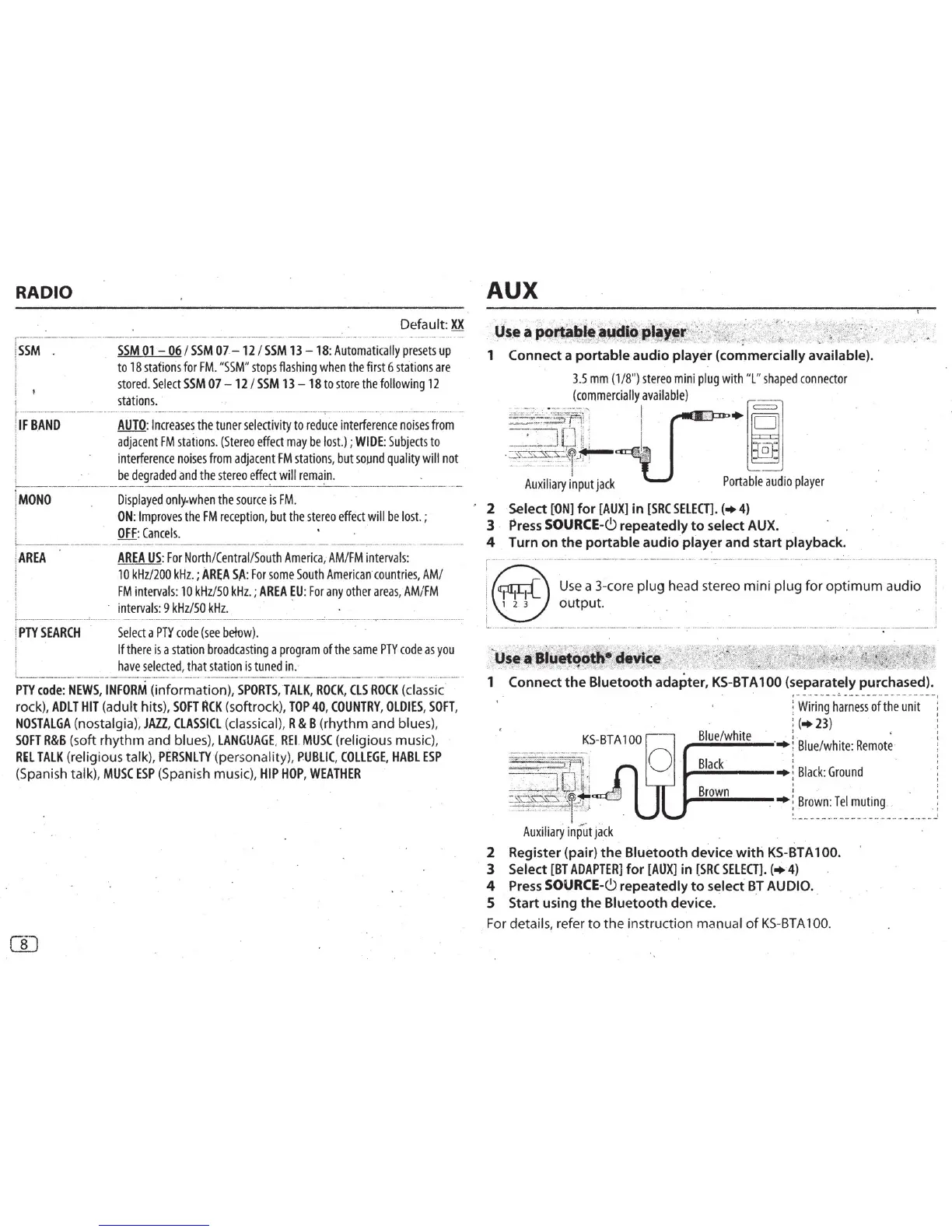
1 Connect a
portable
audio
player (commercially available).
3.5
mm
(1/8
")
stereo
mini
plug
with
"L"
shaped
connector
(
commercially
available
)
·
--
···--
·
~
I
=-'j'Qli
I.
-
7~~~-~~r
~
-.
Auxiliary
input
jack
Portable
audio
player
' 2 Select
["ON]
for
[AUX]
in
[SRC
SELECT].
(•
4)
3
Press
SOURCE-6 repeatedly
to
select AUX.
4 Turn
on
the
portable
audio
player
and
start playback.
~-
--
----
-
··
-
----
---
-----
----
----
-
---------
---
- .
-----.
-
---
-
--
---
-
...
----------
- 1
j
@I
1 1
Use
a 3-core plug head stereo mini
plug
for
optimum
audio
~
. , 2 3
output.
!
i i
'--
·--
-
~-----·---·--------·-------------
·---
-
---
------
-
- :- --------·
-------
--
~-----------~-------
--
---·-····-
·---~
'""";
"'
____
_____
__ ;
..._
'
-
.~
.• - :(·'-
...
)-
..
_~"-,:~(
·:::-~·.r';-};,
...
:zi.;:-~.
·-'~>
:,.
l~
""
:-
us~•~·~~f'l9!i
r
· ·
d~
,
Yf~~
/-•
1 Connect
the
Bluetooth
adapter,
KS-BTA
100
(separately purchased).
~-------~
-
---------------
:
Wi
r
ing
harnes
s
of
the
unit
: (
•23
)
Blue
/
white
:.
,..........,.
......
;;..;..-.._
--
,..
:
Blue
/
white:
Remote
·
i
Black
'
.,........,.._
__
,..
;
Black
:
Ground
Brown
:
.,.........,..
....
__
_ • :
Brown
:
Tel
muting
.
~I
!
.
l...
It
-.
=:JOii'
l
=~~~~2
r~
t
Auxiliar
y input
jack
i
~-
---------------
- -
-
-
-
-
-·---
2 Register (pair)
the
Bluetooth
device
with
KS-BTA
100.
3 Select
[BT
ADAPTER]
for
[AUX]
in
(SRC
SElECT].
(•
4)
4
Press
SOURCE-6 repeatedly
to
select·
BT
AUDIO ..
5 Start using
the
Bluetooth
device.
For detail
s,
refer
to
the instruction manual
of
KS
-
BTA
100.



 To Next Page
 Loading...