EasyManua.ls Logo

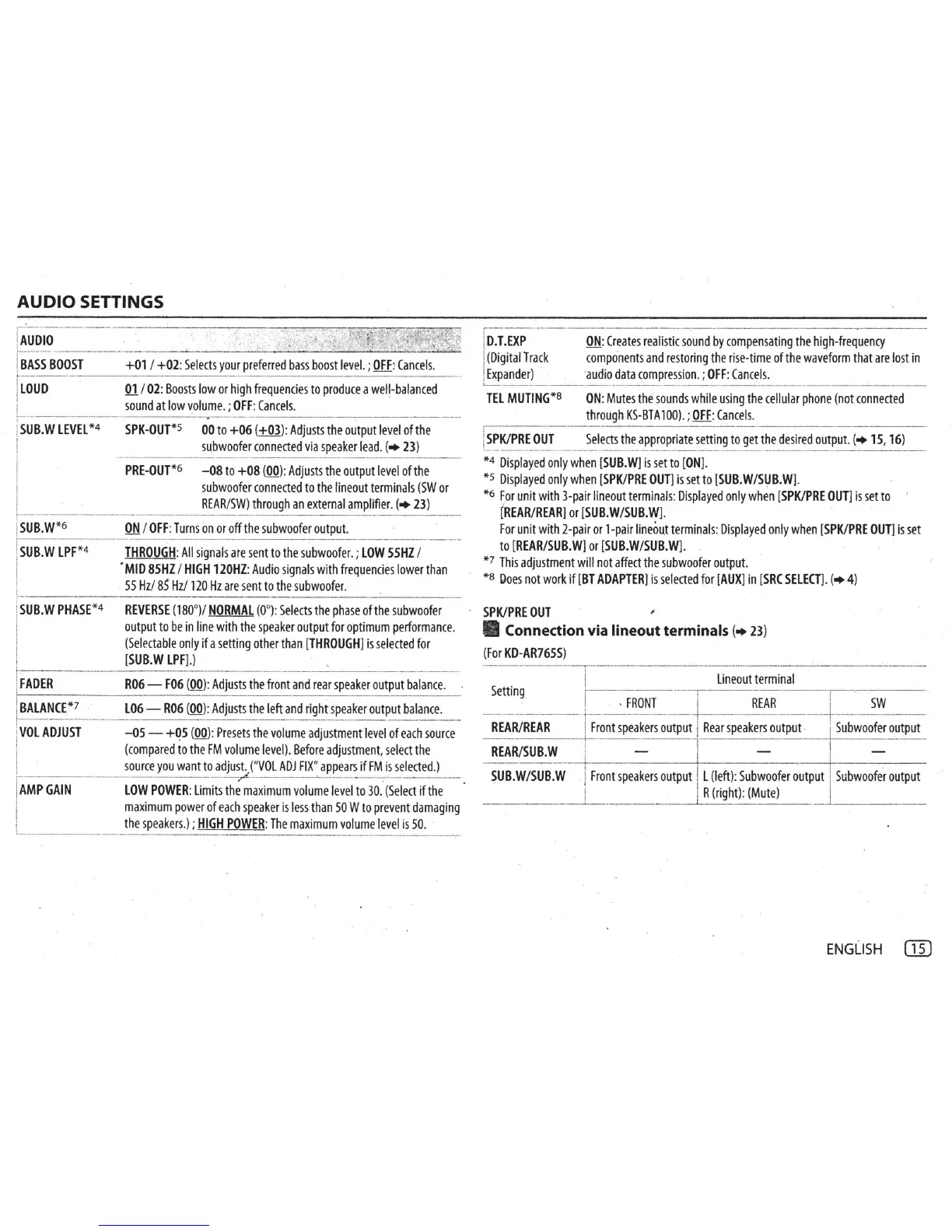
JVC KD-R460 - DETAILED AUDIO CONFIGURATION; Audio Output Level and Tone Adjustments; Special Audio Enhancement Features

JVC KD-R460
31 pages
Print Icon
To Next Page IconTo Next Page
To Previous Page IconTo Previous Page
Loading...
AUDIO
SETTINGS
!
AuoiO
____
----
·-------
i
BASS
BOOST
+01
I
+02:
Selects
your
preferred
bass
boost
level.
;
OFF
:
Cancels.
~
~--------~-~---------------
!
LOUD
01
I
02
:
Boosts
low
or
high
frequencies
to
produce
a
well-balanced
:
sound
at
low
volume.
;
OFF
:
Cancels.
!
--------
------
1
SUB.W
LEVEL
*4
SPK-OUT
*S
00
to
+06 (
+03):
Adjusts
the
output
level
of
the
l
i
subwoo
fer
connected
via
speaker
lead
.
{
23
)
·-·
----·----------·----------------
·
--
·
---------·--------
- -·-·
I
PRE-OUT
*6
-08
to
+08 (
00
):
Adjusts
the
output
level
of
the
1
subwoofer
co
nnected
to
the
lineout
terminals
(SW
or
' .
REAR
/SW)
through
an
external
~mplifier.
(•
23
)
L----------·-·-----·-----·-----
---
·---------·------
-------
i
SUB.W
*6
ON
I
OFF
:
Turns
on
ot
off
the
subwoofer
output.
I
!
SUB
.W
LPF
*4
THROUGH
:
All
signals
are
sent
to
the
s
ubwoofer.
;
LOW
55HZ
I
I
·
MID
85HZ
1
HIGH
120HZ
:
Audio
signals
with
frequencies
lower
than
!
55
Hz
/
85
Hz
/ 1
20Hz
are
sent
to
the
subwoofer.
l..
-----------------------
1
SUB.
W
PHASE
*4
REVERSE
(
180
°
)/
NORMAL
(0
°
):
Selects
the
phase
of
the
subwoofer
j
output
to
be
in
line
with
the
speaker
output
for
optimum
performance.
i
(Selectable
only
if
a
setting
other
than
[THROUGH]
is
selected
for
I
[
SUB.W
LPF]
.)
1
!.
FADER
R06
-
F06
(
00)
:
Adjusts
the
front
and
rear
speaker
output
balance.
·
~--------------
'
BALANCE*?
L06
-
R06
(
00)
:
Adjust
s
the
left
and
right
speaker
output
balance.
r
voL
ADJUST
----------
=:
as
~
+05 (
QQ)
:
Presets
the
~~~~;-~~
-
dJ~~~~~~t
level
·
;~
-
~
-
h
sourc;
-
1
(compared
to
the
FM
volume
level)
.
Before
adjustment,
select
the
I
source
you
want
to
adjust.,
("VOL
ADJ
FIX"
appears
if
FM
is
selected.)
I
~
--------'------
..
-------
[A
MP
GAIN
LOW
POWER
:
limits
the
maximum
volume
level
to
30.
·
(Select
if
the.
·
:
maximum
power
of
each
speaker
is
le
ss
than
50
W
to
prevent
damagmg
I
the
speakers.);
HIGH
POWER
:
The
maximum
volume
level
is
50.
L
·---:-
,-----
1
D.T
.
EXP
ON
:
Creates
realistic
sound
by
compensating
the
high-frequency
I
(Digital
Track
components
and
restoring
the
rise-time
of
the
waveform
that
are
lost
in
i
Expander)
·
audio
data
compression.;
OFF
:
Cancels.
m
MUTING
~
ON
:
Mutes
the
sounds
while
using
the
cellular
phone
(not
connected
through
KS-BTA100).;
Qf.E:
Cancels.
fSPKJ
PRE
OUT
Selects
the
appropriate
settin
_
~
_
to
get
the
d
_
esir~~outp~
_
t.
(
•15
,
16
)
L ________
..
·- ·
----------··---
- - -
*4
Displayed
only
when
[SUB.W]
is
set
to
[
ON].
*s
Displayed
only
when
[SPK/PRE
OUTI
is
set
to
[SUB.W/S~B.
W].
.
*6
For
unit
with
3-pair
lineout
terminals:
Displayed
only
when
[SPK/PRE
OUT]
IS
set
to
(
REAR/REAR]
or
[
SUB.W/SUB.W].
For
unit
with
2-pair
or
1-pair
lineout
terminals:
Displayed
only
when
[SPK/PRE
OUT
]
is
set
to
[REAR/SUB.W]
or
[SUB.W/SUB.W].
*7
This
adjustment
will
not
affect
the
subwoofer
output.
*8
Does
not
work
if
[
BT
AD
'
APTER]
is
selected
for
[AUX]
in
[
SRC
SELEO
].
(
4)
SPK/PRE
OUT
'
Connection via
lineout
terminals
(
23
)
{For
KD-AR765S
)
----·------·--.-~
lineout
te
_
rm
_i_
na
_I
_--.--
Setting
.
FRONT
·-r
REAR
1-----
~Y!_
__
_
--
REARfREAR
---~f
'F!i;;~k~~s
~~~pu~
J
R
-
e-;;~~;~~~~~~t
~----
Subwoofer
output
_
---
f
I
REAR/SUB.W
I
-
-
S
UB
.
W
/
SUB
.~
Front
speakers
output
!L
(left):
Subwoofer
~utput
Subwoofer
output
1
1
R
(right):
(Mute)
ENGLISH
(ill

Related product manuals