EasyManua.ls Logo

JVC KD-R460 - DISPLAY CUSTOMIZATION OPTIONS; Screen Brightness, Scroll, and Color Settings; Custom Color Creation and Guide

JVC KD-R460
31 pages
Print Icon
To Next Page IconTo Next Page
To Previous Page IconTo Previous Page
Loading...
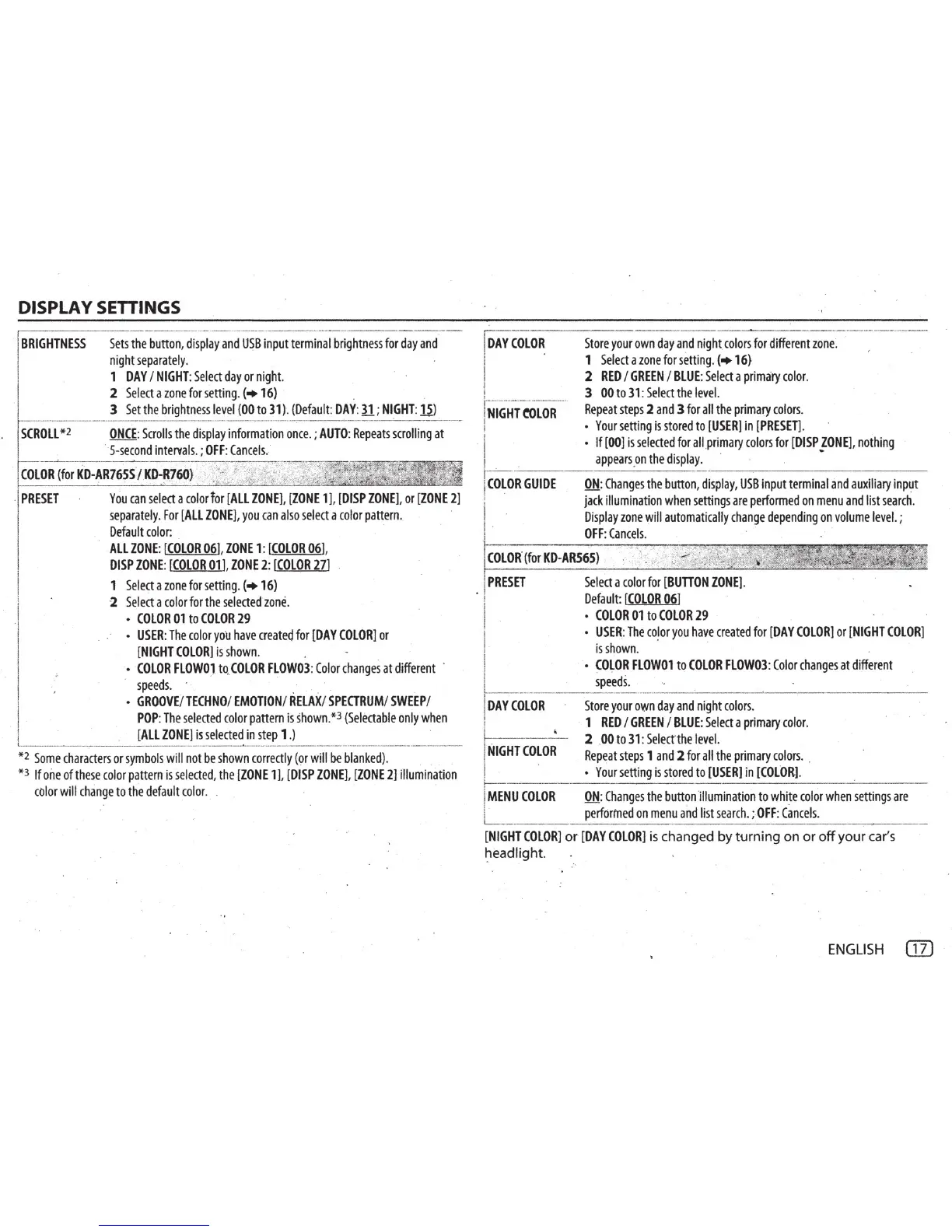
DISPLAY SETTINGS
I
BRIGHTNESS
Sets
the
button,
di
~
~~y
a~d
USBi~put
termi~~ib~ightness
for
day
and
I
night
separately.
I 1
DAY
I
NIGHT:
Select
day
or
night.
I 2
Select
a
zone
for
setting.
(+16) . .
~
i
3
Set
the
brightness
level
(00
to
31)
.
(Default:
DAY
:
31
;
NIGHT:
15)
o>
~-
--
---
-
-MM
.
--0----
-
----
-
-M--------
-----
w
·
-·--·
--
-
--
-
:
-
·
---
-
----
-
-
-
·
- - -
--
··
---
CROLL
*2
ONCE
:
Scrolls
the
display
information
once
.;
AUTO
:
Repeats
scrolling
at
5
-s
econd
intervals
.;
OFF
:
Cancels.
·1
COLOR
(for
KD-AR76SS
./
KD-fi76i)
~
j3~-~~T;~~;~-
·I
PRESET
You
can
select
a
color
lor
(ALL
ZONE],
[ZONE
1],
[DISP
ZONE],
or
[ZONE
2]
separately.
For
[ALL
ZONE]
,
you
can
also
select
a
color
pattern.
Default
color:
. ·
ALL
ZONE
:
(COLOR
06],
ZONE
1: [
COLOR
06]
,
DISP
ZONE
:
[COLOR
01],
ZONE
2:
[COLOR
27]
1
Select
a
zone
for
setting
. (+16)
I
.
2
Select
a
color
for
the
selected
zone
.
COLOR
01
to
COLOR
29
-~!
USER:
The
color
you
have
created
for
(DAY
COLOR]
or
[NIGHT
COLOR]
is
shown.
l'i
·
COLOR
FLOWOJ
to.(OLOR
FLOW03
:
Color
changes
at
diff~rent
.
speeds.
· · . _
GROOVE
/
TECHNO
/
EMOTION
/
RELAX
/
SPEITRUM
/
SWEEP
/
\ .
POP
:
The
selected
color
pattern
is
shown.
*3
(Selectable
only
when
!
[All
ZONE]
is
selected
in
step
1.)
t.
___
_
..,
_
____
__ _____
__
_ --:--------------
-------
--
--
0.
-------
-
---------
--------
-----------
·
*2
Some
characters
or
symbols
will
not
be
shown
correctly
(or
will
be
blanked)
.
*3 If
one
of
these
color
pattern
is
selected
,
the
(ZONE
1
],
[DISP
ZONE]
,
(ZONE
21
illumination
color
will
change
to
the
default
color.
ioAYCOLOR
i .
I
I
I
!
1
--
----·-
·
--
·--
---
---
...
.
NIGHT
e<>LOR
I
i
I
I
COLOR
GUIDE
!
Store
your
own
day
and
night
.
colors
for
different
zone
~
1
Select
a
zone
for
setting.
(+
16}
2
RED
I
GREEN
I
BLUE:
Select
a
primary
color.
3
00
to
31:
Select
the
level.
Repeat
steps
2
and
3
for
all
the
primary
colors
.
Your
setting
is
stored
to
[USERJ
in
[PRESET].
If
[00]
is
selected
for
allprimary
colors
for
[DISP
ZONE],
nothing
appears
_on
the
display.
·
ON
:
Changes
the
button,
display
,
USB
input
terminal
and
auxiliary
input
jack
illumination
when
settings
are
performed
on
menu
and
list
search
.
Display
zone
will
automatically
change
depending
on
volume
level.;
OFF:
Cancels.
COLOR
.
(for
KD-ARS6S)
. I
PRESET
Select
a
color
for
[BUTTON
ZONE].
Default
:
[COLOR
06]
I ·
COLOR
01
to
COLOR
29
1
USER
:
The
color
you
have
created
for
[
DAY
COLOR]
or
[NIGHT
COLOR]
is
shown
. · ·
I
CO~OR
FLOW01
to
COLOR
FLOW03:
Color
changes
at
different
speed
s.
DAY
COLOR
NIGHT
COLOR
Store
your
own
day
and
night
colors.
1
RED
I
GREEN
I
BLUE
:
Select
a
primary
color
.
2 .
00
to
31:
Select
the
level.
Repeat
steps
1
and
2
for
all
the
primary
colors
. .
Your
setting
is
stored
to
[USER]
in
[COLOR]
.
MENU
COLOR
ON
:
Changes
the
button
illumination
to
white
color
when
settings
are
performed
on
menu
and
list
sear
c
h.
;
OFF
:
Cancels
.
[NIGHT
COLORJ
or
[DAY
COLORl
is
changed by turning on
or
off
your car's
~eadlight.
ENGLISH
G1)

Related product manuals