EasyManua.ls Logo

JVC KD-R460 - TROUBLESHOOTING SPECIFIC SERVICES; Pandora, iHeartRadio, SiriusXM Troubleshooting; General Troubleshooting Procedures

JVC KD-R460
31 pages
Print Icon
To Next Page IconTo Next Page
To Previous Page IconTo Previous Page
Loading...
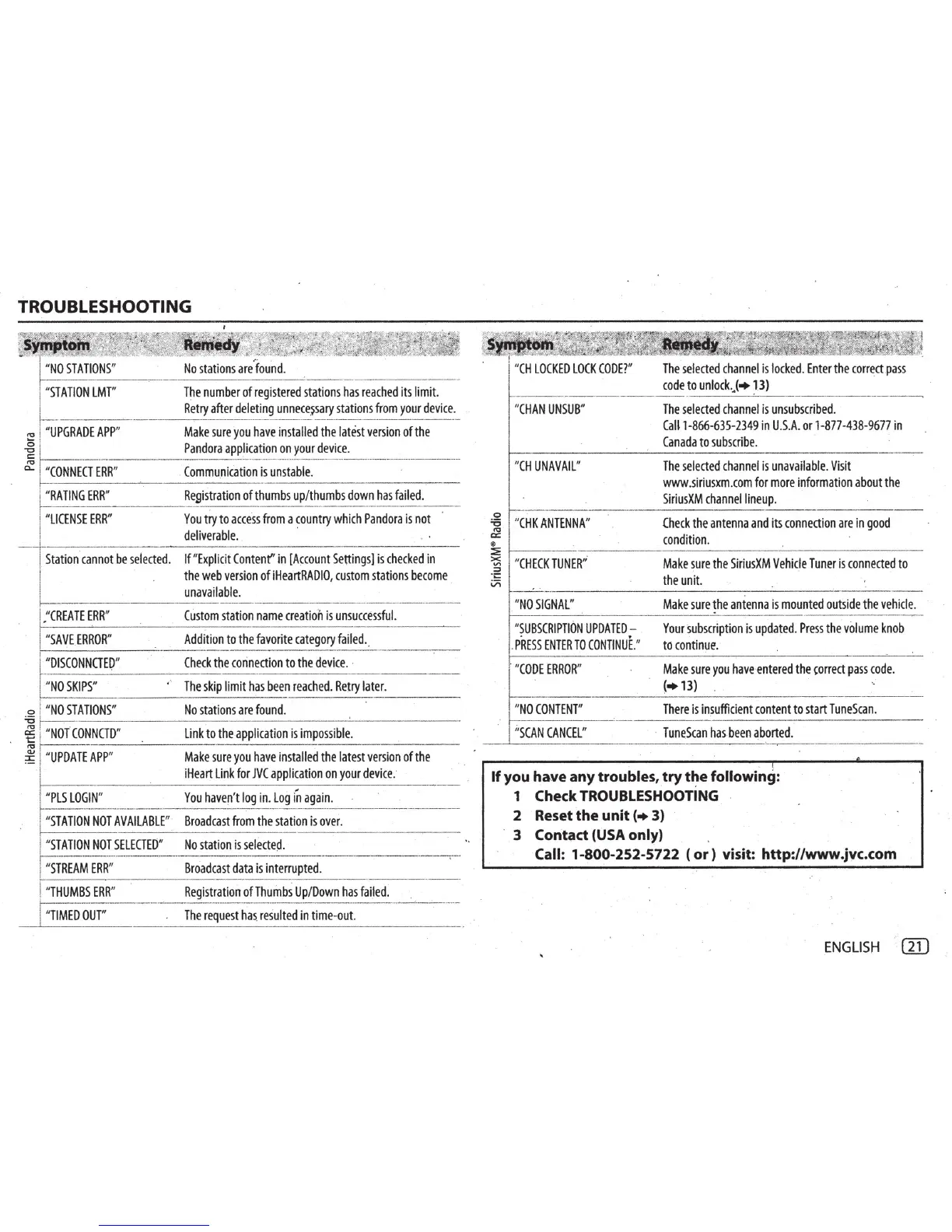
TROUBLESHOOTING
"
NO
STATIONS
"
"
STATION
LMT
"
~
"
UPGRADE
APP
"
j
I "
CONNECT
ERR
_"
__
j:R
A
TING
ERR"
---
"
LICENSE
ERR
"
,.
No
stations
are
found.
T~e
number
of
registered
stations
has
reached
its
limit.
Retry
after
deleting
unnece~sary
stations
from
your
device.
Make
sure
you
have
installed
the
latest
version
of
the
Pandora
application
on
your
device
.
CommuniCation
is
unstable.
------
------
---
Registration
of
thumbs
up
/
thumbs
down
has
failed
.
--
You
try
to
acce
.
ss
from
a
country
which
Pandora
is
not
deliverable.
·
Station
cannot
be
selected.
If "
Explicit
Content"
in
[A~count
Settings)
is
checked
in
the
web
version
of
iHeartRADIO,
custom
stations
become
unavailable.
."
CREATE
ERR
"
Custom
station
name
creation
is
unsuccessful.
"
SAVE
ERROR
"
Addition
to
the
favorite
category
failed
..
Check
the
connection
to
the
device.
·
"DISCONNCTEO"
f------------------
-----
-
"
NO
SKIPS"
'
The
skip
limit
has
been
reached.
Retry
later.
o
l
"
NO
STATIONS
"
No
stations
are
found
.
~
~
"
NOIC
.
O
_
N
_
N
_
C
_
TD
-
,
-------
L
-
in
-
kt
-
o
-
th
--
e
-
a
-
pp
-
li
-
ca
-
ti
-
on
-
i
-
si
-
m
-
po
_
s
_
sib
-
le
~
.
-----------
~
1
"
UPDATE
APP
"
Make
sure
you
have
installed
the
latest
version
of
the
·- I
iHeart
Link
for
JVC
application
on
your
device
:
"PLS
LOGIN
"
You
haven
't
log
in.
Log
in
again
.
"
STATION
NOT
AVAILABLE
"
Broadcast
from
the
station
is
over
.
"
STATION
NOT
SELECTED"
"
STREAM
ERR"
"
THUMBS
ERR
"
~
DOUT"
No
station
is
selecte~.
Broadcast
data
is
interrupted
.
Registration
of
Thumbs
Up/Down
has
failed.
The
request
has
resulted
in
time-out.
"CH
UNAVAIL
"
The
selected
channel
is
unavai
l
able.
Visit
www.siriusxm.com
for
more
information
about
the
SiriusXM
channel
lineup.
0
~
"
CHK
ANTENNA
"
Check
the
antenna
and
its
connection
are
in
good
;x=
condition.
~
r----------------
·--
------~------
-----
--
~
"
CHECK
TUNER
''
Make
sure
the
SiriusXM
Vehicle
Tuner
is
connected
to
·
~
\/)
the
unit.
---·-·-------------
-
-------------
"NO
SIGNAL"
"SUBSCRIPTION
UPDATED
-
.
PRESS
ENTER
TO
CONTINUE.
"
-"
CODE
ERROR
"
Make
sure
the
antenna
is
mounted
outside
the
vehicle
.
Your
subscription
is
updated
.
Press
the
volume
knob
to
continue.
Make
sure
you
have
entered
the
'orrect
pass
code.
(+13)
"NO
CONTENT
"
There
is
insufficient
content
to
start
TuneScan
.
---··---
__
___.~_1
·
·s_
cA
_N_C_A_
NC
_E_
L"
________
TuneScan
has
.
been
aborted
.
.
~
If
you
have any
troubles, try
t~e
followmg:
1 Check
TROUBLESHOOTING
2 Reset the unit
(+
3)
3 Contact
(USA
only)
Call:
1-800-252-5722
(or)
visit: http://www.jvc.com
ENGLISH
WJ

Related product manuals