(No.MA596<Rev.005>)21/28
4.3.4 CD Error Information Display Mode (Not applicable for mechaless models)
*2: Not applicable for mechaless models
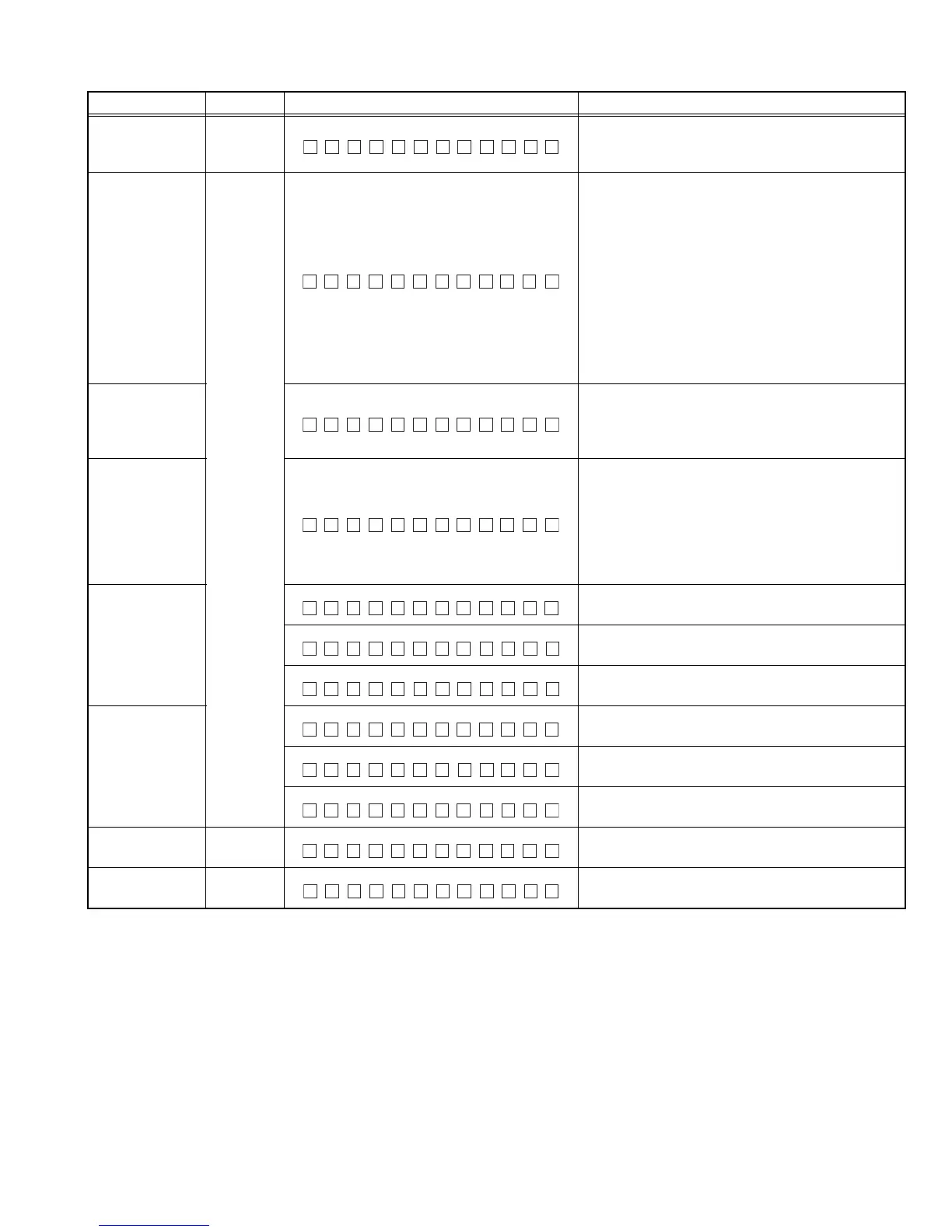
Item Operation Display content Details
CD error
information
display mode
ACCENT
(*2)
Transit to CD error information display mode.
CD Mecha error
log display
DISP
(Toggle)
Move
between
items with
/
Mecha error history 1,2,3 (latest)
#:History No. (1,2,3)
XX: kind of errors, "--" when there is none
00: No Error
04: TOC read Error
05: Unknown CD
06: Heat Error
0A: Update Error
0D: Hold Error
15: Unknown Disc
99: Mecha Error
CD Load error
info display
Load error switch 1,2
#: Switch No. (1,2)
XX: numbers of errors, "--" when there is none
History No. 2 is un-used
CD Eject error
info display
Eject error switch 1,2,3,4
#: History No. (1,2,3,4)
XX: numbers of errors, "--" when there is none
History No.3 is un-used
History No.1: Eject before SW1 is on.
History No.2: Eject until SW1 and SW2 is on.
History No.3: Eject between SW2 on and Eject end
CD time code
error count
information
display (count
skip)
CD time code error count information (count skip)
mode display
CD-DA error count numbers
XX: numbers of errors and "--" when there is none
CD-ROM (compressed file) error count numbers
XX: numbers of errors and “--” when there is none
CD time code
error count
information
display
(no count update)
CD time code error count information
(count not updated) mode display
CD-DA error count numbers
XX: numbers of errors and "--" when there is none
CD-ROM (compressed file) error count numbers
XX: numbers of errors and "--" when there is none
CD error
information clear
ACCENT
(*2)
Clear CD error information by pressing for 2 seconds
when it is displayed.
Mode release ACCENT
(*2)
CD error information display mode release, back to
Common Mode Operation
EMCHAE # XXR
OLAD E#XXR
JEECTE#XXR
NCT OLSE
DCDA XX
DCROM XX
NCT TAYS
DCDA XX
DCROM XX
EMCHA E # --R


 To Next Page
 Loading...