5ENGLISH
Basic operations
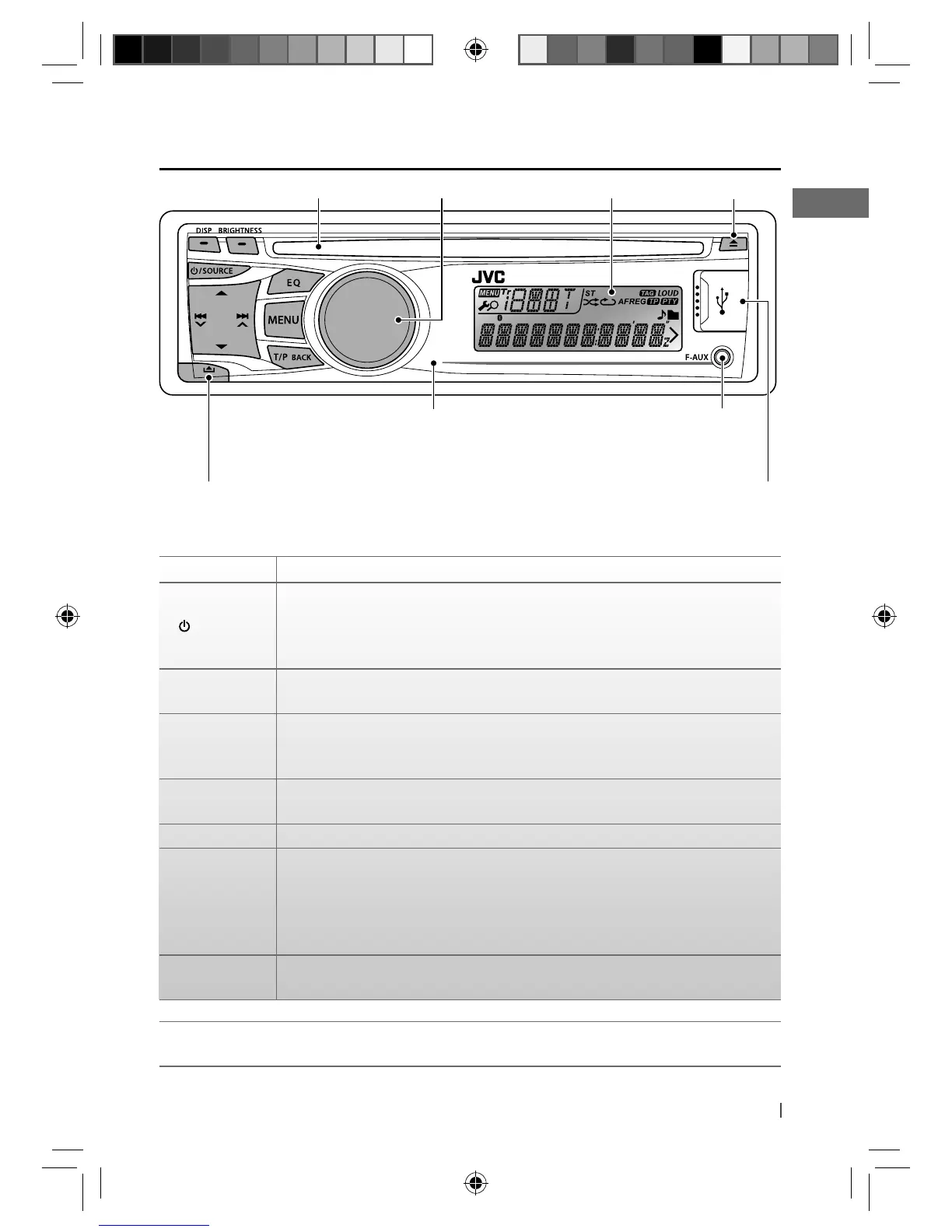
Control dial
Ejects the disc
Loading slot
Remote sensor (for KD-R521/KD-R422/KD-R421)
You can control this unit with an optionally
purchased remote control, RM-RK52 (page 15, 16).
Display window
Front auxiliary
input jack
Detaches the panel
When you press or hold the following button(s)...
Button General operation
/ SOURCE
• Turns on/off [Hold].
• Selects the sources (FM, CD, USB or USB-IPOD, F-AUX, BT AUDIO or R-AUX or
BT PHONE, AM). “CD” or “USB” is selectable only when a disc is loaded or a USB
device is connected.
Control dial
(turn)
• Adjusts the volume level.
• Selects items.
Control dial
(press)
• Mutes the sound during playback. If the source is “CD” or “USB/USB-IPOD”
playback pauses. Press the button again to cancel muting or resume playback.
• Confirms selection.
EQ
• Selects the sound mode.
• Enters tone level adjustment directly [Hold]. (page 12)
BRIGHTNESS Enters <BRIGHTNESS> menu directly. (page 13)
T/P BACK
• Activates/deactivates TA Standby Reception.
• Enters PTY Searching mode [Hold].
• KD-R521: Selects the controlling terminal of an iPod/iPhone [Hold]. (page 11)
• Returns to the previous menu.
• Exit from the menu [Hold].
DISP
• Changes the display information.
• Scrolls the display information [Hold].
KD-R521/KD-R422/KD-R421 is equipped with the steering wheel remote control function.
• For details, refer also to the instructions supplied with the remote adapter.
USB (Universal Serial
Bus) input terminal
EN02-19_KD-R521_003A_f.indd 5EN02-19_KD-R521_003A_f.indd 5 10/13/10 12:45:34 PM10/13/10 12:45:34 PM



 To Next Page