12
Data Size: B6L (182 mm x 128 mm)
Book Size: B6L (182 mm x 128 mm)
•
DualDisc playback:
The Non-DVD side of a “DualDisc” does not comply with the “Compact
Disc Digital Audio” standard. Therefore, the use of Non-DVD side of a DualDisc on this product
cannot be recommended.
•
Playable files:
- File extensions: MP3(.mp3), WMA(.wma)
- Bit rate: MP3: 8kbps — 320kbps
WMA: 32kbps — 192kbps
- Sampling frequency:
MP3: 48kHz, 44.1kHz, 32kHz, 24kHz, 22.05kHz, 16kHz, 12kHz, 11.025kHz, 8kHz
WMA: 8kHz — 48kHz
- Variable bit rate (VBR) files.
•
Maximum number of characters for file/folder name:
It depends on the disc format used (includes 4 extension characters—<.mp3> or
<.wma>).
- ISO 9660 Level 1 and 2: 32 characters
- Romeo: 32 characters
- Joliet: 32 characters
- Windows long file name: 32 characters
About USB devices
• This unit can play MP3/WMA/WAV/FLAC files stored on a USB mass storage class device.
• You cannot connect a USB device via a USB hub.
• Connecting a cable whose total length is longer than 5m may result in abnormal playback.
• The maximum number of characters for:
- Folder names: 64 characters
- File names: 64 characters
- MP3 Tag: 64 characters
- WMA Tag: 64 characters
- WAV Tag: 64 characters
- FLAC Tag: 64 characters
• This unit can recognize a total of 15 000 files, 500 folders (999 files per folder including folder
without unsupported files), and of 8 hierarchies.
• This unit cannot recognize a USB device whose rating is other than 5V and exceeds 1A.
About Android device
• This unit supports Android OS 4.1 and above.
• Some Android devices (with OS4.1 and above) may not fully support Android Open Accessory
(AOA)2.0.
• If the Android device supports both mass storage class device and AOA2.0, this unit always
playback via AOA2.0 as priority.
Change the display information
Each time you press , the display information changes.
• If the information is unavailable or not recorded, “NO TEXT”, “NO NAME”, or other
information (eg. station name) appears.
FM
or
AM
Frequency Day/Clock
(For FM Radio Data System stations only)
Station name (PS) Frequency Program type (PTY)
Radiotext+
Day/Clock
(back to the beginning)
CD
or
USB (For CD-DA)
Playing time Day/Clock Disc name
Track title (backtothebeginning)
(For MP3/WMA/WAV/FLAC files)
Playing time Day/Clock Album title/Artist Track title
Folder/filename
(back to the beginning)
ANDROID
Playing time Day/Clock Album title/Artist Track title
(backtothebeginning)
AUX
AUX Day/Clock
BT AUDIO
BT AUDIO Day/Clock
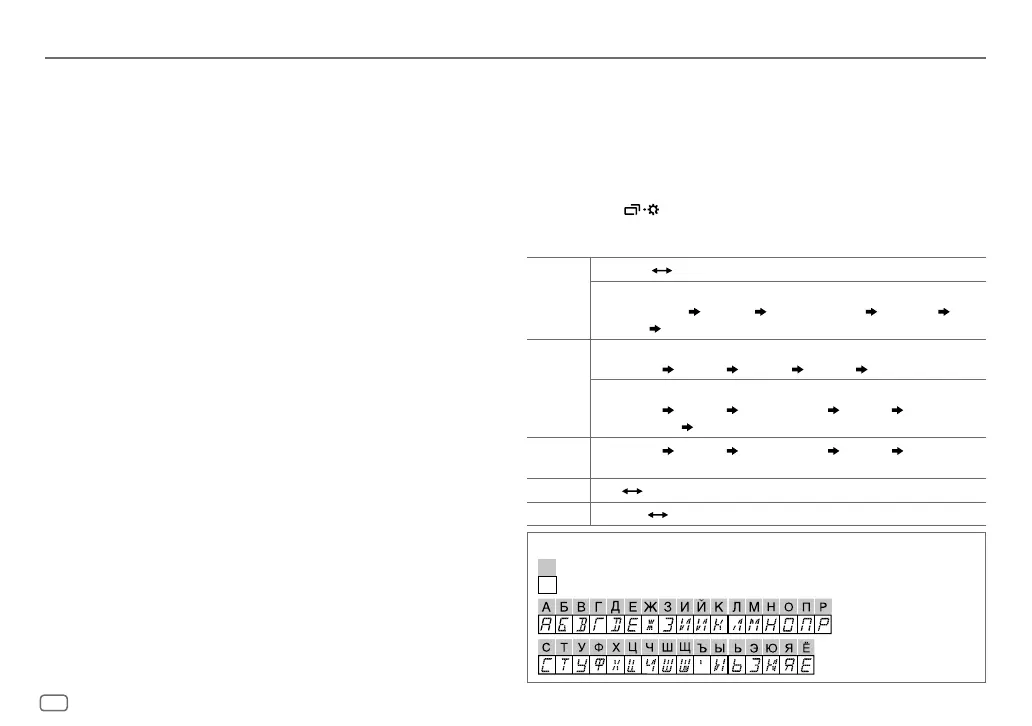
Available Cyrillic letters
Available characters
Display indications
REFERENCES
JS_JVC_KD_R571M_M2_EN_4.indd 12JS_JVC_KD_R571M_M2_EN_4.indd 12 11/8/2015 4:31:59 PM11/8/2015 4:31:59 PM


 To Next Page
 Loading...