EasyManua.ls Logo

JVC KD-R618 - Listening to a Disc

JVC KD-R618
54 pages
Print Icon
To Next Page IconTo Next Page
To Previous Page IconTo Previous Page
Loading...
Listening
to
a disc
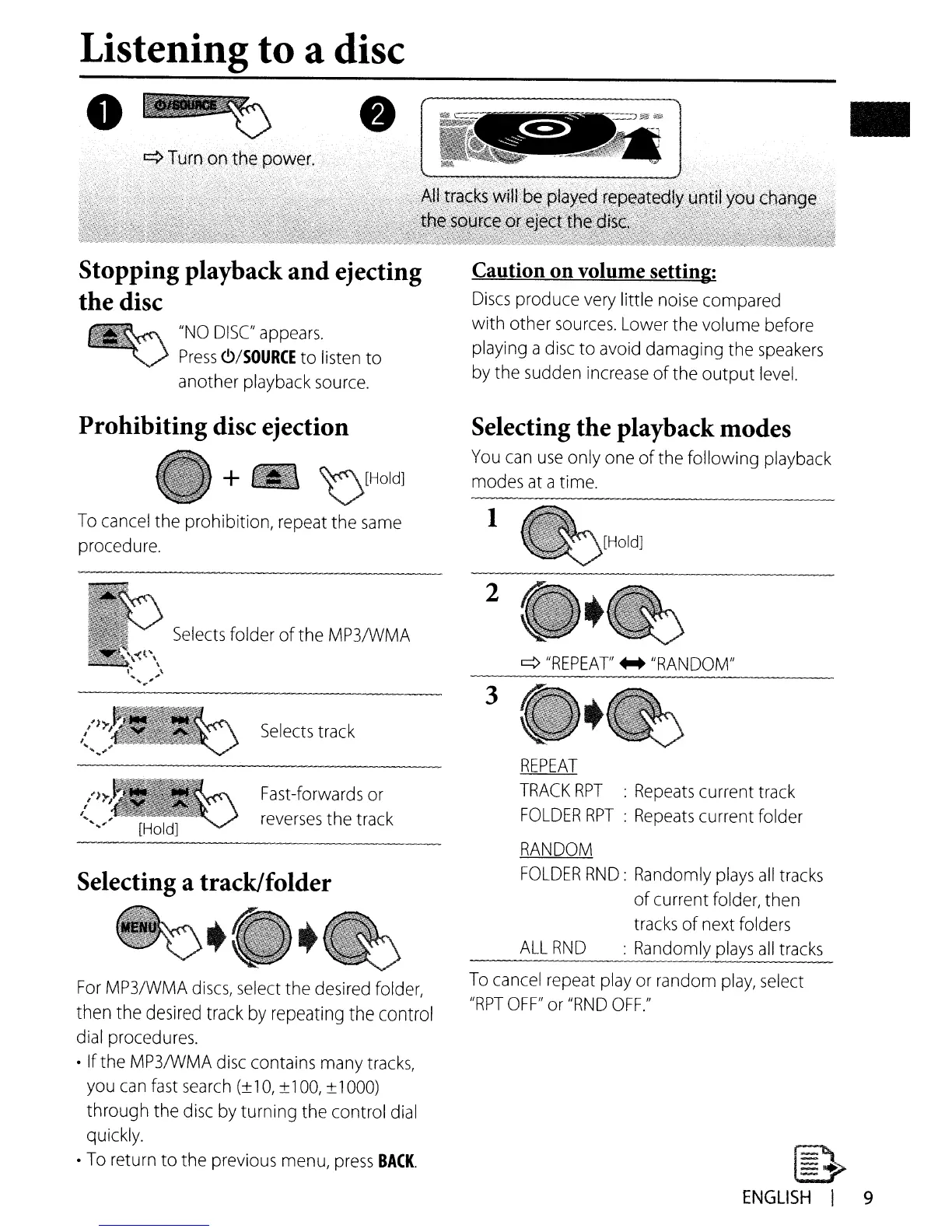
Stopping playback and ejecting
the disc
~
"NO
DISC
appears.
~
Press
<!)/SOURCE
to
listen
to
another
playback
source.
Caution
on
volume setting:
Discs
produce
very
little
noise
compared
with other
sources.
Lower
the volume before
playing a
disc
to
avoid
damaging the
speakers
by
the
sudden
increase
of the output
level.
REPEAT
TRACK
RPT
:
Repeats
current
track
FOLDER
RPT
:
Repeats
current folder
RANDOM
FOLDER
RND:
Randomly
plays
all
tracks
ofcurrent
folder,
then
tracks
of next
folders
ALL
RND
:
Randomly
plays
all
tracks
q
"REPEAT'
...
"RANDOM"
~
ENGLISH
I 9
3
2
1
To
cancel
repeat
play
or
random
play,
select
"RPT
OFF"
or
"RND
OFF."
Selecting the playback modes
You
can
use
only
one
of the following
playback
modes
at
atime.
Fast-forwards
or
reverses
the
track
Selects
track
Selects
folder ofthe
MP3IWMA
For
MP3/WMA
discs,
select
the
desired
folder,
then the
desired
track
by
repeating the control
dial
procedures.
If the
MP3IWMA
disc
contains
many
tracks,
you
can
fast
search
10,
±
100,
±
1000)
through the
disc
by
turning the control
dial
qUickly.
To
return to the
previous
menu,
press
BACK.
Selecting a track/folder
~~
,
Prohibiting disc ejection
+ _
~[HOld]
To
cancel
the prohibition, repeat the
same
procedure.

Other manuals for JVC KD-R618

Related product manuals