3ENGLISH
CONTENTS
2 How to read this manual
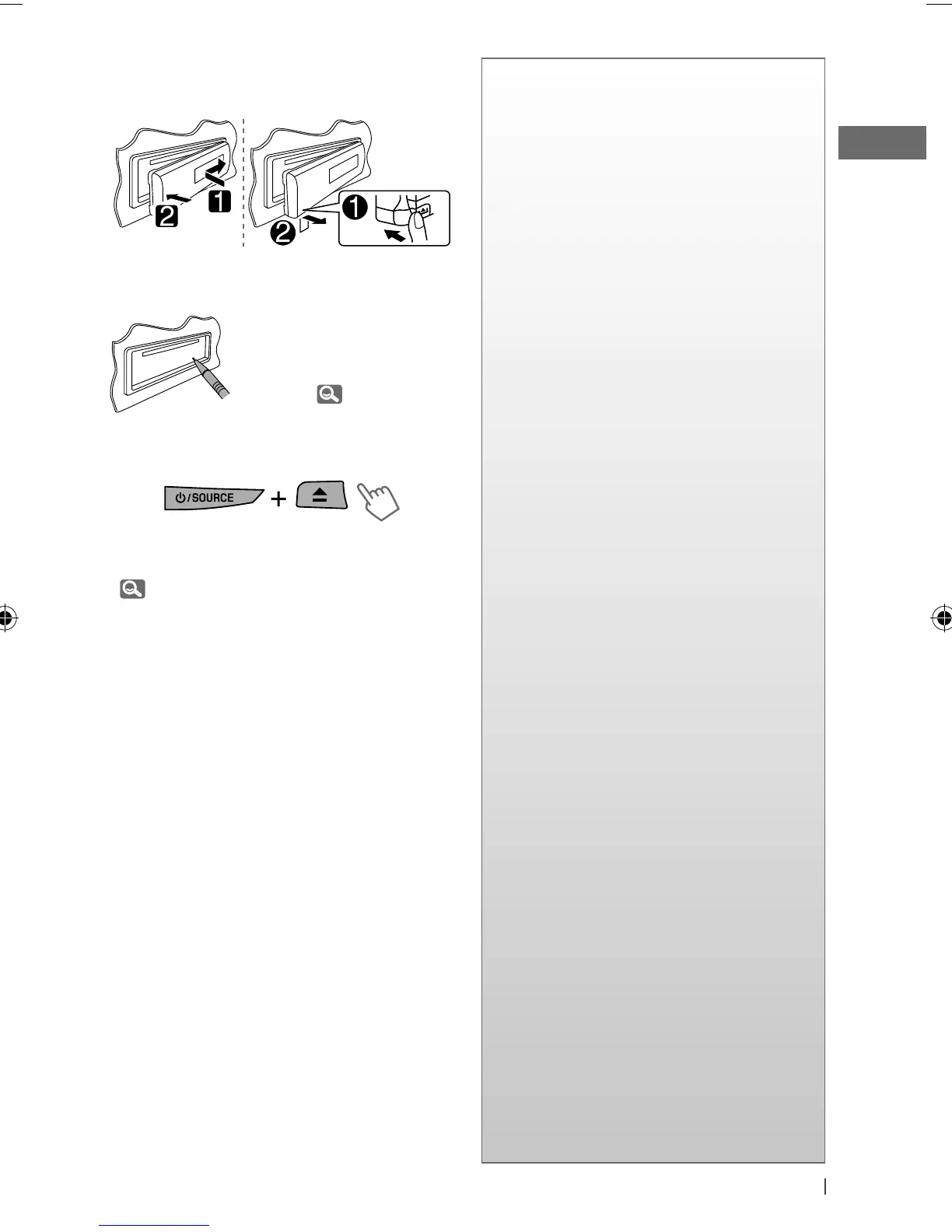
3 How to attach/detach the control
panel
3 How to reset your unit
3 How to forcibly eject a disc
4
Canceling the display
demonstration
4 Setting the clock
5 Preparing the remote controller
(RM-RK50)
6 Basic operations
7 Listening to the radio
9 Listening to a disc
10 Listening to the USB device
11 Using Bluetooth ® devices
13 Using a Bluetooth mobile phone
14 Using a Bluetooth audio player
16 Listening to the iPod/iPhone
18 Listening to the other external
components
19 Selecting a preset sound mode
20 Menu operations
26 More about this unit
29 Maintenance
30 Troubleshooting
34 Specifications
How to attach/detach the control
panel
How to reset your unit
Your preset adjustments
will also be erased (except
the registered Bluetooth
device). ( 11)
How to forcibly eject a disc
• You can forcibly eject the loaded disc even
if the disc is locked. To lock/unlock the disc,
9.
• Be careful not to drop the disc when it ejects.
• If this does not work, reset your unit.
[Hold]
EN02-09_KD-R616_001A_3.indd 3EN02-09_KD-R616_001A_3.indd 3 11/24/09 5:17:00 PM11/24/09 5:17:00 PM


 To Next Page
 Loading...