8
ENGLISH
Radio operations
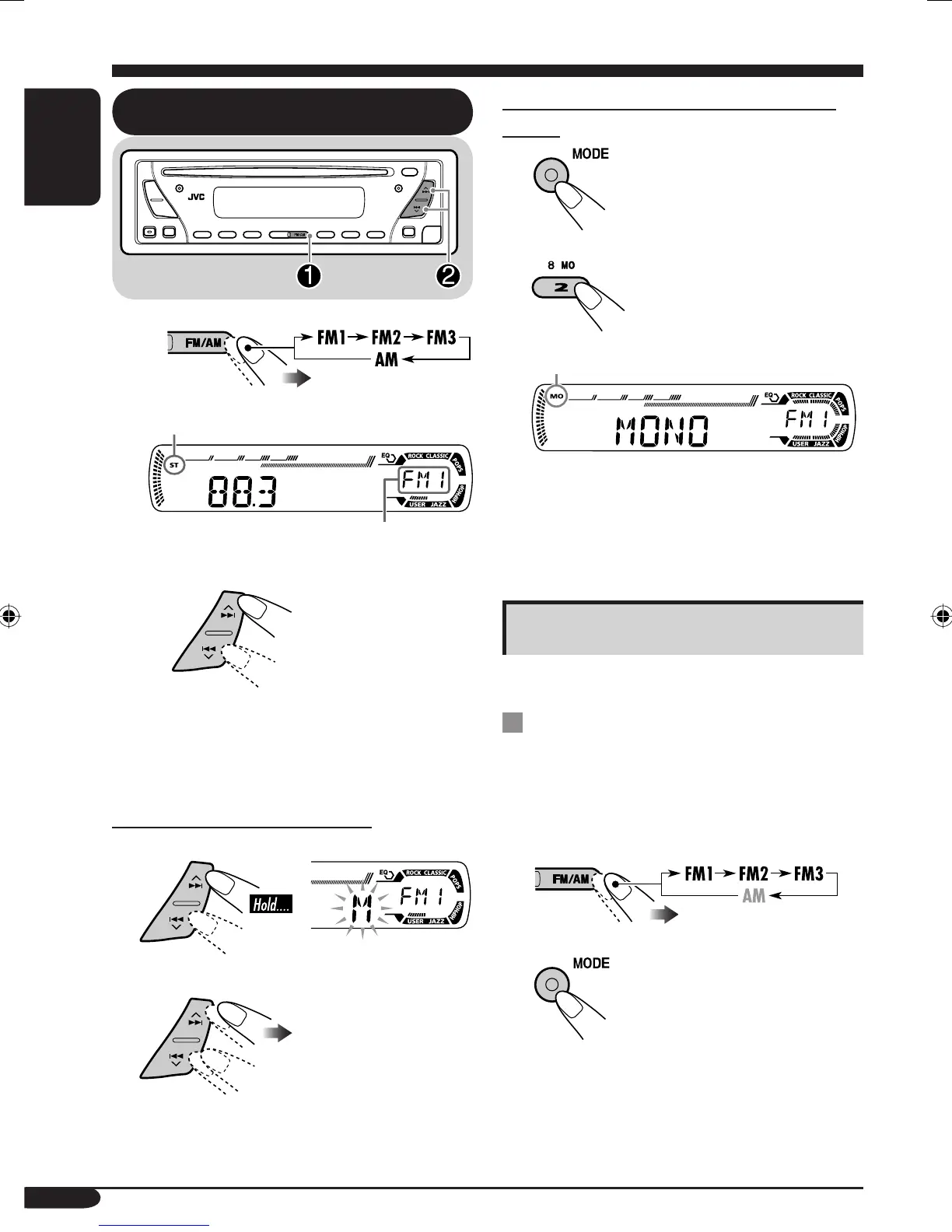
Listening to the radio
~
Lights up when receiving an FM stereo
broadcast with sufficient signal strength.
Selected band appears.
Ÿ Start searching for a station.
When a station is received, searching
stops.
To stop searching, press the same
button again.
To tune in to a station manually
In step Ÿ above...
1
2 Select the desired station frequencies.
When an FM stereo broadcast is hard to
receive
1
2
Lights up when monaural mode is activated.
Reception improves, but stereo effect will
be lost.
To restore the stereo effect, repeat the same
procedure so that the MO indicator goes off.
Storing stations in memory
You can preset six stations for each band.
FM station automatic presetting —
SSM (Strong-station Sequential
Memory)
1
Select the FM band (FM1 – FM3)
you want to store into.
2
EN06-09_KD-S12[J]f.indd 8EN06-09_KD-S12[J]f.indd 8 7/11/05 4:02:09 PM7/11/05 4:02:09 PM



 To Next Page