ENGLISH
4 INTRODUCTIONS
Preparation
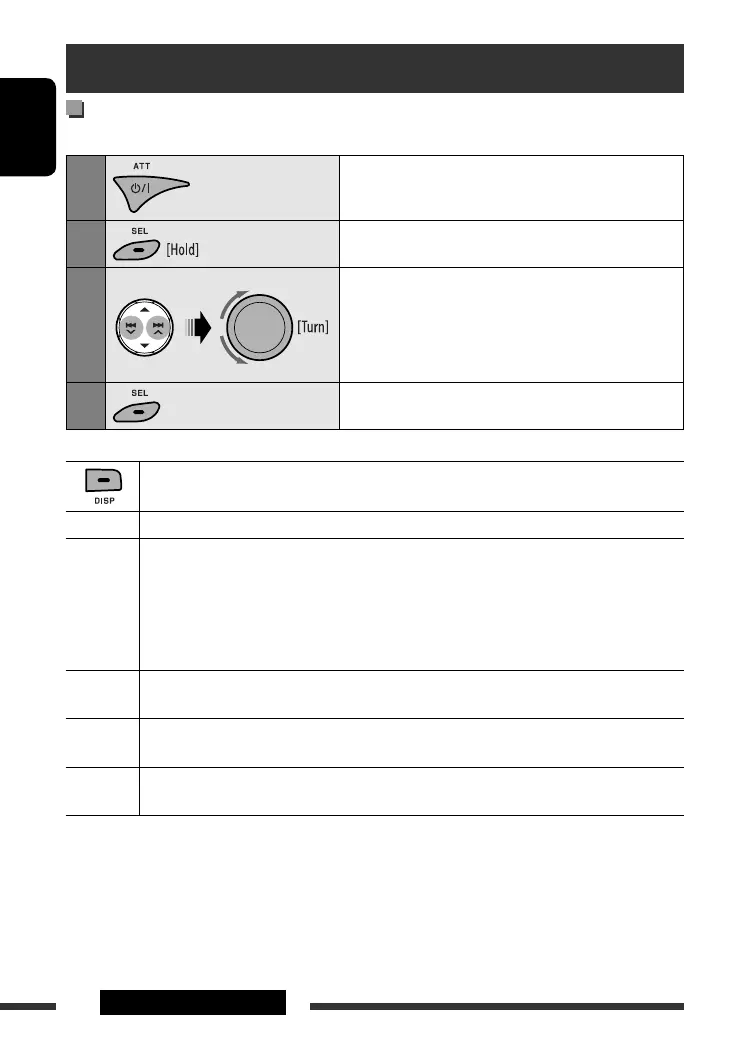
Cancel the display demonstration and set the clock
• See also page 22.
1
Turn on the power.
2
Enter the PSM settings.
3
Cancel the display demonstrations
Select “DEMO,” then “DEMO OFF.”
Set the clock
Select “CLOCK HOUR,” then adjust the hour.
Select “CLOCK MIN” (minute), then adjust the minute.
4
Finish the procedure.
When the power is turned off: Check the current clock time
When the power is turned on: Change the display information of the current source
FM/AM Station name *
1
= Frequency = Clock = (back to the beginning)
CD/CD-CH Audio CD/CD Text: Disc title/performer *
2
= Track title *
2
= Current track number with the
elapsed playing time = Current track number with the clock time = (back to
the beginning)
MP3/WMA: Album name/performer (folder name) *
3
= Track title (file name) *
3
= Current
track number with the elapsed playing time = Current track number with the
clock time = (back to the beginning)
IPOD Folder name
= Track name = Current track number with the elapsed playing time = Current
track number with the clock time
= (back to the beginning)
HD RADIO Call Sign *
4
= Frequency = Title/artist/album name of the current segment *
5
= Clock = (back
to the beginning)
SIRIUS/
XM
Category name = Channel name = Artist name = Composer name *
6
= Song/program name/
title = Clock = (back to the beginning)
*
1
If no title is assigned to a station, “NO NAME” appears. To assign a title to a station, see page 25.
*
2
If the current disc is an audio CD, “NO NAME” appears.
*
3
If an MP3/WMA file does not have Tag information or “TAG DISPLAY” is set to “TAG OFF” (see page 23), folder name
and file name appear.
*
4
“
****
-FM” or “
****
” appears when no Call Sign is received.
*
5
“NO TEXT” appears when no text is received.
*
6
Only for SIRIUS Satellite radio.
EN02-07_KD-S25[J]_1.indd 4EN02-07_KD-S25[J]_1.indd 4 5/5/08 2:11:57 PM5/5/08 2:11:57 PM



 To Next Page