ENGLISH
6
Before using the remote controller:
• Aim the remote controller directly at the remote
sensor on the unit.
• DO NOT expose the remote sensor to bright light
(direct sunlight or artificial lighting).
Installing the lithium coin battery (CR2025)
For USA-California Only:
This product contains a CR Coin Cell Lithium Battery
which contains Perchlorate Material—special
handling may apply.
See www.dtsc.ca.gov/hazardouswaste/perchlorate
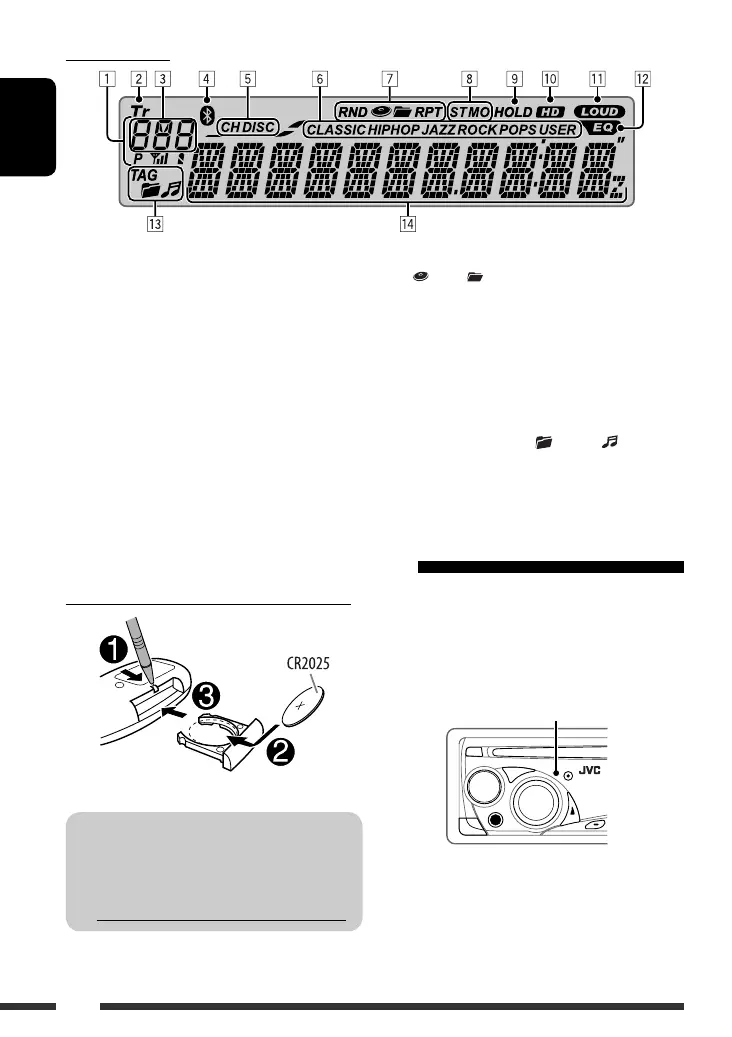
Display window
1 Status of Bluetooth device
(Device number, [1 – 5]; signal strength, [0 – 3]*;
battery reminder, [0 – 3]*)
* As the number increases, the signal/battery power
becomes stronger.
2 Tr (track) indicator
3 Source display / Track number / Folder number /
Time countdown indicator
4 Bluetooth indicator
5 Playback source indicators—CH (CD changer), DISC
6 Sound mode (iEQ: intelligent equalizer) indicators
—CLASSIC, HIP HOP, JAZZ, ROCK, POPS, USER
7 Playback mode / item indicators— RND (random),
(disc), (folder), RPT (repeat)
8 Tuner reception indicators—ST (stereo),
MO (monaural)
9 HOLD indicator
p HD (HD Radio) indicator
q LOUD (loudness) indicator
w EQ (equalizer) indicator
e Disc information indicators—
TAG (Tag information), (folder), (track/file)
r Main display
Using the remote controller (RM-RK50)
Remote sensor
EN02-07_KD-S25[J]_1.indd 6EN02-07_KD-S25[J]_1.indd 6 5/5/08 2:11:58 PM5/5/08 2:11:58 PM



 To Next Page