11ENGLISH
Cautions:
• Avoid using the iPod/iPhone if it might hinder
your safety driving.
• Make sure all important data has been backed
up to avoid losing the data.
Selecting the control terminal
]
<HEAD MODE / IPOD MODE / EXT MODE>
• For details, see <IPOD SWITCH> setting on
page 15.
Basic operations
Not applicable under <EXT MODE>.
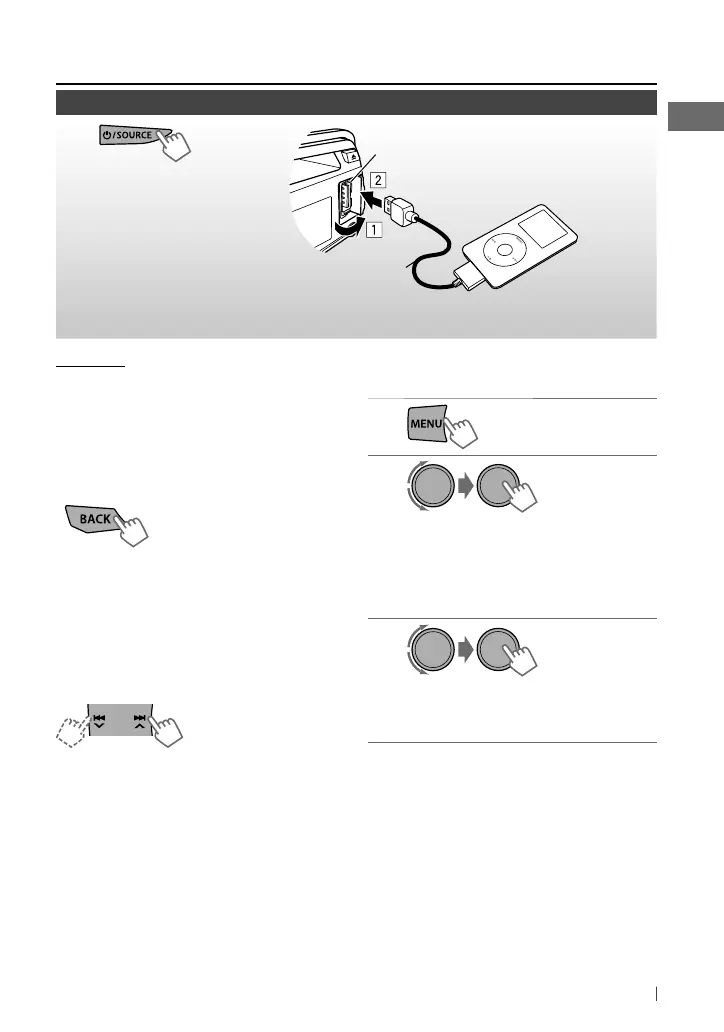
[Press] Selects track/
chapter.
[Hold] Fast-forwards or
reverses the track.
Using the remote controller
2
/
3
: [Press] Selects track/chapter.
[Hold] Fast-forwards or reverses the
track.
~
]
Turn on the power.
Ÿ
All tracks will be played repeatedly until you change the source or disconnect the iPod/
iPhone.
Available for KD-S38
USB 2.0 cable (accessory of the iPod/iPhone)
USB input terminal
Apple iPod/iPhone
Continued...
Listening to an iPod/iPhone
Selecting a track from the menu
Not applicable under <IPOD MODE / EXT MODE>.
1
2
]
Select the desired menu.
PLAYLISTS
j
ARTISTS
j
ALBUMS
j
SONGS
j
PODCASTS
j
GENRES
j
COMPOSERS
j
(back to the
beginning)
3
]
Select the desired track.
Repeat this step until the desired track
is selected.
• If the selected menu contains many tracks,
you can fast search (±10, ±100, ±1 000)
through the menu by turning the control dial
quickly.
• To return to the previous menu, press BACK.
[Hold]
[Hold]
EN02-19_KD-S38_S28[J]_f.indd 11EN02-19_KD-S38_S28[J]_f.indd 11 6/17/11 4:53:03 PM6/17/11 4:53:03 PM



 To Next Page