ENGLISH
9
Data Size: B6L (182 mm x 128 mm)
Book Size: B6L (182 mm x 128 mm)
Quick search
If you have many files, you can search through them quickly.
1 Press .
2 Turn the volume knob to select a folder/list, then press the knob.
3 Turn the volume knob quickly to browse through the list quickly.
4 Turn the volume knob to select a file, then press the knob.
Selected file starts playing.
• To return to the previous setting item, press
.
• To cancel, press and hold
.
USB
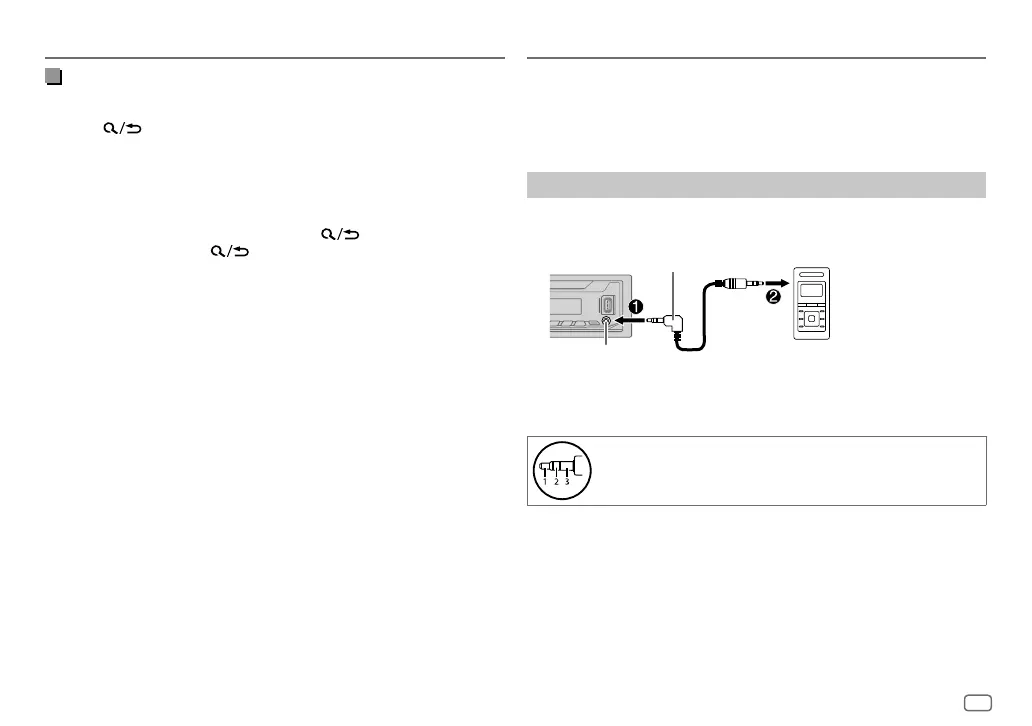
You can listen to music from a portable audio player via the auxiliary input
jack.
Preparation:
Select
[ON]
for
[BUILT-IN AUX]
in
[SOURCESELECT]
. (Page 5)
Start listening
1
Connect a portable audio player (commercially available).
3.5 mm stereo mini plug with “L” shaped
connector (commercially available)
Portable audio player
Auxiliary input jack
2 Press B SRC repeatedly to select AUX.
3 Turn on the portable audio player and start playback.
Use a 3-core plug head stereo mini plug for optimum audio
output.
AUX
JS_JVC_KD_X176_E_EN_int1.indd 9JS_JVC_KD_X176_E_EN_int1.indd 9 4/22/2019 10:14:33 AM4/22/2019 10:14:33 AM


 To Next Page
 Loading...