EasyManua.ls Logo

JVC KD-X2 - Page 5

JVC KD-X2
20 pages
Print Icon
To Next Page IconTo Next Page
To Previous Page IconTo Previous Page
Loading...
KD-X2
A/B/C/E/G/J/U
Mechanism
Section
Mechanical
parts
@
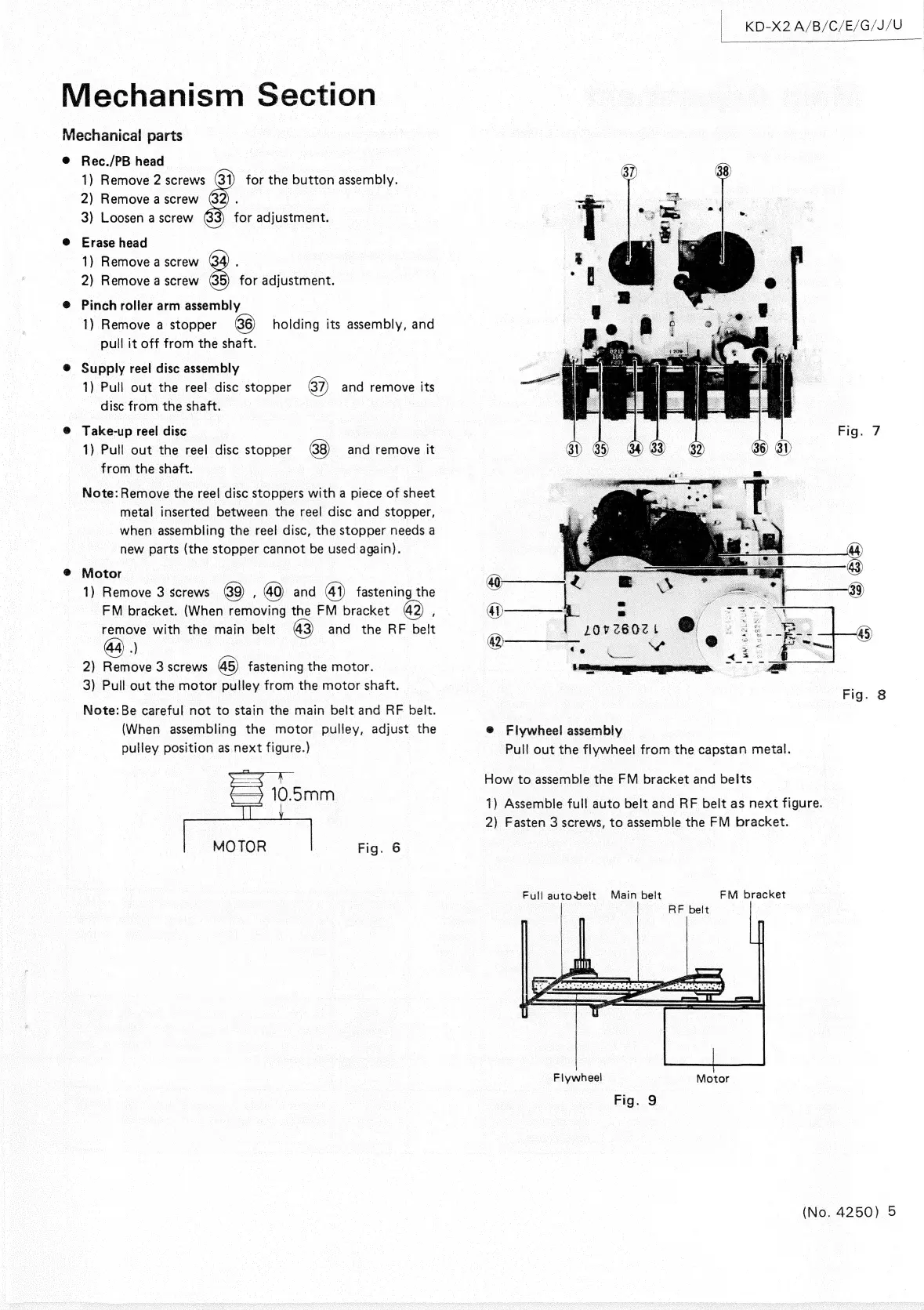
Rec./PB
head
1)
Remove
2
screws
61)
for
the
button
assembly.
2)
Remove
a
screw
@2)
.
3)
Loosen
a
screw
(@3)
for
adjustment.
@
Erase
head
1)
Remove
a
screw
(34)
,
2)
Remove
a
screw
5)
for
adjustment.
@
Pinch
roller
arm
assembly
1)
Remove
a
stopper
holding
its
assembly,
and
pull
it
off
from
the
shaft.
®
Supply
reel
disc
assembly
1)
Pull
out
the
reel
disc
stopper
and
remove
its
disc
from
the
shaft.
@
Take-up
reel
disc
1)
Pull
out
the
reel
disc
stopper
and
remove
it
from
the
shaft.
Note:
Remove
the
reel
disc
stoppers
with
a
piece
of
sheet
metal
inserted
between
the
reel
disc
and
stopper,
when
assembling
the
reel
disc,
the
stopper
needs
a
new
parts
(the
stopper
cannot
be
used
again).
@
Motor
1)
Remove
3
screws
;
and
4))
fastening
the
-
FM
bracket.
(When
removing
the
FM
bracket
:
———}
.
~~
remove
with
the
main
belt
and
the
RF
belt
|
por
z60z
2)
Remove
3
screws
fastening
the
motor.
"peice
3)
Pull
out
the
motor
pulley
from
the
motor
shaft.
Note:
Be
careful
not
to
stain
the
main
belt
and
RF
belt.
(When
assembling
the
motor
pulley,
adjust
the
@
Flywheel
assembly
pulley
position
as
next
figure.)
Pull
out
the
flywheel
from
the
capstan
metal.
How
to
assemble
the
FM
bracket
and
belts
1)
Assemble
full
auto
belt
and
RF
belt
as
next
figure.
2)
Fasten
3
screws,
to
assemble
the
FM
bracket.
Fig.
6
Full
autobeit
Main
belt
FM
bracket
RF
belt
Fiywheel
Fig.
9
(No.
4250)
5

Related product manuals