EasyManua.ls Logo

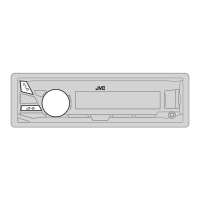
JVC KD-X50BT - User Manual

JVC KD-X50BT
46 pages
Print Icon
To Next Page IconTo Next Page
Loading...
DIGITAL MEDIA RECEIVER / RECEPTOR DE MEDIOS
DIGITALES / RÉCEPTEUR MULTIMÉDIA NUMÉRIQUE
For canceling the display demonstration, see page 4. /
Para cancelar la demostración en pantalla, consulte la página 4. /
Pour annuler la démonstration des affichages, référez-vous à la page 4.
ENGLISH
ESPAÑOL
FRANÇAIS
INSTRUCTIONS
MANUAL DE INSTRUCCIONES
MANUEL D’INSTRUCTIONS
GET0786-001B
[J]
KD-X50BT
For installation and connections, refer to the separate manual.
Para la instalación y las conexiones, refiérase al manual separado.
Pour l’installation et les raccordements, se référer au manuel
séparé.
For Customer Use:
Enter below the
Model No. and Serial
No. which are located
on the top or bottom
of the cabinet. Retain
this information for
future reference.
Model No.
Serial No.

Other manuals for JVC KD-X50BT

Questions and Answers

  • D
    davisconnieAug 29, 2025
    What to do if the phone sound quality is poor on my JVC Car Receiver?
    • M
      Michael ThompsonAug 29, 2025
      If the phone sound quality is poor on your JVC Car Receiver, try reducing the distance between the unit and the Bluetooth device. Additionally, move your car to a location with better signal reception.
  • E
    Elizabeth WilkersonSep 4, 2025
    Why does my JVC KD-X50BT display 'NO FILE'?
    • T
      Todd SloanSep 4, 2025
      If your JVC Car Receiver displays 'NO FILE', verify that the selected folder, connected USB device, or iPod/iPhone contains a playable file.
  • L
    Lisa CarterAug 28, 2025
    What does it mean when 'PAIRING FULL' scrolls on the display of my JVC KD-X50BT when trying to pair a device?
    • G
      gmitchellAug 28, 2025
      If 'PAIRING FULL' is displayed on your JVC Car Receiver when you attempt to pair a device, it means you have reached the maximum limit of five registered Bluetooth devices. To pair a new device, you must first delete one of the existing paired devices from the unit.
  • A
    arnoldjoSep 22, 2025
    Why “BT FRONT”/“BT REAR” cannot be selected on JVC Car Receiver?
    • M
      Melissa MooreSep 22, 2025
      If “BT FRONT”/“BT REAR” cannot be selected on your JVC Car Receiver, check in the setting.
  • J
    Jason JohnsonSep 23, 2025
    What does “STATION REACH LIMIT” mean on JVC Car Receiver?
    • S
      Sherri HansonSep 23, 2025
      You may not create more than 100 stations.
  • L
    Logan ReedSep 7, 2025
    Why does my JVC KD-X50BT display 'STATION REACH LIMIT'?
    • V
      Victoria HayesSep 8, 2025
      If your JVC Car Receiver displays 'STATION REACH LIMIT', it means you have created the maximum allowed number of 100 stations.
  • A
    Alejandro JohnsonSep 12, 2025
    How to stop echo or noise on JVC Car Receiver?
    • B
      bishopelizabethSep 12, 2025
      If you are experiencing echo or noise with your JVC Car Receiver, adjust the microphone unit’s position. You can also adjust the and settings to find a better combination.
  • K
    Kimberly AndersonSep 18, 2025
    How to fix SSM automatic presetting that does not work on JVC Car Receiver?
    • M
      marissa88Sep 18, 2025
      If SSM automatic presetting does not work on your JVC Car Receiver, store stations manually.
  • D
    Daniel HallAug 26, 2025
    How to fix no sound, sound interrupted or static noise on JVC Car Receiver?
    • T
      tylermcintoshAug 26, 2025
      If you are experiencing no sound, interrupted sound, or static noise with your JVC Car Receiver, check the cords, antenna, and cable connections. Also, verify the condition of the connected device and the recorded tracks. When connecting to an external component, ensure you are using the recommended stereo mini plug.
  • T
    Theresa ScottAug 25, 2025
    Why is sound being interrupted or skipped during playback of a Bluetooth audio player on my JVC Car Receiver?
    • M
      Michelle RamosAug 26, 2025
      If the sound is being interrupted or skipped during playback from a Bluetooth audio player on your JVC Car Receiver, try reducing the distance between the unit and the Bluetooth audio player. You can also try turning the unit off and then on again, then attempt to reconnect. Another possibility is that other Bluetooth devices might be trying to connect to the unit.

Summary

Getting Started

Control Panel and Remote Functions

Overview of control panel and remote buttons and their functions.

Audio Source Operations

Bluetooth Connectivity and Phone Management

Bluetooth Connection Setup

Install and connect the Bluetooth adapter and pair devices.

Bluetooth Mobile Phone Operations

Handle incoming calls, make calls, use voice recognition, and manage phone settings.

Customization and Menu Navigation

Menu Operations

Navigate and configure various unit settings through the menu system.

Troubleshooting and Specifications

Troubleshooting Common Issues

Solutions for common problems across radio, USB, iPod, Bluetooth, and unit functions.

JVC KD-X50BT Specifications

General IconGeneral
MP3 playbackYes
CD-R playbackNo
Audio formats supportedMP3, WAV, WMA
Tuner typeHS-IVi
FM band range87.5 - 108 MHz
LW band range153 - 279 kHz
Supported radio bandsFM, LW, MW
Preset stations quantity24
Product colorBlack
Line outputs (RCA)2
Weight and Dimensions IconWeight and Dimensions
Weight900 g

Related product manuals