EasyManua.ls Logo

JVC KS-RT313 - Page 8

JVC KS-RT313
45 pages
Print Icon
To Next Page IconTo Next Page
To Previous Page IconTo Previous Page
Loading...
0
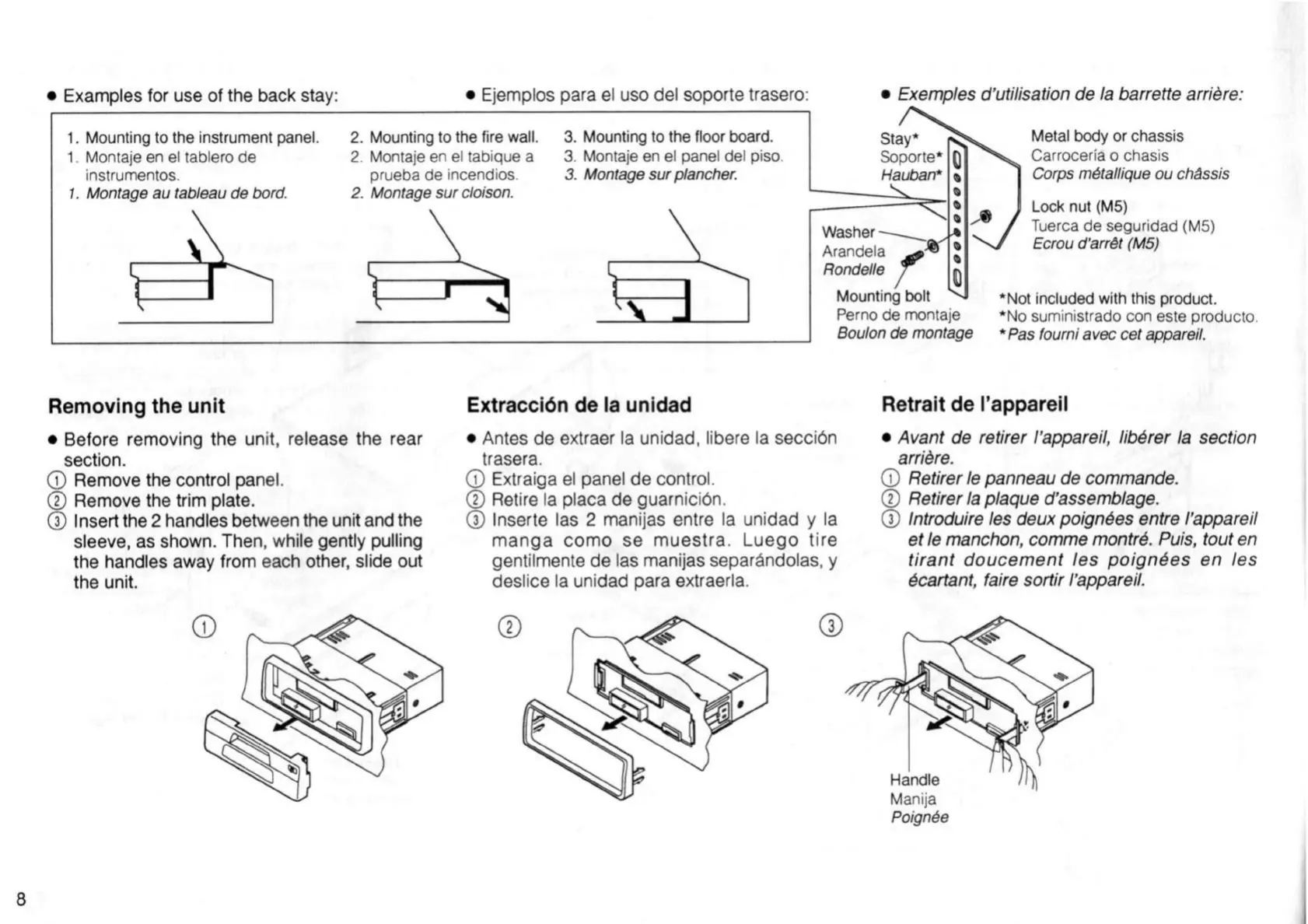
Examples
for
use
of
the back
stay:
0
Ejemplos
para
el
uso
del
soporte
trasero:
1.
Mounting
to
the instrument
panel.
1.
Montaje
en
el
tablero
de
instrumentos.
1.
Montage
au
tableau
de
bard.
2.
Mounting
to
the
fire wall.
2.
Montaje
en
el
tabique a
prueba
de
incendios.
2.
Montage
sur
c/oison.
3.
Mounting
to
the
floor
board.
3.
Montaje
en
el
panel
del
piso.
3.
Montage
sur
plancher.
Removing
the
unit
0
Before
removing
the
unit,
release
the
rear
section.
6)
Remove
the
control
panel.
®
Remove
the
trim
plate.
6)
Insert
the
2
handles between
the
unit
and
the
sleeve,
as
shown.
Then,
while
gently
pulling
the
handles
away
from
each
other,
slide
out
the
unit.
Washer
\
o
Exemples
d’utilisation
de
la
barrette
arriere:
Stay’
Metal
body
or
chassis
Carroceria
o
chasis
Corps métal/ique
cu
chassis
Lock
nut
(M5)
Tuerca
de
seguridad
(M5)
Ar
a
n
d
el
3
Ecrou
d'arrét
(M5)
Handel/e
I
\
Mounting
bolt
.
*Not
included
with
this
product.
Perno
de
montaie
*No
suministrado
con
este
producto.
Bou/on
de
montage
*Pas
foumi
avec
cet
appareil.
Extraccién
de
la
unidad
Retrait
de
I’appareil
0
Antes
de
extraer
la
unidad.
Iibere
Ia
seccién
trasera.
G)
Extraiga
el
panel
de
control.
@
Retire
Ia
placa
de
guarnicién.
®
Inserte las
2
manijas
entre
la
unidad
y
la
manga
como
se
muestra.
Luego
tire
gentilmente
de las
manijas
separandolas.
y
deslice
la
unidad
para
extraerla.
o
Avant
de
retirer
I’appareil,
libérer
Ia
section
arriére.
G)
Retirer
Ie
panneau
de commande.
®
Retirer
Ia
plaque d’assemblage.
GD
Introduire
les deux
poignées
entre
I’apparei/
et
le
manchon,
comme
montré.
Puis,
tout
en
tirant
doucement
Ies
poignées
en
las
écartant,
faire sortir
l’appareil.
Manija
Poignée

Related product manuals