14
Bluetooth
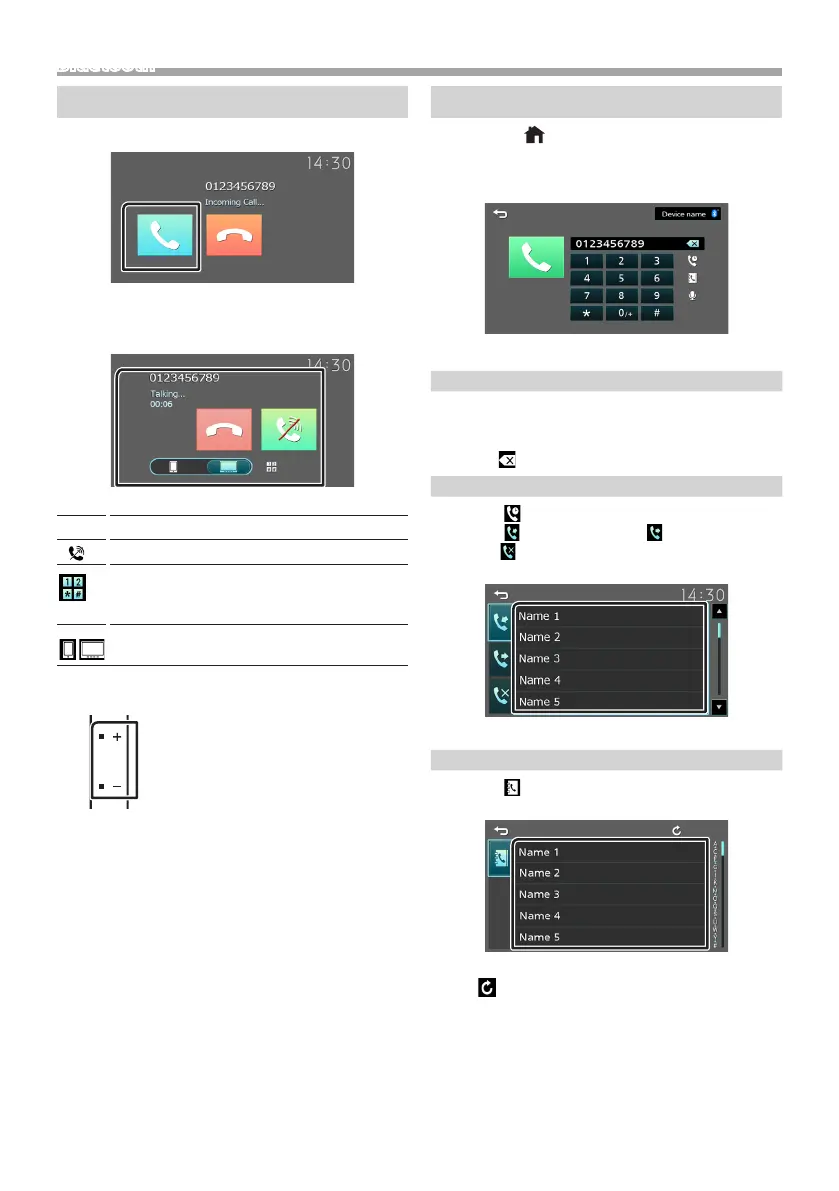
Receive a phone call
1 Touch [Û].
• [Ý] : Reject an incoming call.
Ñ Operations during a call
[Ý]
Ending a call
[ ]
Mute your voice
You can send tones by touching desired keys
on the screen.
• Touch [6] to close the window.
Switches the speaking voice output between
smartphone/cell-phone and speaker.
Adjust the receiver volume
Press the <+> or <–> button.
Make a phone call
1 Press the < > button.
2 Touch [Phone].
3 See the table below for each operation method.
Call by entering a phone number
1) Enter a phone number with number keys.
2) Touch [Û].
Make a call
• Touch [ ] to delete the last entry.
Call using call records
1) Touch [ ].
2) Touch [ ] (Incoming Calls), [ ] (Outgoing
Calls), [ ] (Missed Calls).
3) Select the phone number from the list.
Make a call
Call using the phonebook
1) Touch [ ].
2) Select the name from the list.
Make a call
• [ ] : Updates the phonebook. Touch this
button after you have made a change
to the phonebook of your smartphone/
cell-phone.



 To Next Page
 Loading...








