15
English |
Bluetooth
Call by voice
You can make a voice call using the voice
recognition function of the Bluetooth smartphone.
1) Touch [ ].
2) Say the name registered in the Bluetooth
smartphone.
• Touch [Cancel] to cancel voice dialing.
Call Waiting
When you receive a new call while talking on the
phone:
1) Touch [ ] , the current call is put on hold and
you can answer the newly received call.
2) Each time you touch [ ], the caller will change
to the other one.
3) If you touch [ ] during call waiting, reject an
incoming call.
4) If you touch [ ], when someone is on hold, the
current call will end to be swtiched to the call
waitng on hold .
5) Touch [ ] mute your voice
Playing Bluetooth Audio Device
1 Press the < > button.
2 Touch [Bluetooth Audio].
Ñ Source control screen
1
Displays the information of the current le.
2
Playing time/File number
Play time bar : For conrmation of current playing
position.
3
[ ] : Selects Random playback mode.
: Randomly plays all les.
: Random o
[ ] : Selects Repeat playback mode.
: Repeats all les.
: Repeats the current le.
: Repeat o
[U], [H] : Plays or pauses.
[E], [F] : Searches the previous/next
content.
Touch and hold to fast forward or fast
backward.
[1] : Searches le. (P.15)
✎ NOTE
• Operations and display indications may dier
according to their availability on the connected
device.
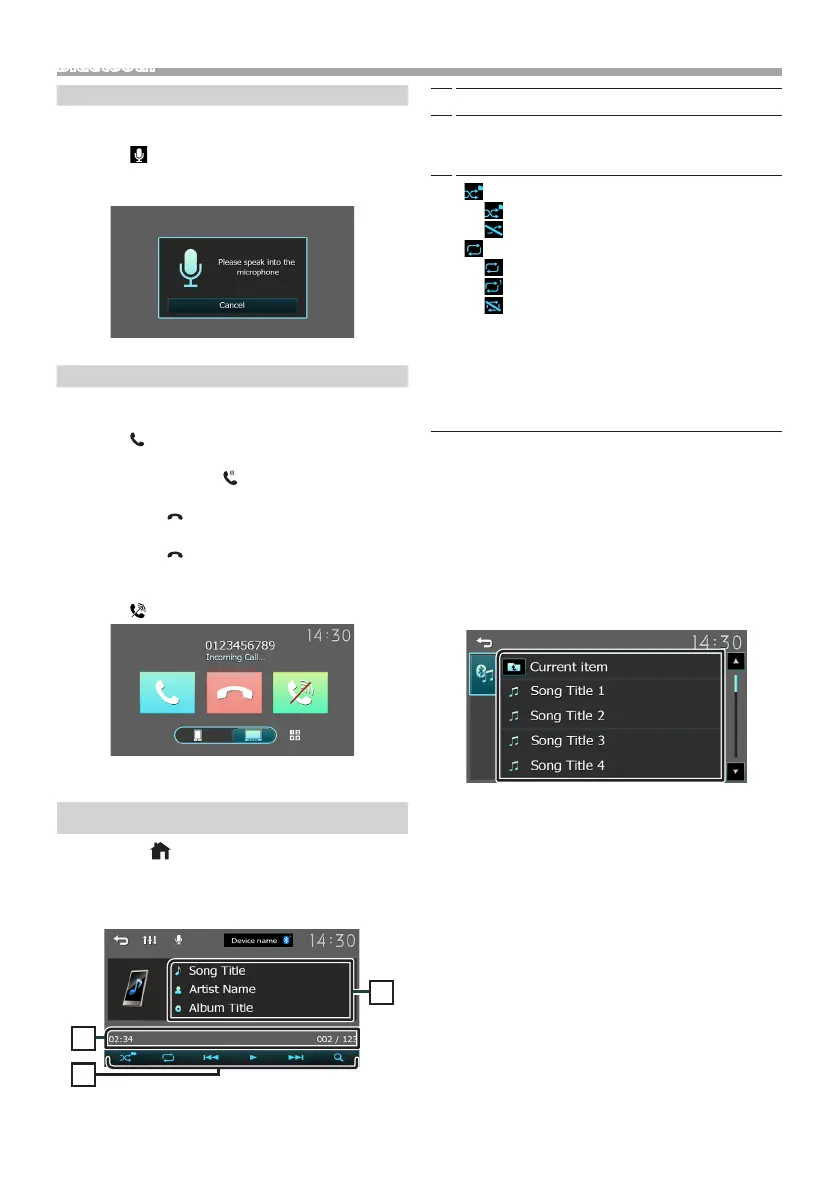
Ñ Selecting a content in a list
1 Touch [1].
2 Touch desired item.
When you touch a category its contents are
displayed.
3 Touch desired item from the content list.
Playback starts.
• Touch [6] to moves to the upper hierarchy.
✎ NOTE
• The source control screen appears when you touch
[6] at the top hierarchy.



 To Next Page
 Loading...








