EasyManua.ls Logo

JVC KW-XC828 - User Manual

JVC KW-XC828
44 pages
Print Icon
To Next Page IconTo Next Page
Loading...
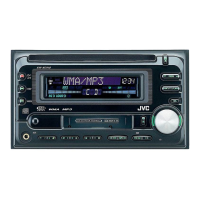
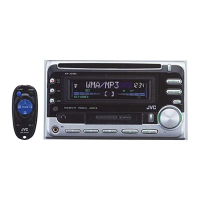
CD/CASSETTE RECEIVER
‡§√◊ËÕ߇≈àπ´’¥’/‡∑ª§≈“‡´µ KW-XC828
ENGLISH
INSTRUCTIONS
§Ÿà¡◊Õ°“√„™âß“π
LVT0835-001A
[U]
For installation and connections, refer to the separate manual.
‡æ◊ËÕ°“√µ‘¥µ—Èß·≈–°“√‡™◊ËÕ¡µàÕ ‚ª√¥Õâ“ßÕ‘ß§Ÿà¡◊Õ∑’Ë·¬°¡“
EX
DIRECTORY
¿“…“‰∑¬
SOUND
VOL
VOL
SOURCE
R
F
U
D
ATT
C0150 KW-XC828 Cover 1/2/02, 2:18 PM3

Other manuals for JVC KW-XC828

Questions and Answers

  • C
    Crystal BoydAug 15, 2025
    What to do if the sound is interrupted on my JVC Car Receiver?
    • J
      jacksonrobertAug 15, 2025
      If the sound from your JVC Car Receiver is interrupted or inaudible, start by checking all cords and connections to ensure they are secure and correct. Then, make sure the volume isn't set too low; adjust it to a suitable level. If the issue persists, the microcomputer might be malfunctioning due to external noise. In this case, press the reset button located on the front panel.
  • B
    barbarabryantAug 18, 2025
    Why won't my JVC Car Receiver play the disc?
    • K
      Katherine SummersAug 18, 2025
      If your JVC Car Receiver won't play back a disc, it might be because there are no MP3 files recorded on it. Try a different disc. Add the extension code— mp3 to their file names. Change the disc. (Record MP3 files using a compliant application.) Insert a disc that contains files encoded in Layer 3 format. Skip to another file or change the disc. (Do not add the extension code—mp3 to non-MP3 files.) Do not use too many hierarchies and directories. Also, do not record any MP3 other types of audio tracks together with MP3 files. Select another directory. Insert a disc that contains MP3 files.
  • T
    tylergeorgeAug 21, 2025
    What to do if my JVC Car Receiver says 'NO DISC'?
    • C
      Christina ClarkAug 21, 2025
      If your JVC Car Receiver displays “NO DISC,” struggles to play a disc, has interrupted disc sound, or fails to eject, there could be several reasons. First, ensure the disc is inserted correctly. Stop playing the disc while driving on rough roads. The disc may be scratched, so try a different one. Check all the connections to ensure they are correct. If no disc is inserted, insert one. If the CD player isn't working correctly, press and hold both the /ATT and CD 0 buttons simultaneously for a few seconds. If the disc ejection or insertion was interrupted, press CD 0, or press both the /ATT and CD 0 buttons together to clear the message. For CD-R/CD-RW issues, ensure the disc is finalized, and if not, finalize it with the component used for recording or try a finalized disc.
  • J
    Janet ObrienAug 25, 2025
    Why is there static noise when listening to the radio on my JVC Car Receiver?
    • R
      Rebecca RussellAug 25, 2025
      If the SSM automatic preset isn't working or you're experiencing static noise while listening to FM/AM radio on your JVC Car Receiver, the signals may be too weak. Try storing stations manually. Also, check that the antenna is firmly connected.
  • L
    Linda GarciaAug 27, 2025
    What does 'NO MAGAZINE' mean on my JVC Car Receiver?
    • L
      Linda GarciaAug 27, 2025
      If your JVC Car Receiver displays “NO MAGAZINE” or “RESET” errors and the CD changer isn't functioning, first, ensure a magazine is inserted into the CD changer. Verify that the unit is correctly connected to the CD changer, and then press the reset button on the CD changer. If problems persist, the microcomputer may be malfunctioning due to noise, so press the reset button on the front panel.
  • V
    Valerie NelsonAug 30, 2025
    How to insert a cassette tape into my JVC Car Receiver?
    • J
      Jennifer RodriguezAug 30, 2025
      If your JVC Car Receiver won't let you insert a cassette tape, make sure you're inserting it correctly, with the exposed tape facing right. If it still won't go in, the tape head might be dirty. Try cleaning it with a head cleaning tape.
  • M
    Michelle MartinezSep 2, 2025
    What does 'NO FILES' mean on my JVC Car Receiver?
    • A
      Ariana DavisSep 2, 2025
      If your JVC Car Receiver displays “NO FILES” and ejects the disc, it means there are no MP3 files on the disc.
  • W
    William GillSep 5, 2025
    Why does 'MP3' flash on the display of my JVC Car Receiver?
    • G
      Gregory ParkerSep 6, 2025
      If your JVC Car Receiver displays “MP3” flashing, it indicates that there are no MP3 files in the current directory.
  • K
    Kelly LiSep 8, 2025
    Why can't I play back files as intended on my JVC Car Receiver?
    • T
      triciaschultzSep 8, 2025
      The playback order is determined when the files are recorded.
  • B
    Brittany MartinezSep 12, 2025
    Why is the elapsed playing time incorrect on my JVC Car Receiver?
    • M
      Morgan StevensonSep 12, 2025
      This is caused by how the files are recorded on the disc.

Summary

IMPORTANT FOR LASER PRODUCTS

Volume Setting Precautions

Warning about potential speaker damage from sudden volume changes.

Unit Reset Procedure

Instructions for resetting the unit using a ball-point pen.

BUTTON LOCATIONS

Control Panel Overview

Identifies and describes the buttons on the main unit's control panel.

Display Window Overview

Explains the various indicators and displays on the unit.

REMOTE CONTROLLER

Button Functions and Usage

Details the functions of each button on the remote controller.

REMOTE CONTROLLER SETUP

Battery Installation

Guide on how to insert the battery into the remote control.

BASIC OPERATIONS

Power On and Volume Adjustment

Steps to turn on the unit and adjust the audio volume.

Selecting Audio Sources

How to switch between different audio input sources like CD, FM/AM, and Tape.

RADIO OPERATION

Tuning Radio Stations

Instructions for auto and manual searching for radio stations.

STORING RADIO STATIONS

Preset Station Storage Methods

Explains how to save favorite radio stations into memory.

ADVANCED RADIO FUNCTIONS

Storing Favorite Station to EX Button

Procedure to save a station to the EX button for quick recall.

CD OPERATION

Playing a CD

Instructions for inserting a CD and starting playback.

Stopping and Ejecting a CD

Steps to stop CD playback and remove the disc.

NAVIGATING CD TRACKS

Track Navigation Methods

Methods to locate specific tracks or portions on a CD.

CD PLAYBACK MODES

Repeat and Random Playback

Options for repeating tracks or playing them in random order.

CD TEXT AND OTHER FUNCTIONS

Playing CD Text Information

Displaying disc title, artist, and track title from CD Text.

MP3 INTRODUCTION

Understanding MP3 Format

Explains MP3 compression and its benefits for storage capacity.

MP3 Recording Precautions

Guidelines for recording MP3 files onto CDs for compatibility.

MP3 OPERATION

TAPE OPERATION

SOUND ADJUSTMENTS

PREFERRED SETTING MODE (PSM) OPTIONS

EXTERNAL COMPONENT OPERATIONS

CD CHANGER OPERATIONS

TROUBLESHOOTING

General and Radio Troubleshooting

Common problems and solutions for general operation and radio reception.

Disc Playback Troubleshooting

Troubleshooting steps for problems related to CD playback.

MP3 PLAYBACK TROUBLESHOOTING

TAPE AND CD CHANGER TROUBLESHOOTING

SPECIFICATIONS

JVC KW-XC828 Specifications

General IconGeneral
BrandJVC
ModelKW-XC828
CategoryCar Receiver
LanguageEnglish

Related product manuals