11
ENGLISH
Location of controls
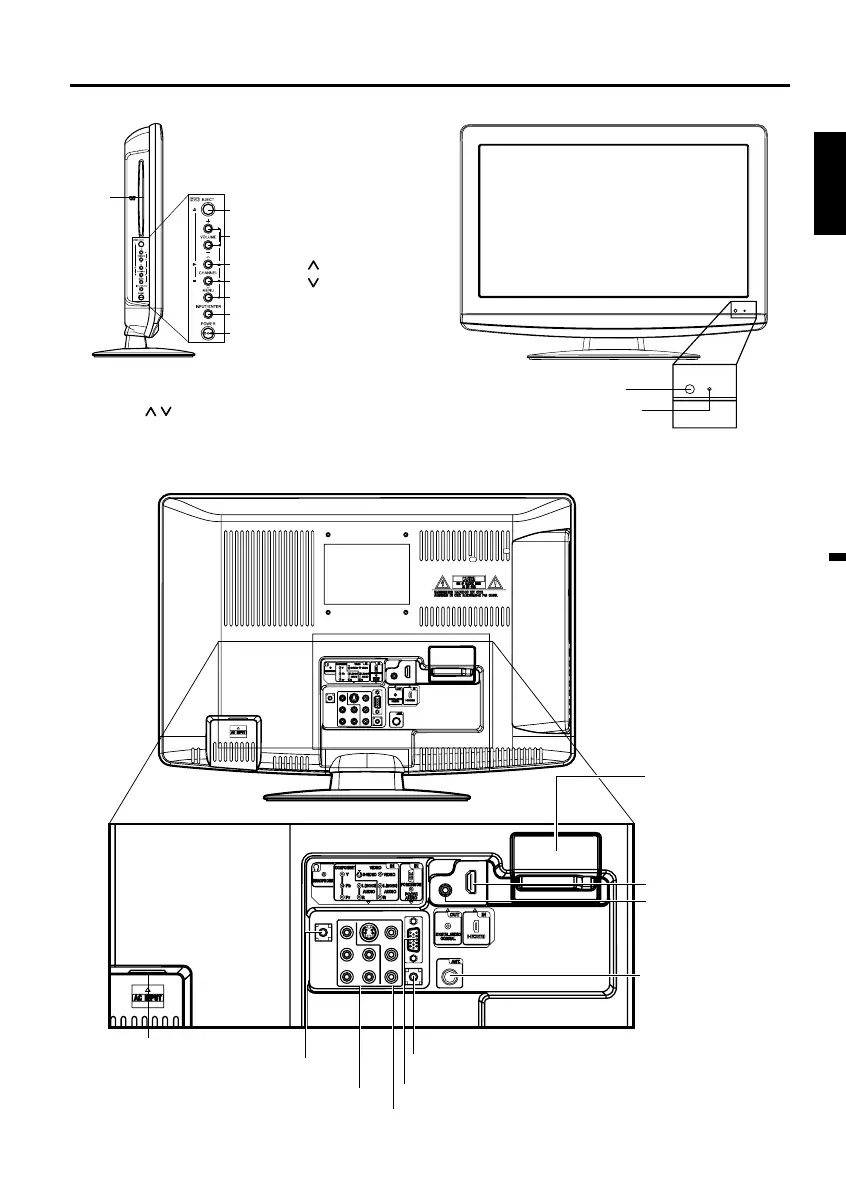
Front (Illustration of LT-22DM21)
To display the menu screen.
Press MENU button to display the menu screen.
CHANNEL
/ buttons, VOLUME +/– buttons and
INPUT/ENTER button can be used to select the
desired setting during the menu screen operations.
POWER button
INPUT/ENTER button
VOLUME +/– buttons
CHANNEL /1 (PLAY) button
MENU button
Remote sensor
POWER indicator
Red: Standby
Green: On
EJECT button
Left side (Illustration of LT-22DM21)
CHANNEL /3 (STOP) button
DISC
slot
Rear side (Illustration of LT-22DM21)
AC INPUT jack
HEADPHONE IN jack
PC MONITOR IN jack
RF (ANT.) IN jack
COMPONENT IN jacks
(Y/Pb/Pr/AUDIO (L/R))
PC/DVI AUDIO IN jack
DIGITAL AUDIO
COAXIAL OUT jack
VIDEO IN jacks (VIDEO/S-VIDEO/AUDIO (L/R))
HDMI IN jack
Service connector cover:
Please do not open this
cover. There is a socket
only for service purpose
inside.
53Y0421B_eng.indd 1153Y0421B_eng.indd 11 8/5/10 10:17:40 AM8/5/10 10:17:40 AM



 To Next Page