35
YPbPr
Connection to other equipment
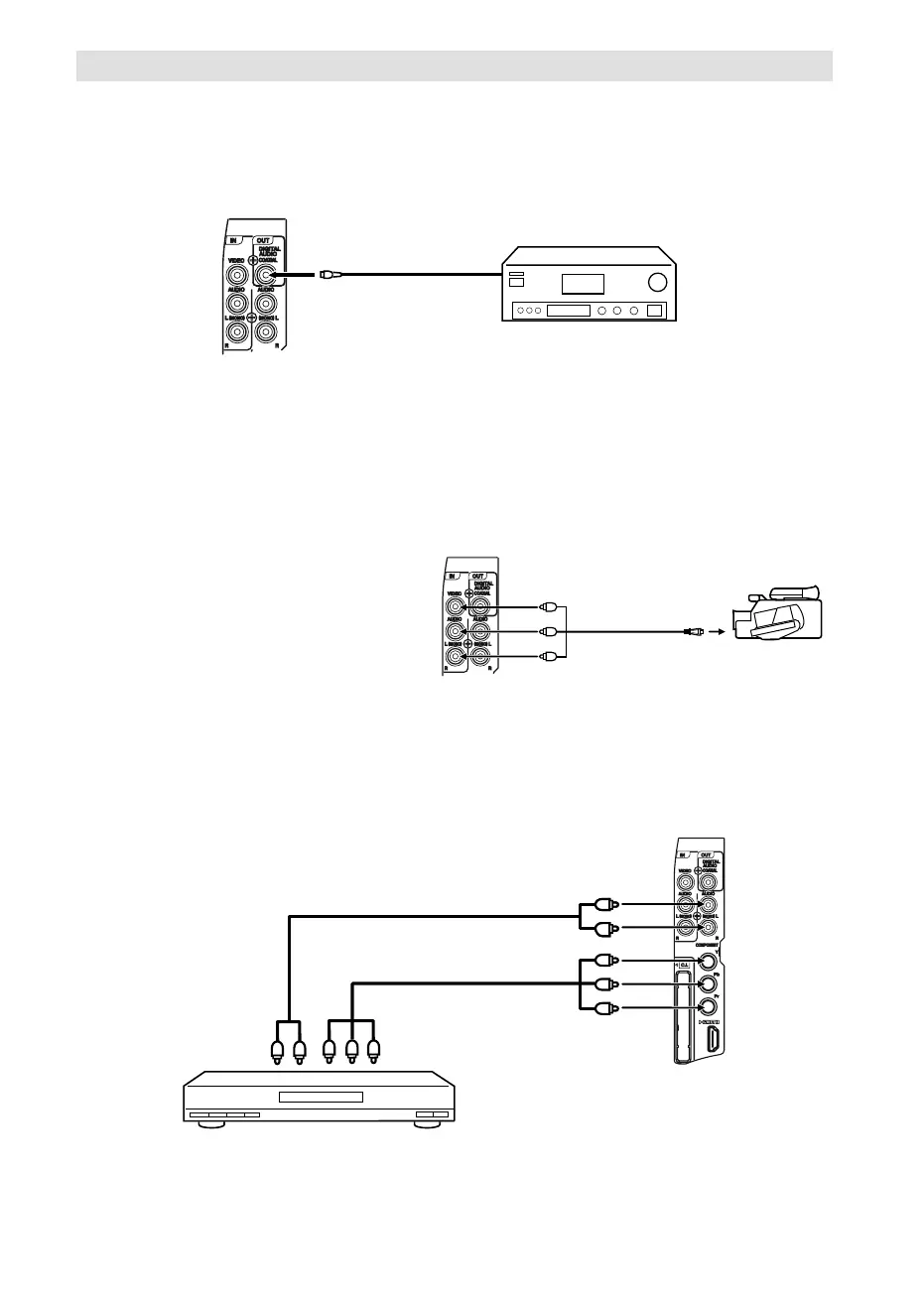
6. Connecting to a DVD player or other AV device with Component Video outputs
If your DVD player (or other device) has Component Video output jacks, use a suitable set of leads (RCA/
Phono) to connect these to the Component Video inputs on this TV as shown - it can greatly enhance
the picture quality and performance. Please remember that you will also need to connect separate leads
(RCA/Phono) for the audio signals. Select the COMPONENT input mode (see P.12).
Component
output
Audio output
Video cable (not supplied)
To COMPONENT IN
TV (Side view)
Note:
The Component Video input of this unit are for use with equipment which outputs interlaced signals (PAL: 576i/1080i or
NTSC: 480i/1080i) and progressive signals (PAL: 576p/720p or NTSC: 480p/720p).
•
DVD player
5. Connecting a Video camera or Games console to AV-2
Select the AV-2 input mode (see P.12).
(AV cable, not supplied)
AV output
Video camera
(example)
Audio cable (not supplied)
TV (Side view)
4. Connection of a digital amplifier or digital A/V receivers
(with DTS or Dolby Digital Decoder)
DTS and Dolby Digital are two different systems. DTS-DVDs cannot be played with a Dolby Digital
receiver. Please use in this case a decoder that matches your DVDs.
Audio digital cable
(not supplied)
A/V receiver with Dolby
Digital decoder
TV (Side view)
After connecting a DD decoder please select in the DVD menu the Dolby Digital (DD) sound track option.
Several DVDs may be pre-recorded on both sides however only one side contains the DD sound track.
Please insert the correct DVD side.
When a DTS sound track is played the integrated loudspeakers are mute. The DTS sound can only be
played digitally using the digital outlet. For hearing a DTS decoder is necessary.
Digital audio output is active only when receiving DVB-T, not when receiving analog cable TV broadcasting.
•
•
•
•
55L0501A_ENG.indd 3555L0501A_ENG.indd 35 11/25/10 11:32:33 AM11/25/10 11:32:33 AM



 To Next Page