12
LT-32/26A61BU/SU / LCT1996-001A-U / English
TV buttons and functions
Refer to the pages in parentheses for details.
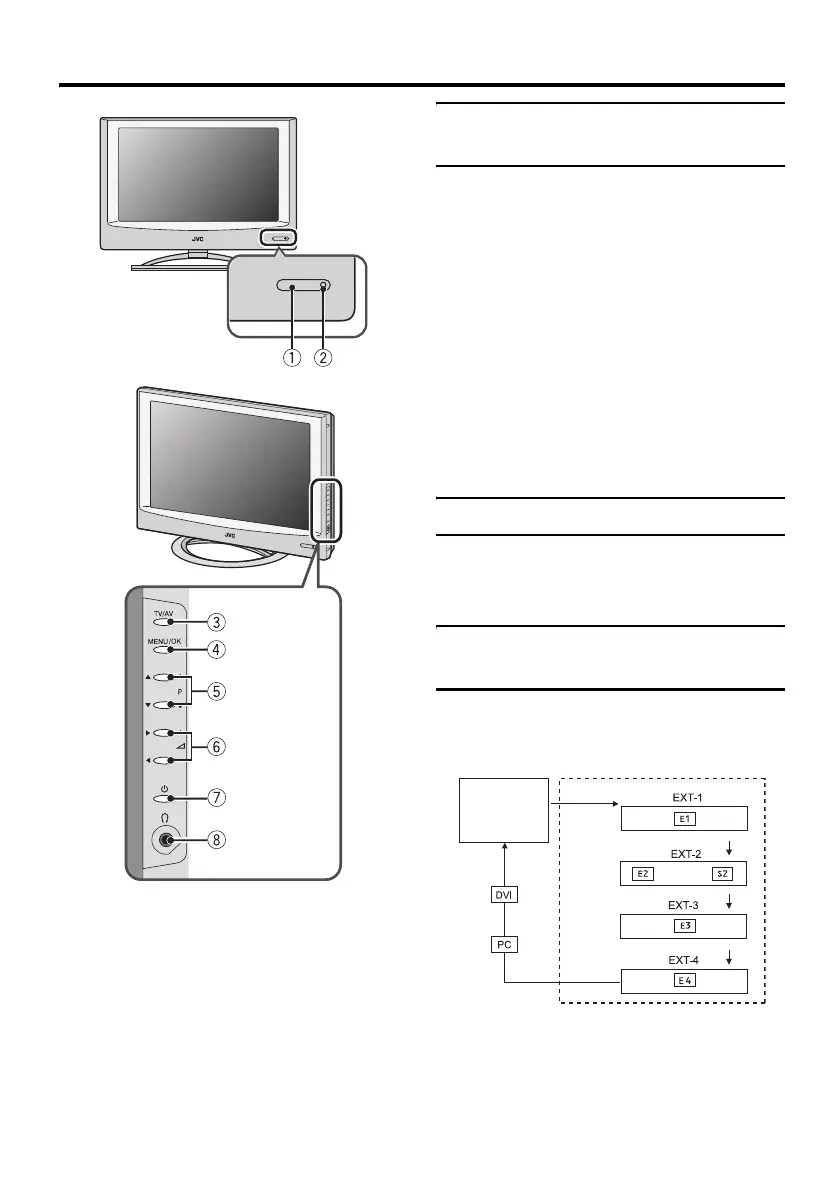
1 Remote control sensor
2 Power lamp (page 7)
3 TV/AV button (page 12)
4 MENU/OK button (pages 13, 24)
5 P p buttons (page 12)
6 r (Volume) q buttons (page 13)
7 A (Stand by) button (page 12)
8 Headphone jack (mini jack) (page 40)
Turn the TV on from standby
mode
Press the A button or the P p
buttons to turn the TV on from
standby mode.
When the TV is turned on, the power lamp
lights blue.
To turn the TV off:
Press the A button again.
The power lamp goes off.
Caution
•The A button on the TV does not fully
isolate the TV from the AC supply. If
you are not going to use the TV for a
long period, be sure to disconnect the
AC plug from the AC socket.
Choose a TV channel
Press the P p buttons to choose a
programme number (PR) or an EXT
terminal
Watch images from external
devices
Press the TV/AV button to choose an
EXT terminal
TV mode EXT modes
Last
Programme
number
or
Body_Eng.fm Page 12 Thursday, October 20, 2005 1:22 PM



 To Next Page
 Loading...