REMOTE CONTROL
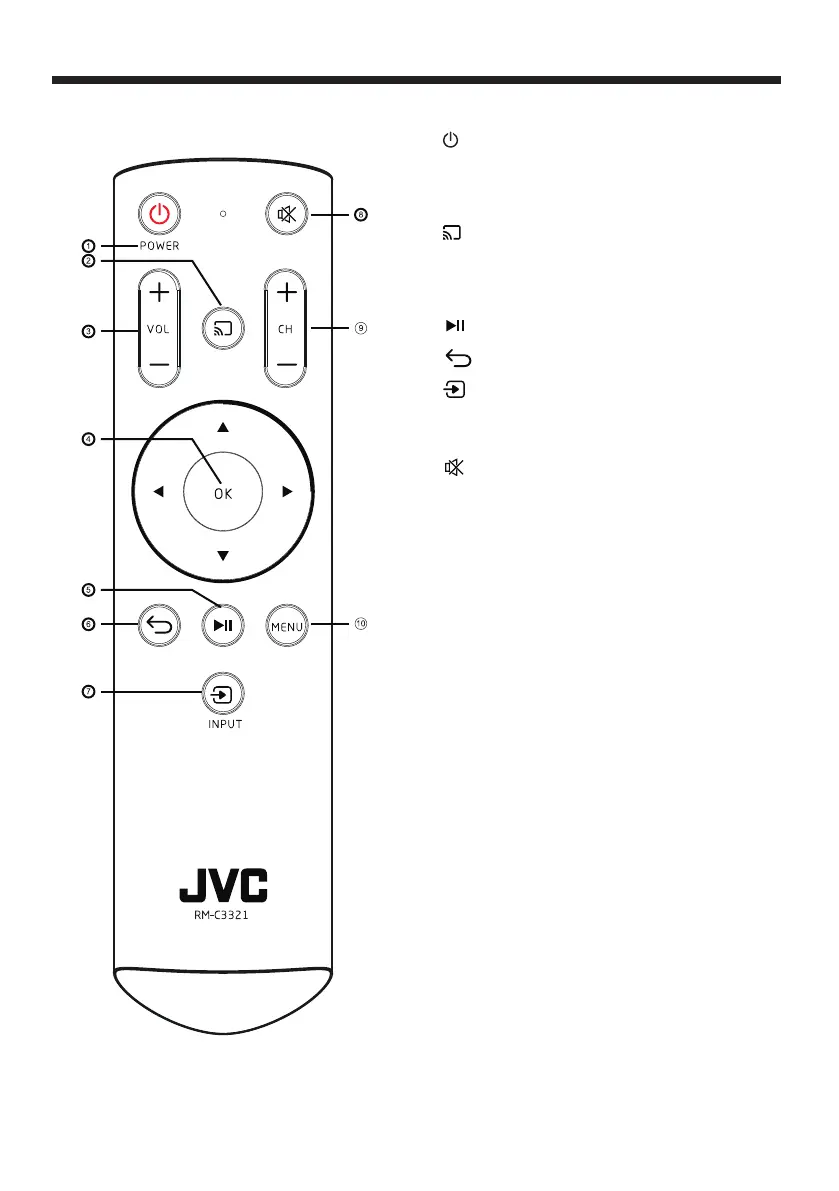
Button Press to...
1. (power) : Turn your TV on or off (standby mode).
When your TV is off the power indicator lights red.
Warning: When your TV is off, power still flows
through it. To disconnect power, unplug the power
cord.
2. : Switch to Chromecast built-in.
3.VOL +/- : To adjust sound level.
4. OK: Confirm selections or changes in TV menus.
5. (play/pause): Start or stop playback.
6. (back): Return to the previous level or channel.
7. (INPUT): Open the Input Selection list. Press
INPUT one or more times or press S or T to select the
video input source, then press OK. See Selecting the
video input source .
8. (MUTE): To disable or enable the sound output
9. CH +/- : Change channel in channel list.
10. MENU: Open the on-screen menu..
REMOTE CONTROL
-12-


 To Next Page
 Loading...