(No.MB350)1-11
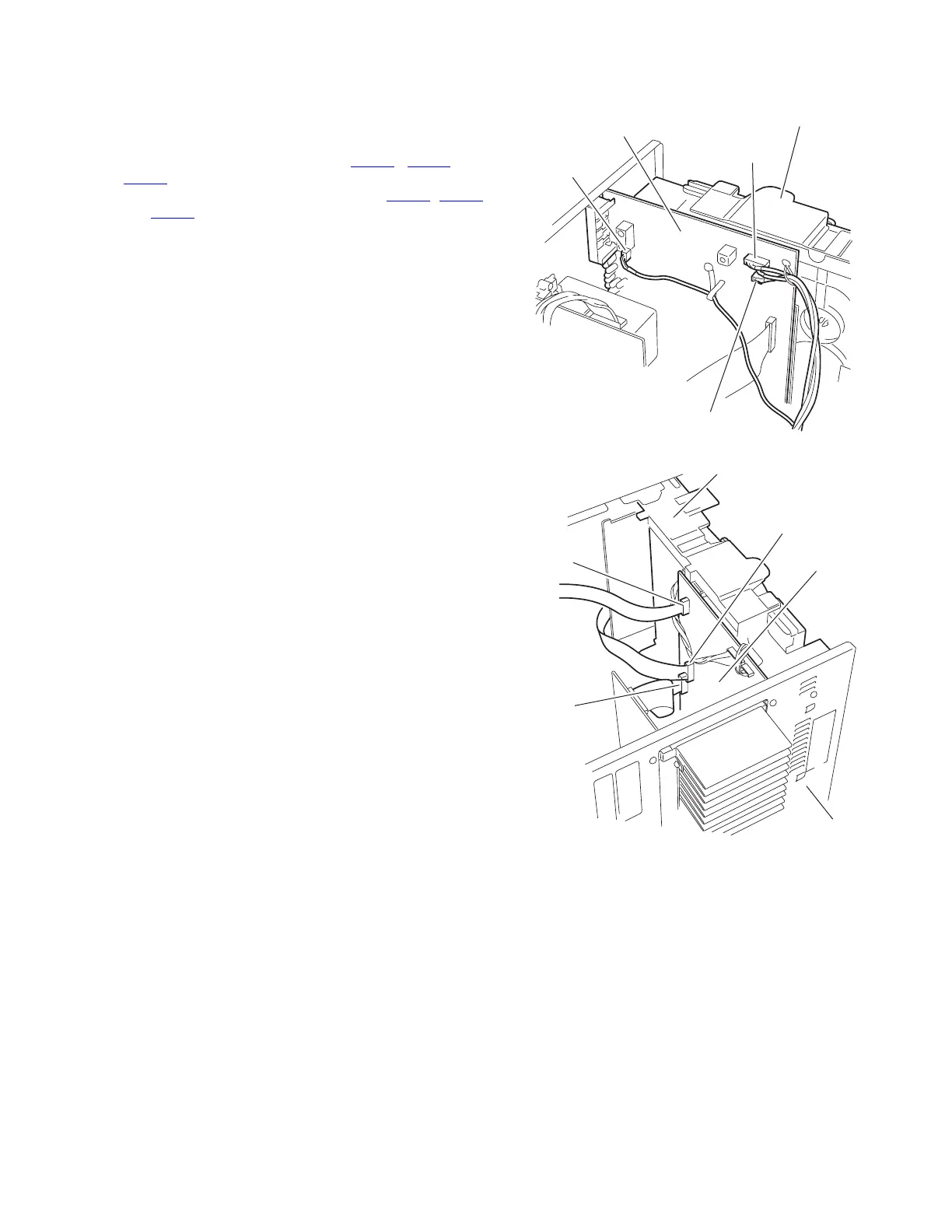
3.1.4 Removing the CD changer mechanism unit
(See Fig.10 to 14)
• Prior to performing the following procedure, remove the metal
cover/ rear cover and the CD fitting.
(1) From the bottom of the CD changer mechanism unit, dis-
connect the wire from connector CN401
, CN402 and
CN205
on the main board.
(2) Disconnect the card wire from connector CN403, CN201
and CN601 on the main board.
(3) From the back of the body, remove the four screws E at-
taching the CD changer mechanism unit.
(4) From the back of the body, remove the four screws F at-
taching the CD changer mechanism unit.
(5) Pulling the rear panel backward, move the CD changer
mechanism unit in the direction of the arrow and remove.
Fig.10
Fig.11
CN402
Main board
CN401
CN205
CD changer mechanism unit
CN403
CN201
CN601
Main board
CD changer mechanism unit
Rear panel


 To Next Page