(No.MB664<Rev.002>)1-13
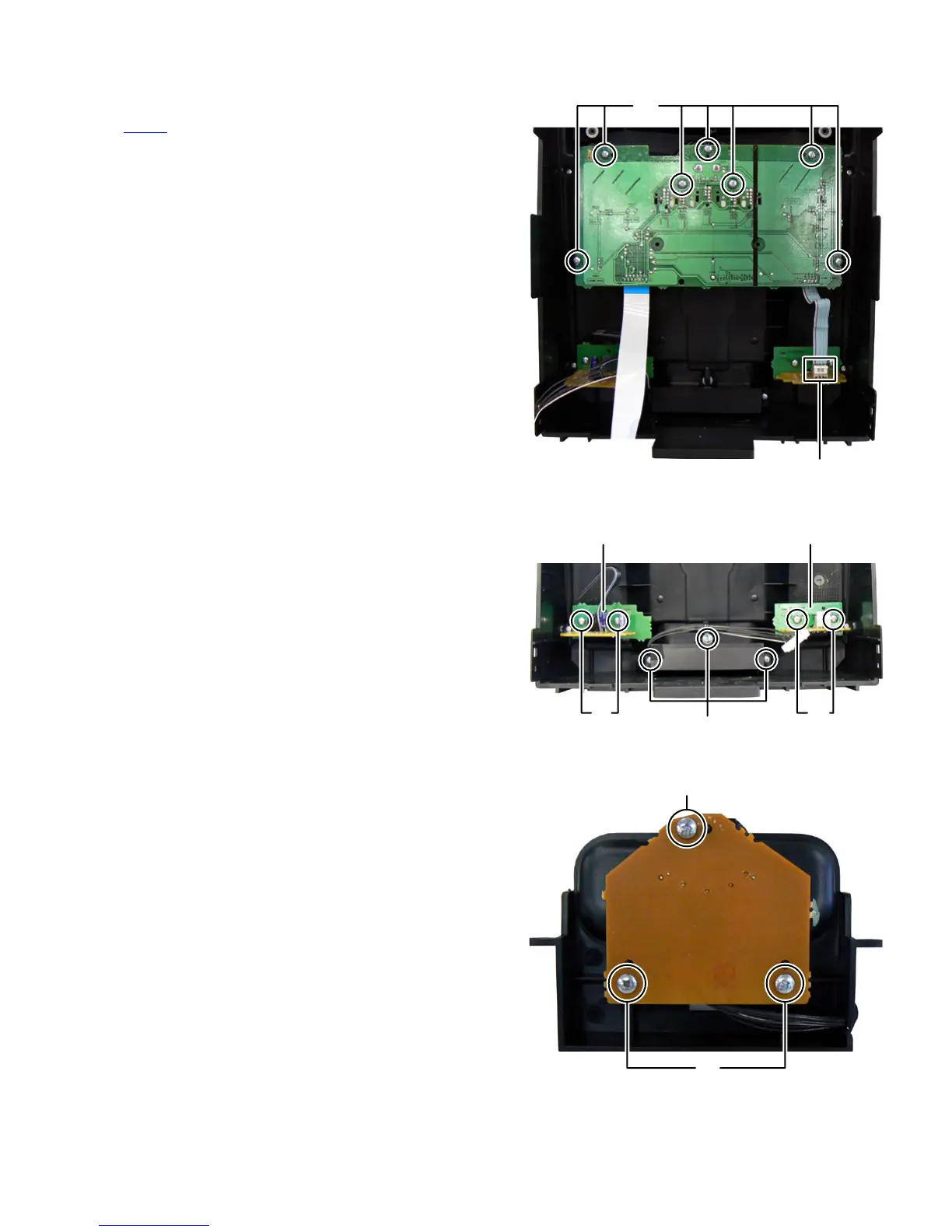
3.1.11 Removing the Volume board (See Fig.18)
(1) Remove the volume knob.
(2) Disconnect the flat cable wire connected to connector
CN951
of the Headphone jack board.
(3) Remove the seven screws N attaching the Volume board.
Fig.18
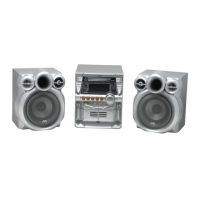
3.1.12 Removing the Audio input board (See Fig.19)
(1) Remove the two screws P attaching the Audio input board.
3.1.13 Removing the Headphone jack board (See Fig.19)
(1) Remove the two screws Q attaching the Headphone jack
board.
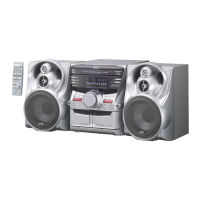
3.1.14 Removing the iPod jack board (See Fig.19, 20)
(1) Remove the three screws R attaching the iPod holder.
(See Fig.20)
(2) Remove the three screws S attaching the iPod jack board.
(See Fig.20)
Fig.19
Fig.20
CN951
N
Audio input board Headphone jack board
PQ
R
S
S


 To Next Page