51
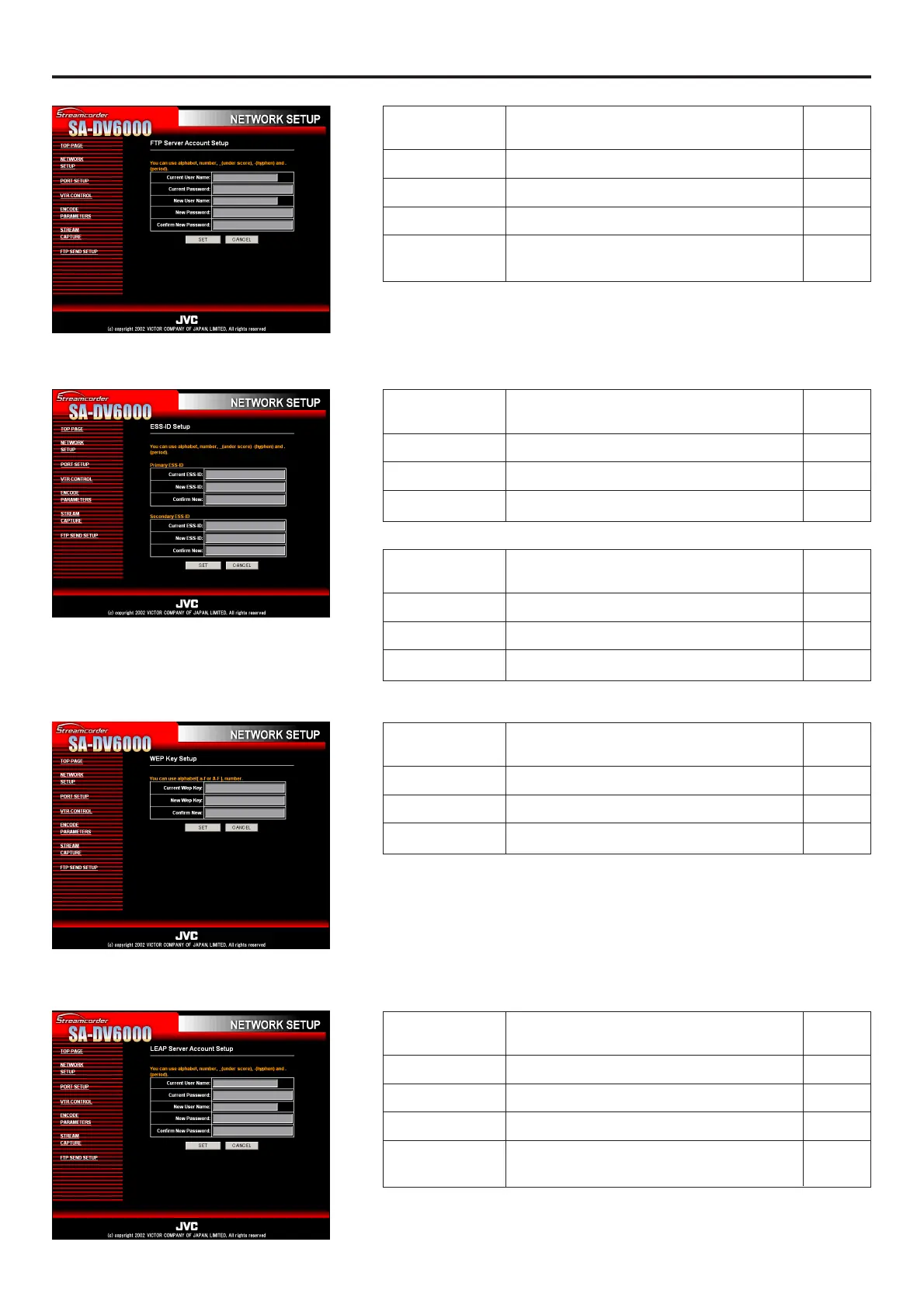
Network remote control NETWORK SETUP page
FTP Server Account Setup screen
ESS-ID Setup screen
WEP Key Setup screen
LEAP Server Account Setup screen
Primary ESS-ID
Item Description
Factory
setting
User Name Input the FTP user name. ftp-user
Old password Input the currently used password. sa-dv
New Password Input the new password.
Confirm New For confirmation, input the new password
again.
Item Description
Factory
setting
Current ESS-ID Input the currently used ESS-ID. NONE
New ESS-ID Input the new ESS-ID.
Confirm New For confirmation, input the new ESS-ID again.
Item Description
Factory
setting
Current ESS-ID Input the currently used ESS-ID. NONE
New ESS-ID Input the new ESS-ID.
Confirm New For confirmation, input the new ESS-ID again.
Secondary ESS-ID
Item Description
Factory
setting
Current Wep Key Input the currently used Wep Key.
New Wep Key Input the new Wep Key.
Confirm New
For confirmation, input the new Wep Key again.
Item Description
Factory
setting
User Name Input the LEAP user name. leap-user
Old Password Input the currently used password. sa-dv
New Password Input the new password.
Confirm New
For confirmation, input the new password again.


 To Next Page