53
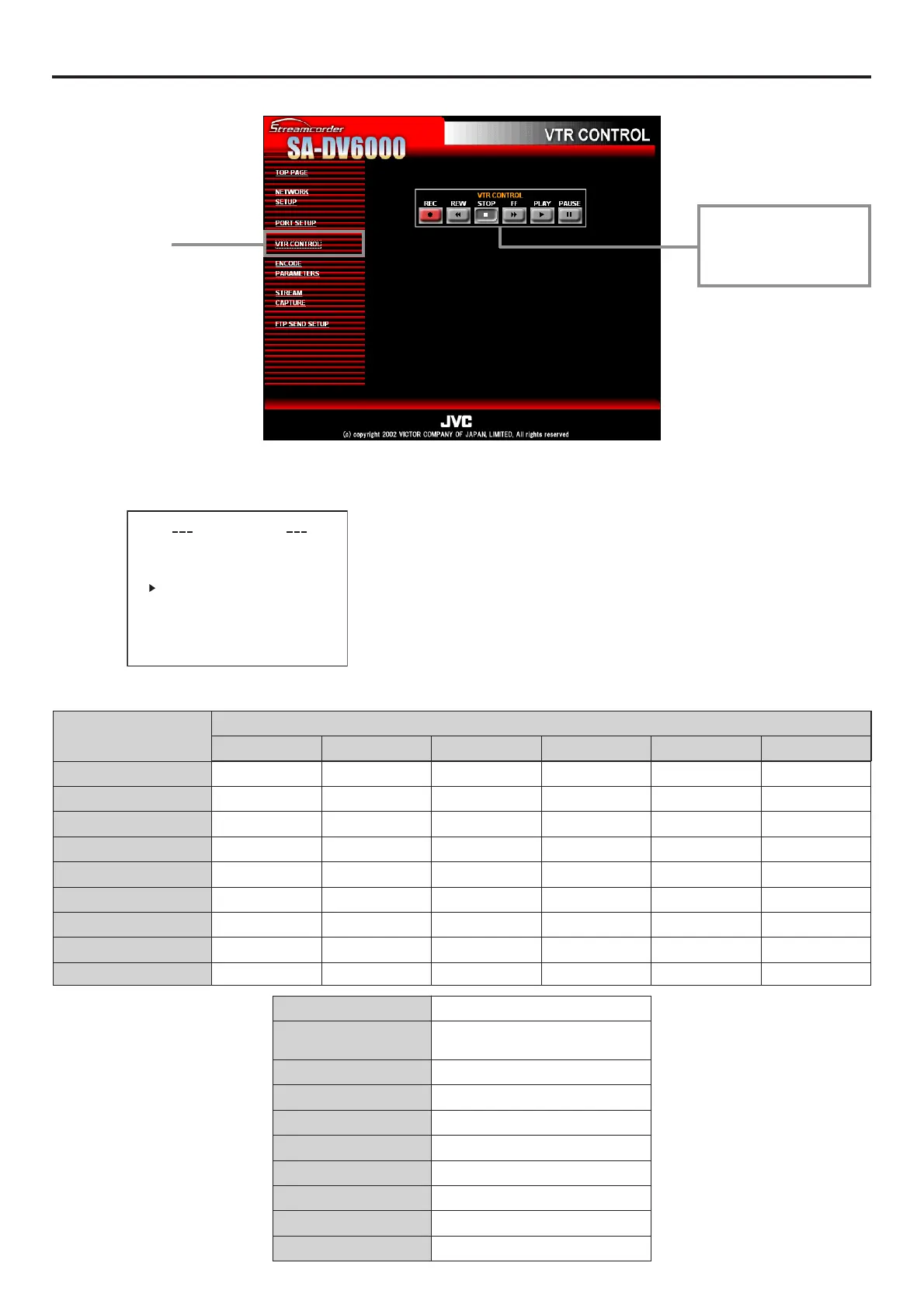
Network remote control VTR control
VTR can be controlled using a network connection.
\ To control the VTR in the Streamcorder screen, the following menu items of BR-DV6000 must be set in advance.
\ VTR control icon operations are as follows:
● Set REMOTE SEL NET in the REMOTE [1/2] menu screen to
LOC+REM or ON.
When set to OFF, the VTR cannot be controlled from the
Streamcorder screen.
REMOTE [1/2] menu screen
—: Mode will not change
Clicking VTR control icon
Previous mode
REC REW STOP FF PLAY PAUSE/STILL
STOP REC REW — FF PLAY STILL
FF — REW STOP — PLAY STILL
REW ——STOP FF PLAY STILL
PLAY REC SHTL –20 STOP SHTL +20 — STILL
FWD — SHTL –20 STOP SHTL +20 PLAY STILL
REV ——STOP — PLAY STILL
STILL REC-PAUSE SHTL –20 STOP SHTL +20 PLAY —
REC ——STOP ——REC-PAUSE
REC-PAUSE REC — STOP — REC —
REMOTE SEL
REMOTE SEL
REMOTE SEL
REMOTE SEL
REMOTE SEL
9P
REMOTE [ 1 / 2 ]
ON
SER ON
DV ON
JVC ON
NET LO
LOCAL FUNCT I ON TSTP+EJ
MC+RE
PREROLL
G
7SEC
NEXT
PA
E
PAGE BAC
K
VTR control icons
Click each button to per-
form operation.
Screen selection
VTR mode State of buttons pressed
STOP STOP
FF FF
REW REW
PLAY PLAY
FWD PLAY + FF
REV PLAY + REW
STILL PLAY + PAUSE
REC PLAY + REC
REC-PAUSE PLAY + REC + PAUSE


 To Next Page