57
Network remote control
STREAMCAPTURE (Playing back video/audio using a PC and saving to file)
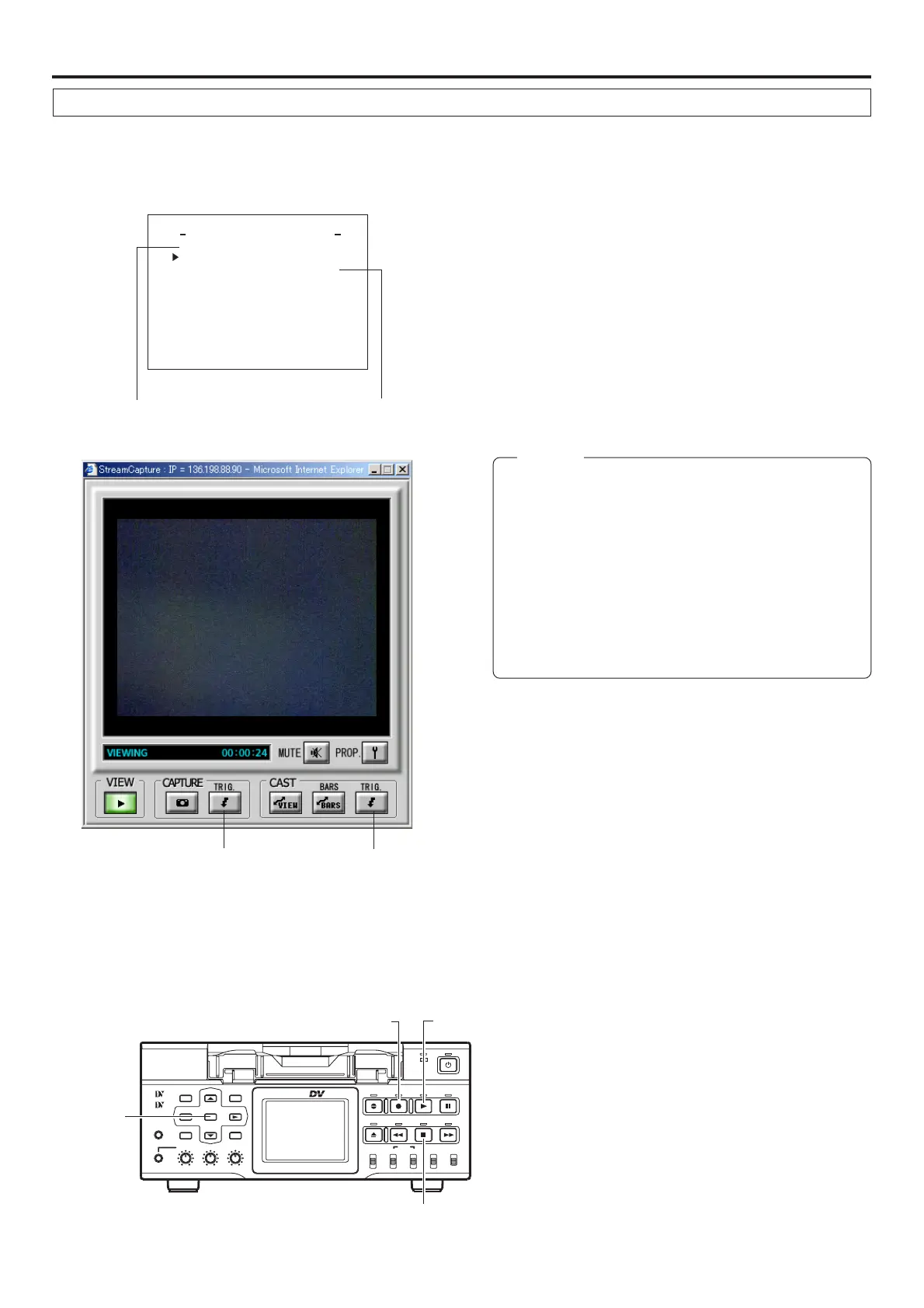
The Trigger Mode function can be used to save and transmit video/audio from SA-DV6000 to your PC by synchronizing to the button
operations of BR-DV6000.
NETWORK MAIN SETUP menu screen
(☞ page 10)
NETWORK PACK CONFIG
menu screen
NE T WOR K T U P . .SE
ORTWENKACK
P
ON
C
IG
F
ENCODE
MPEG R EC
T
RGI
MOV I E
u
C
LI
P
(WMP nder 8
MENU R ES E T C AN C E
er
)
L
PAGE B
A
CK
TUP. .SE
AINM
TUP. .S
)
E
FView(C
Setting
About the Trigger Mode function (TRIG)
CAPTURE-TRIG.
button
CAST-TRIG.
button
1.
Set MPEG REC in the NETWORK PACK CONFIG menu to
“TRIG” or “SPLIT” using steps 1 ~ 8 of page 10.
● TRIG: Records/transmits video/audio streaming data to your
PC at the same time as the recording to the DV cassette
tape set in BR-DV6000.
● SPLIT: Records/transmits video/audio streaming data to
your PC regardless of whether the DV cassette is set.
2.
Click the CAPTURE-TRIG./CAST-TRIG. button in the
Streamcapture screen.
● Button lights and the program enters the trigger standby
mode.
Memo
● When the CAPTURE-TRIG. button is on:
Saves the video/audio from SA-DV6000 to your PC by
synchronizing to the button operations of BR-DV6000.
● When the CAST-TRIG. button is on:
Transmits video/audio from SA-DV6000 to another PC
by synchronizing to the button operations of BR-DV6000.
* When saving and transmitting video/audio at the same
time, light both CAPTURE-TRIG. and CAST-TRIG. but-
tons.
3.
Turning trigger on
● When SA-DV6000 is in the TRIG mode: press REC and
PLAY of BR-DV6000 at the same time.
● When SA-DV6000 is in the SPLIT mode: press the SET
button of BR-DV6000.
● Saving of file or transmission will start on the PC.
4.
Turning trigger off
● When SA-DV6000 is in the TRIG mode: press the STOP
button of BR-DV6000.
● When SA-DV6000 is in the SPLIT mode: press the SET
button of BR-DV6000.
● File recording on the PC will end. Furthermore, transmit-
ted video screen will display color bars.
BR-DV6000
PROFESSIONAL
MENU RESET
A.DUB
EJECT
COUNTER
AUDIO INPUT
SELECT
MONITOR OUTPUT REMOTE
LOCAL
CTL L
MIX
R
CH-1/2
MIX
CH-3/4
DV
LINE
Y/C
(CPN)
TC
UB
REW STOP FF
REC
OPERATE
PLAY PAUSE
DISP
SET SEARCH+
BLANK CUE UP
HOLD
PHONES REC LEVEL
CH-1/3 CH-2/4
MIC
SEARCH–
Mini
SET button
PLAY button
STOP button
REC button


 To Next Page