24
English
9
Press MEMORY to finish the setting.
“SETUP END” appears on the display for a while, then
goes back to the source indication.
• Speaker configuration settings now become active.
For the registered speaker size and distance, see
below.
Note:
• This procedure will not be completed if you stop in the middle of the
process.
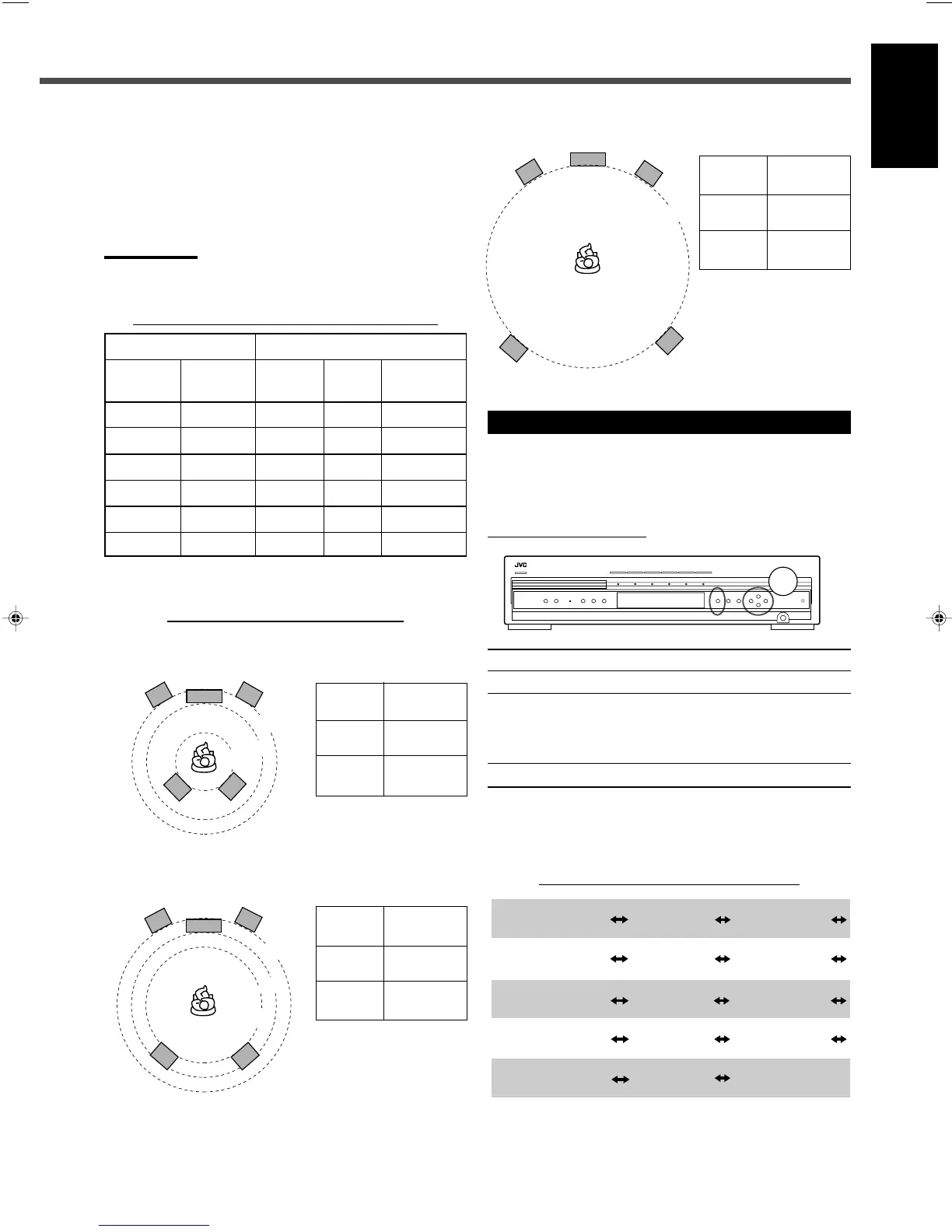
Speaker size for each speaker channel number
Selected value Speaker size
Number of Subwoofer Front L/R Center Surround L/R
speakers use (L/R) (C) (LS/RS)
3NOLRG SML NO
3 USE SML SML NO
4NOLRG NO SML
4 USE SML NO SML
5NOLRG SML SML
5 USE SML SML SML
• For details about speaker size, see page 25.
Speaker distance for each room size
• When you select “SMALL” as the room size
Front 2.4 m
(L, R)
Center 2.1 m
Surround 1.5 m
(LS, RS)
• When you select “MEDIUM” as the room size
Front 2.7 m
(L, R)
Center 2.4 m
Surround 2.1 m
(LS, RS)
Setting Basic Items
After completing connection, set the basic items listed on
page 23.
7 Operation buttons
On the front panel ONLY
Button To do
SETTING Show the setting items on the display*
1
.
CONTROL 5/∞ Select an item on the display.
Each time you press the button, the items
change (see “Configuration of the items
on the display” below).
CONTROL 3/2 Adjust the selected item.
• When no operation is done for about 5 seconds, the
indications on the display will disappear.
*
1
Pressing SETTING repeatedly also changes the items.
Configuration of the items on the display
*
2
For details about “QUICK SETUP,” see “Setting Speakers
Quickly” on page 23.
• When you select “LARGE” as the room size
Front 3.0 m
(L, R)
Center 3.0 m
Surround 3.0 m
(LS, RS)
SUBWFR
(Subwoofer)
QUICK SETUP
*
2
(Quick setup)
FRNT SP
(Front speaker)
CNTR SP
(Center speaker)
SURR SP
(Surround speaker)
FRNT D
(Front distance)
CNTR D
(Center distance)
SURR D
(Surround distance)
CROSS
(Crossover)
LFE
(Low frequency
effect)
D.COMP
(Dynamic range
compression)
DGT
(Digital)
AUTO SR
(Auto surround)
VOUT
(Video out)
(back to the beginning)
23-29_RX-DV31SL[UW]f.p65 03.4.22, 18:5524


 To Next Page