EasyManua.ls Logo

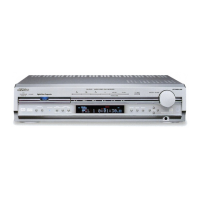
JVC RX-ES1SL - Service Manual

JVC RX-ES1SL
51 pages
Print Icon
To Next Page IconTo Next Page
Loading...
SERVICE MANUAL
COPYRIGHT © 2003 VICTOR COMPANY OF JAPAN, LIMITED
No.MB105
2003/11
HOME CINEMA CONTROL CENTER
MB105200311
RX-ES1SL
TABLE OF CONTENTS
1 PRECAUTION. . . . . . . . . . . . . . . . . . . . . . . . . . . . . . . . . . . . . . . . . . . . . . . . . . . . . . . . . . . . . . . . . . . . . . . . . 1-3
2 SPECIFICSERVICE INSTRUCTIONS . . . . . . . . . . . . . . . . . . . . . . . . . . . . . . . . . . . . . . . . . . . . . . . . . . . . . . 1-4
3 DISASSEMBLY . . . . . . . . . . . . . . . . . . . . . . . . . . . . . . . . . . . . . . . . . . . . . . . . . . . . . . . . . . . . . . . . . . . . . . . 1-5
4 ADJEUTMENT . . . . . . . . . . . . . . . . . . . . . . . . . . . . . . . . . . . . . . . . . . . . . . . . . . . . . . . . . . . . . . . . . . . . . . . 1-11
5 TROUBLESHOOTING . . . . . . . . . . . . . . . . . . . . . . . . . . . . . . . . . . . . . . . . . . . . . . . . . . . . . . . . . . . . . . . . . 1-12
Area suffix
A ------------------------- Australia

Other manuals for JVC RX-ES1SL

Questions and Answers

  • I
    Ian MeyersAug 13, 2025
    What to do if JVC RX-ES1SL remote control does not work?
    • F
      Francisco RobertsAug 13, 2025
      If your JVC Home Theater System remote control isn't working, first ensure there's nothing blocking the remote sensor on the unit. If that's not the issue, try replacing the batteries. Finally, make sure the mode selector is in the correct position.
  • G
    Gerald DelgadoAug 16, 2025
    Why is there no sound from my JVC RX-ES1SL speakers?
    • E
      Eric PhillipsAug 16, 2025
      If you're getting no sound from the speakers of your JVC Home Theater System, start by checking the speaker wiring to ensure all cables are securely connected. Then, verify that you've selected the correct source and that muting is not activated. Also, confirm that the input mode (analog or digital) is correctly selected and check all other connections.
  • L
    Laura WatersAug 20, 2025
    What to do if JVC RX-ES1SL Home Theater System turns off after turning on?
    • C
      Christopher BensonAug 20, 2025
      If your JVC Home Theater System powers on briefly but then turns off and the STANDBY lamp lights up, it could be due to overloaded speakers from high volume or a short circuit at the speaker terminals. First, turn off the unit, stop the playback source, and turn it on again, adjusting the volume. Then, check the speaker wiring. If the wiring isn't short-circuited, consult your dealer.
  • T
    Tony MorseAug 25, 2025
    Why is there continuous hiss during FM reception on my JVC Home Theater System?
    • D
      Danny RichardsonAug 25, 2025
      If you're experiencing continuous hiss or buzzing during FM reception on your JVC Home Theater System, it could be due to a weak incoming signal. Try connecting an outdoor FM antenna or contact your dealer. It may also be that the station is too far away, so try selecting a new station. Also, make sure you have the correct antenna and that all antenna connections are properly connected.
  • D
    David CastilloAug 28, 2025
    Why is sound coming from only one speaker on my JVC Home Theater System?
    • M
      michaeledwardsAug 28, 2025
      If you only hear sound from one speaker on your JVC Home Theater System, the balance might be set to one extreme. Adjust the balance properly.
  • R
    Robert MendezAug 31, 2025
    Why surround mode cannot be selected on JVC RX-ES1SL Home Theater System?
    • S
      Sydney ReynoldsAug 31, 2025
      If you can't select surround mode on your JVC Home Theater System, check the speaker setting. The surround mode may not be available on the software being played back, or only the front speakers are set for use.
  • K
    kelseybrownSep 4, 2025
    Why DSP mode cannot be selected on JVC RX-ES1SL?
    • C
      Catherine EdwardsSep 4, 2025
      If you can't select DSP mode on your JVC Home Theater System, check the speaker setting. The DSP mode may not be available on the software being played back, or only the front speakers are set for use.
  • H
    Howard Bray IISep 8, 2025
    What causes cracking noise during FM reception on JVC RX-ES1SL Home Theater System?
    • S
      schroederheatherSep 8, 2025
      If you notice occasional cracking noises during FM reception on your JVC Home Theater System, it may be due to ignition noise from automobiles. Try moving the antenna farther from automobile traffic.

Summary

Safety and Precautions

Safety Precautions and Warnings

General safety guidelines, warnings, cautions, and critical component identification for safe operation and repair.

Specific Service Instructions

Disassembly Procedures

Main Body Section Disassembly

Procedures for removing the top cover, front panel, and rear panel from the main body.

Component Removal Procedures

Steps for removing the tuner, digital input board, and digital output board.

Board and Power Supply Removal

Procedures for removing the AC power supply, DC power board, main board, and amp board.

Ancillary Component Removal

Steps for removing the power transformer, fan motor, rectifier board, and headphone jack board.

Front Panel Component Removal

Procedures for removing the FL board, volume board, and SW board from the front panel assembly.

Adjustment Procedures

Troubleshooting Guide

Schematic Diagrams

Block Diagram

Overall system block diagram illustrating component interconnections and signal flow.

Standard Schematic Diagrams

Detailed schematic diagrams for various sections like primary, regulator, speaker terminal, and PWM modulator.

Printed Circuit Board Layouts

Layouts and component placement for front, volume, DC power, SW, FL, and AC power supply boards.

Parts List

Exploded View and General Parts List

Visual exploded view of the unit with numbered parts and their corresponding list.

Electrical Parts List

Detailed list of electrical components (ICs, transistors, resistors, capacitors) with part numbers and descriptions.

Packing Materials and Accessories

List and diagrams of packing materials and included accessories like remote control, batteries, and manuals.

JVC RX-ES1SL Specifications

General IconGeneral
Channels5.1
Audio Formats SupportedDolby Digital, DTS
TunerAM/FM
Frequency Response20 Hz - 20 kHz
Signal-to-Noise Ratio100 dB
Speaker Impedance6-16 ohms
TypeReceiver
Inputs1 x Optical, 1 x Coaxial
Outputs1 x Subwoofer
Input Sensitivity/Impedance200 mV/47 kΩ

Related product manuals