(No.MB368)1-15
3.1.6 Removing the fan
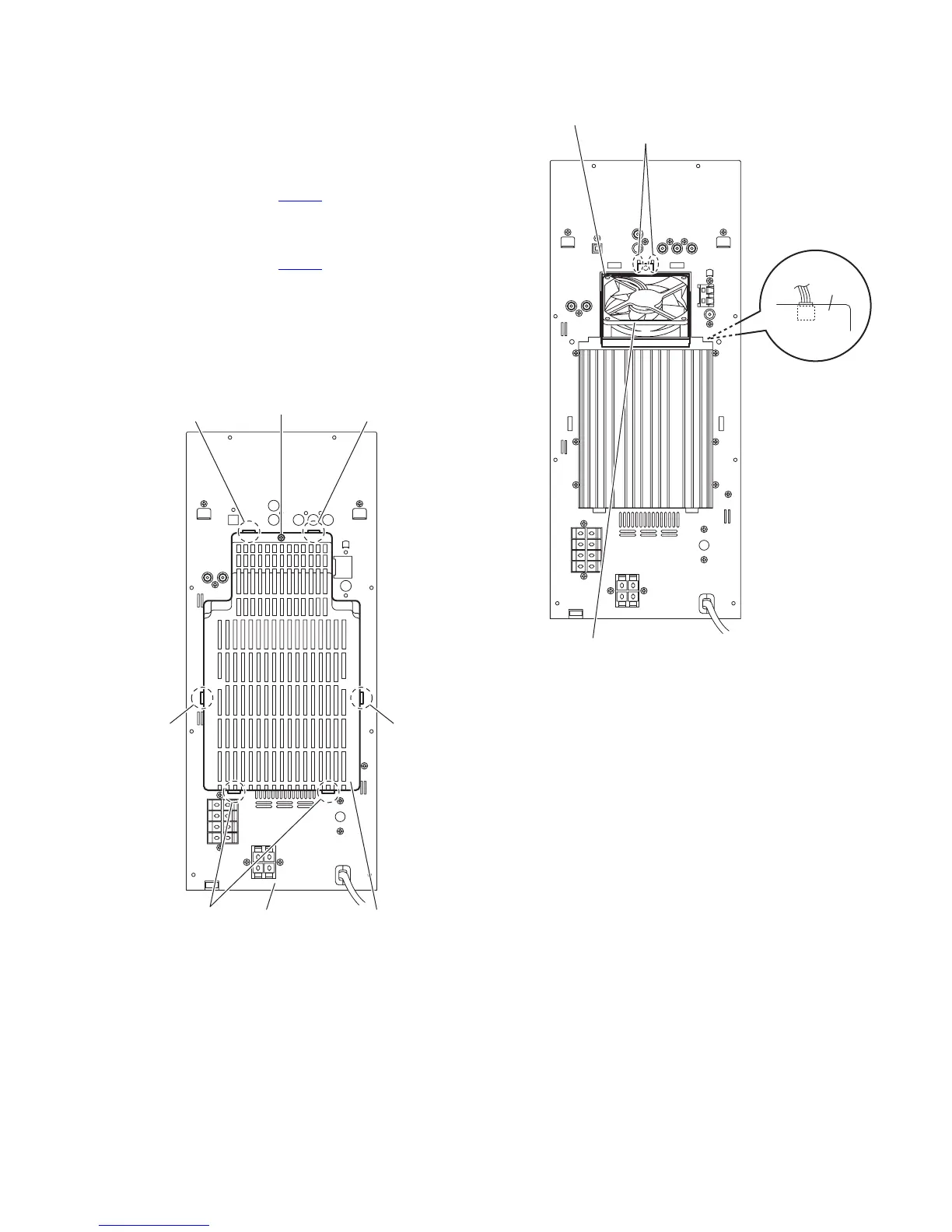
(See Figs.13 and 14.)
• Remove the metal cover.
(1) From the back side of the main body, remove the screw H
attaching the rear cover to the rear panel. (See Fig.13.)
(2) Remove the joints d and remove the rear cover. (See
Fig.13.)From the left side of the main body, disconnect the
wire from the connector CN304
on the amplifier 2 board.
(See Fig.14.) [For DX-T9, DX-T5]
(3) Remove the joints d and remove the rear cover. (See
Fig.13.)From the left side of the main body, disconnect the
wire from the connector CN604
on the amplifier 2 board.
(See Fig.14.) [For DX-T7]
(4) Release the joints e of the fan bracket in the direction of the
arrow and take out the fan with the fan bracket. (See
Fig.14.)
Reference:
Remove the fan from the fan bracket as required.
Fig.13
Fig.14
Rear paneld Rear cove
d
dd
d
H
Fan
Fan bracket
e
CN304
(CN604)
Amplifier 2
board


 To Next Page