(No.MB368)1-59
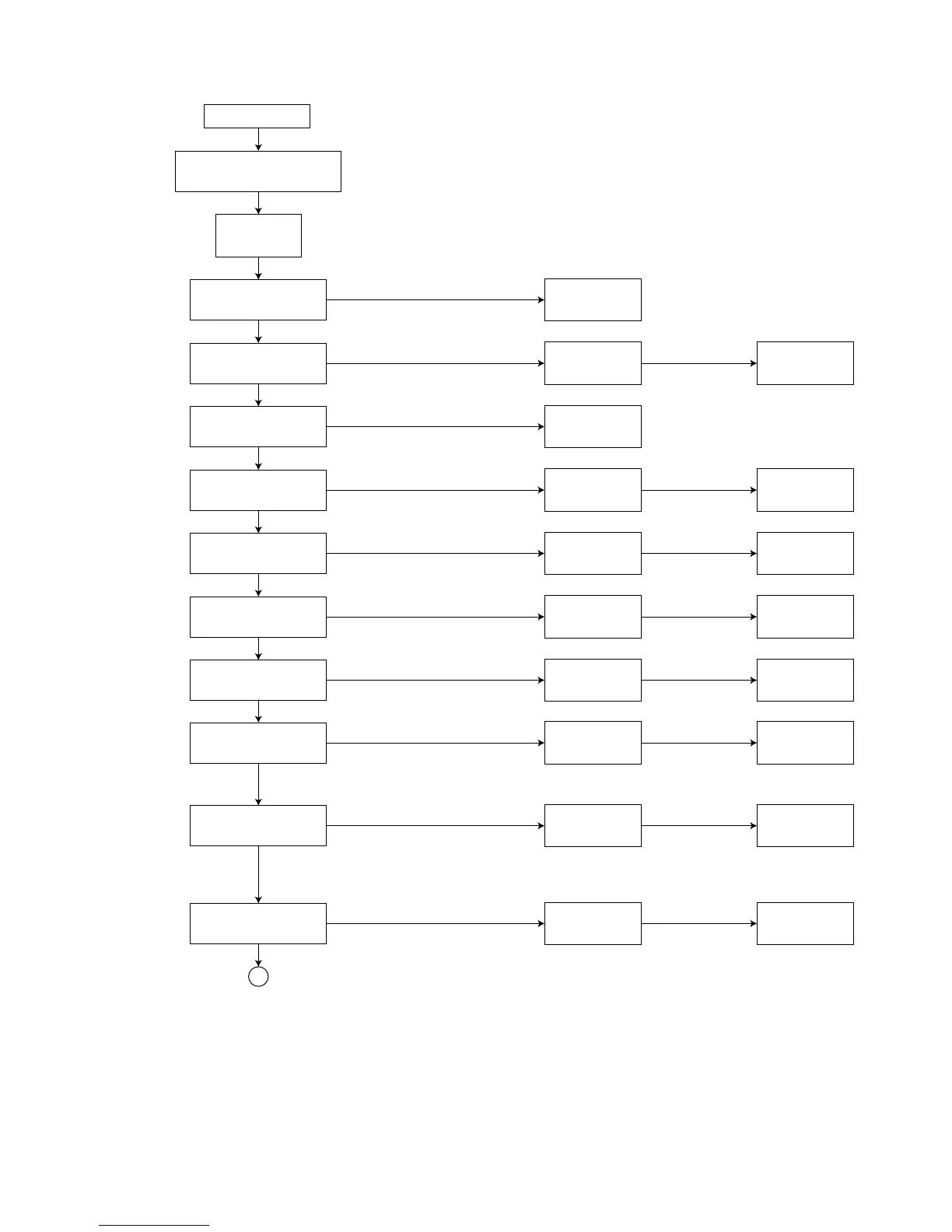
4. DVD check mode
DVD test mode
Press the [
MENU
] key on
the remote controller
.
" CHECK "
FL indication
Press the [
1
] key on
the remote controller
.
" PLAYBACK "
FL indication
Press the [
2
] key on
the remote controller
.
"WOBBLE"
FL indication FL indication
(After 2 seconds)
"xxxxyyyy"
Perform SEARCH TNO+1
START PLAYBACK
Press the [
3
] key on
the remote controller
.
"CHECK"
FL indication
Perform SEARCH TNO-1
Press the [
4
] key on
the remote controller
.
"COLD LSR"
FL indication FL indication
(After 2 seconds)
"xxxxyyyy"
Light up CD_LD and
display laser current
Press the [
5
] key on
the remote controller
.
"DVDLDLSR"
FL indication FL indication
(After 2 seconds)
"xxxxyyyy"
Light up DVD_LD and
display laser current
Press the [
6
] key on
the remote controller
.
"JITX1"
FL indication FL indication
(After 2 seconds)
"xxxxyyyy"
Enter DVD x 2 JITTER
MEASUREMENT MODE
Press the [
7
] key on
the remote controller
.
"EEP BWD"
FL indication FL indication
(After 2 seconds)
"xxxxyyyy"
View EEPROM (MECHA)
content in -1 address step.
Press the [
8
] key on
the remote controller
.
"EEP FWD"
FL indication FL indication
(After 2 seconds)
View EEPROM (MECHA)
content in +1 address step.
"xxxxyyyy"
Press the [
9
] key on
the remote controller
.
"TEMP"
FL indication FL indication
(After 2 seconds)
View TEMP in main body.
"xxxxyyyy"
Press the [
10
] key on
the remote controller
.
"DVD-DL"
FL indication FL indication
(After 2 seconds)
Perform SEARCH DVD_DL
PARALLEL DISC DESIGNATED
POSITION and JITTER
MEASUREMENT
"xxxxyyyy"
A


 To Next Page