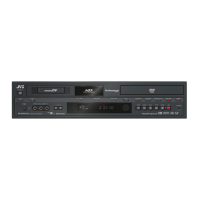
A [ A ] button
Switches operation on or off.
B Disc tray
C [ M ] button
Opens/closes the disc tray.
D Display window
E Remote control sensor
F [RESET] switch
Reset the unit.
G [REC MODE] button
Switches the recording mode.
H [HDD] lamp
Lights up when in HDD mode.
The [REC] lamp lights up while recording/importing.
I [INPUT SELECT] button
Switches the external input signals (HDV/DV, L-1).
J [BD] lamp
Lights up when in BD/DVD mode.
The [REC] lamp lights up while recording/dubbing.
K [MEDIA SELECT] button
Switches between HDD and BD/SD.
L [SD] lamp
Lights up when in the SD mode.
M [ONE TOUCH DUBBING] button
Starts one touch dubbing.
N
Playback control buttons
v
[ I ] button
Plays back the data.
v
[ o ] button
Stops playback/recording.
v
[ O ] button
Fast reverses playback.
v
[ N ] button
Fast forwards playback.
v
[ W ] button
Pauses playback.
O [ R ] button
Starts recording of a title.
P [SD SLOT]
Used for inserting SD cards.
Q [i.LINK(HDV/DV IN)] terminal
Connect a video camera using i.LINK (HDV/DV. IN).
R [USB] terminal
Connect a video camera using USB.
Getting Started
16



 To Next Page