External Control (only for
SR-HD1700)
This unit can be controlled using a PC, etc. by connecting them with an RS-232C or LAN cable.
RS-232C Specifications
v
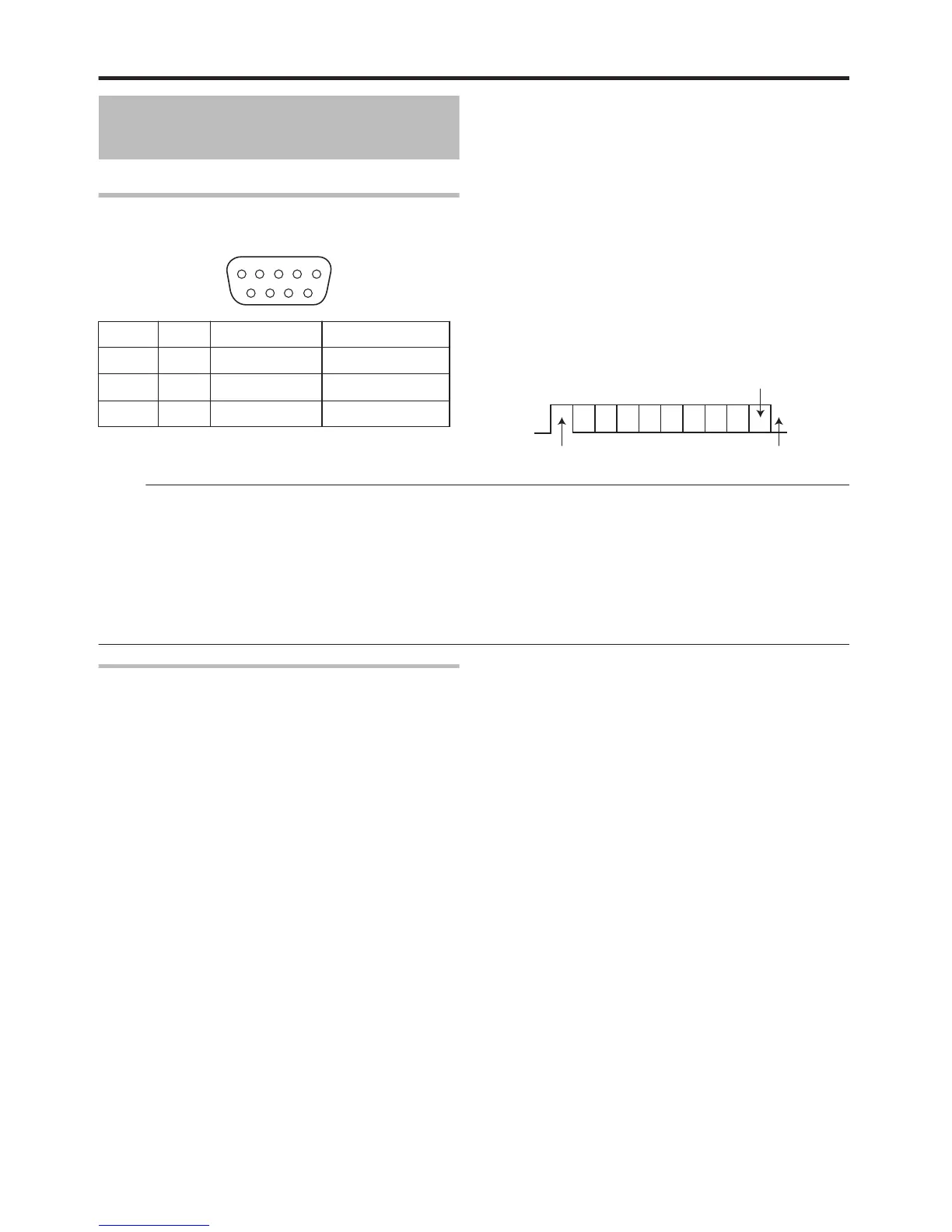
Pin layout
.
PIN No. Signal Operation Direction of signal
2 TxD Transmit data This unit h PC
3 RxD Receive data This unit i PC
5 GND Signal grounding
Mode
:
Non-synchronous
Character length
:
8 bits
Parity check
:
Odd
Start bit
:
1
Stop bit
:
1
Data rate
:
9600 bps
v
Bit configuration
.
Memo:
v
When using the Serial Command Connector, the cable to be used should be an RS-232C interface cable (straight type, 3 m or
shorter).
v
During command transmission, a minimum interval of 50 ms is required between each command.
v
During command transmission, do not send the next command until the ACK (refer to “System Commands” (A page 100) ) or
response (refer to “Response Commands” (A page 100) ) for each command is received.
v
The recommended maximum waiting time for the ACK or response for each command is as follows.
ACK
:
About 50 ms
Response
:
About 5 seconds
.
LAN Connection
To use a LAN connection, run the IP settings in “NETWORK SETTING(only for SR-HD1700)” (A page 90) .
Connect by specifying 1111 for the port.
During command transmission, a minimum interval of 100 ms is required between each command.
.
Others
92



 To Next Page