34
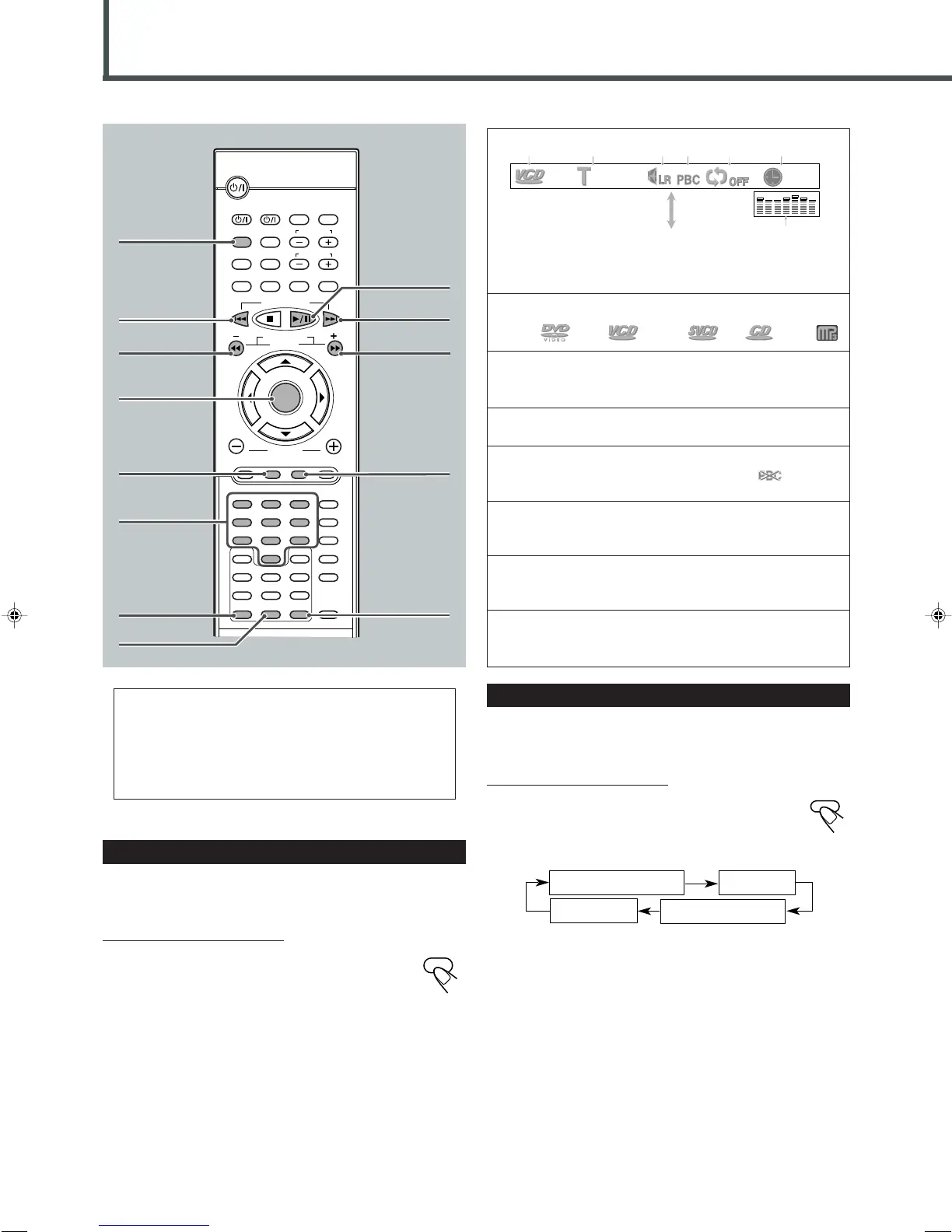
1 : Disc type
DVD VCD SVCD CD MP3
2 : Current track and total number of the tracks on
the disc
• Ex.: 1st track is playing out of 35 tracks recorded.
3 : Sound mode
• Ex.: Stereo sound (Left channel and Right channel).
4 : Play Back Control (PBC) indicator
• Ex.: PBC is on. (When PBC is turned off, will
appear.)
5 : Repeat mode indicator
• Ex.: When repeat mode is turned off. See page 36 for more
details.
6 : Elapsed playing time or remaining time
You can change the play time indication by pressing
REMAIN. See below.
7 : Sound indication
• Indicates sound input level. (Appears only during playback
VCD.)
Showing the On-Screen Bar
You can show the following information on the TV screen while a
disc is loaded.
From the remote control ONLY:
Press DISPLAY.
• Each time you press the button, the following on-screen
bar appears in sequence.
VCD/CD Playback
* Appears only when a VCD is loaded.
** Appears only when a VCD is played back.
*
• SVCD can be operated by using the VCD operation
procedure.
• For basic disc operations such as inserting a disc, starting
playback, and moving to another tracks, see “Basic VCD/
CD Operations” on pages 12, 13, and “Basic Disc
Operations” on page 26.
Checking the Remaining Time
While playing back a VCD or CD, you can check the remaining
time.
From the remote control ONLY:
Press REMAIN.
The on-screen bar appears on the TV screen for a while.
• Each time you press the button, the play time indication
changes as follows:
REMAIN TIME:TRACK
: Select this to show the remaining time of the current track.
DISC TIME
: Select this to show the total elapsed playing time of the disc.
REMAIN TIME:DISC
: Select this to show the total remaining time of the disc.
TRACK TIME
: Select this to show the elapsed playing time of the current
track.
REMAIN TIME:TRACK
REMAIN TIME:DISC
TRACK TIME
DISC TIME
1
¢
¡
DISPLAY
CLEAR
DISPLAY
B.SEARCH
DOWN
REW
UP
FF
F.SEARCH
RETURN
STEP
TV/VIDEO
TV VOLUME
TV CHANNEL
SUBTITLE
TOP MENU
TV
STANDBY/ON
AUDIO
VCR
VCR
CONTROL
TUNER PRESET
ENTER
VOLUME
MENU
AUDIO/
FM MODE
VCR CHANNEL
TUNING
DVD FM/AM AUX
MUTING
REMAIN
PROGRAM
D.R.CZOOM
SETUP
DSP MODE
SLEEP
TEST
PRO LOGIC
SETTING
SOUND
CLEAR
REPEAT
ANGLE
SLOW
SEARCH
A-B REPEAT
123
45
6
78
9
0
PTY – PTY +PTY SEARCH
RDS
DISPLAY
Number
buttons
REMAIN
RETURN
3/8
4
SEARCH
MENU
00:12
1/35
12 3 64 5
On-screen bar goes off.
7
ENTER
**
EN34-39TH-A30R[B]ff.pm6 02.7.2, 9:50 PM34



 To Next Page