41
Starting Playback
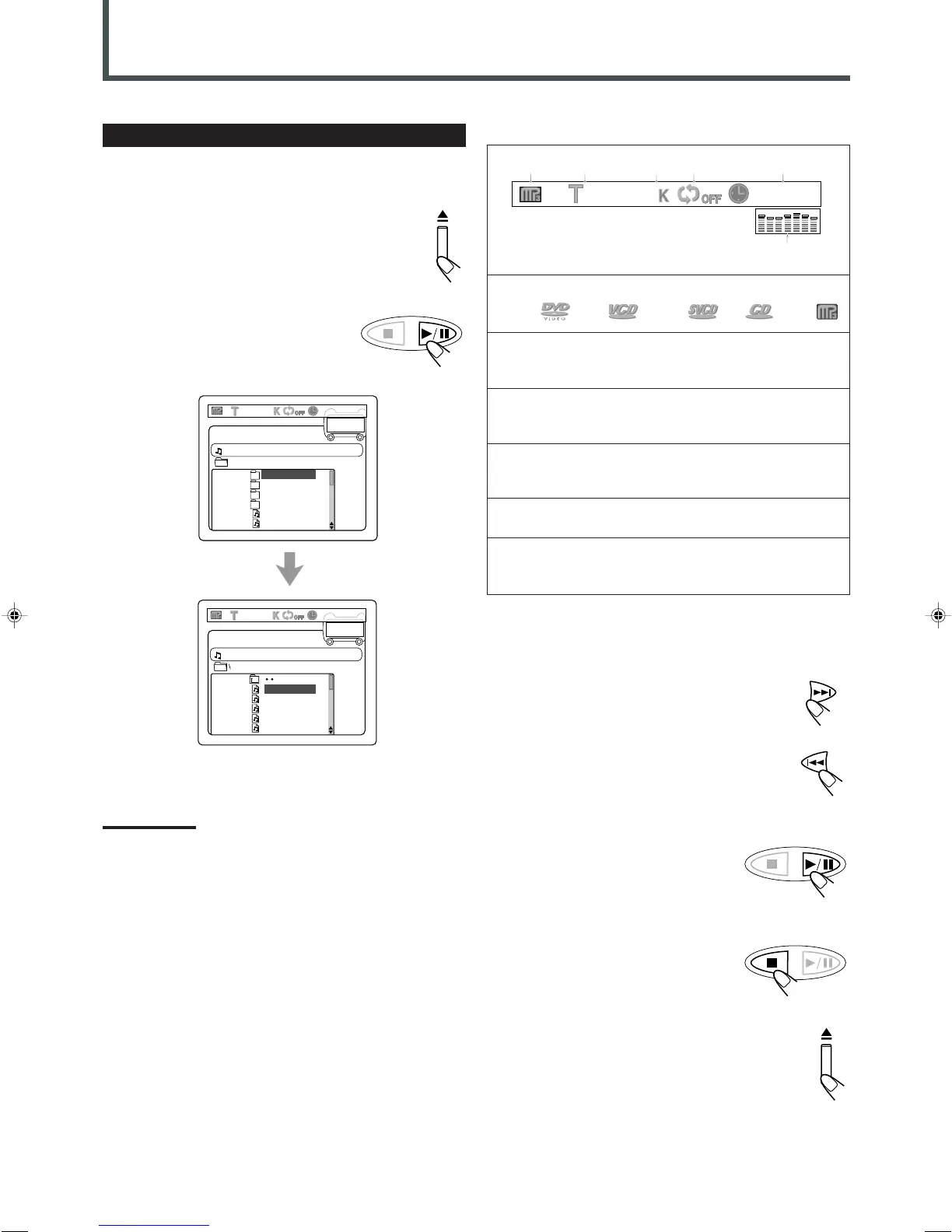
It is recommended to turn on your TV when playing back an MP3
disc.
1
Press 0 to load a disc.
2
Press 3/8 .
After detecting the disc, playback starts.
• The on-screen bar and the contents
recorded on the MP3 disc will be shown
on the TV if it is turned on.
SPRING
SUMMER
FALL
WINTER
LIAR.MP3
LOVE.MP3
??
5/135
SPRING
SPRING1.MP3
SPRING2.MP3
SPRING3.MP3
SPRING4.MP3
SPRING5.MP3
??
5/135
MP3 Playback
To go to another track
Press ¢ or 4 during playback.
• ¢ : Skip to the beginning of the next track.
• 4 : Skip to the beginning of the previous track.
To stop playback for a moment
Press 3/8.
To resume play, press 3/8 again or ENTER.
To stop during playback
Press 7.
To remove the disc
Press 0 on the front panel.
The disc tray comes out.
To close the disc tray, press 0 again.
1 : Disc type
DVD VCD SVCD CD MP3
2 : Current track (file) and total number of the tracks
on the disc
• Ex.: 1st track is playing out of 35 tracks recorded.
3 : Bit rate
• Ex.: Bit rate used for recording the loaded disc is
128 Kbps. (See the previous page.)
4 : Repeat mode indicator
• Ex.: When repeat mode is turned off.
See page 43 for more details.
5 : Elapsed playing time and the total playing time of
the current track
6 : Sound indication
• Indicates sound input level. (Only appears during
playback.)
128 00:22/03:48
1/35
12 345
6
The on-screen bar
Note:
If the loaded disc is not recorded in the audio CD format or MP3
format, “WRONG DISC FORMAT” appears on the TV screen.
EN40-43TH-A30R[B]ff.pm6 02.7.2, 9:50 PM41



 To Next Page