TH-A35
1-8
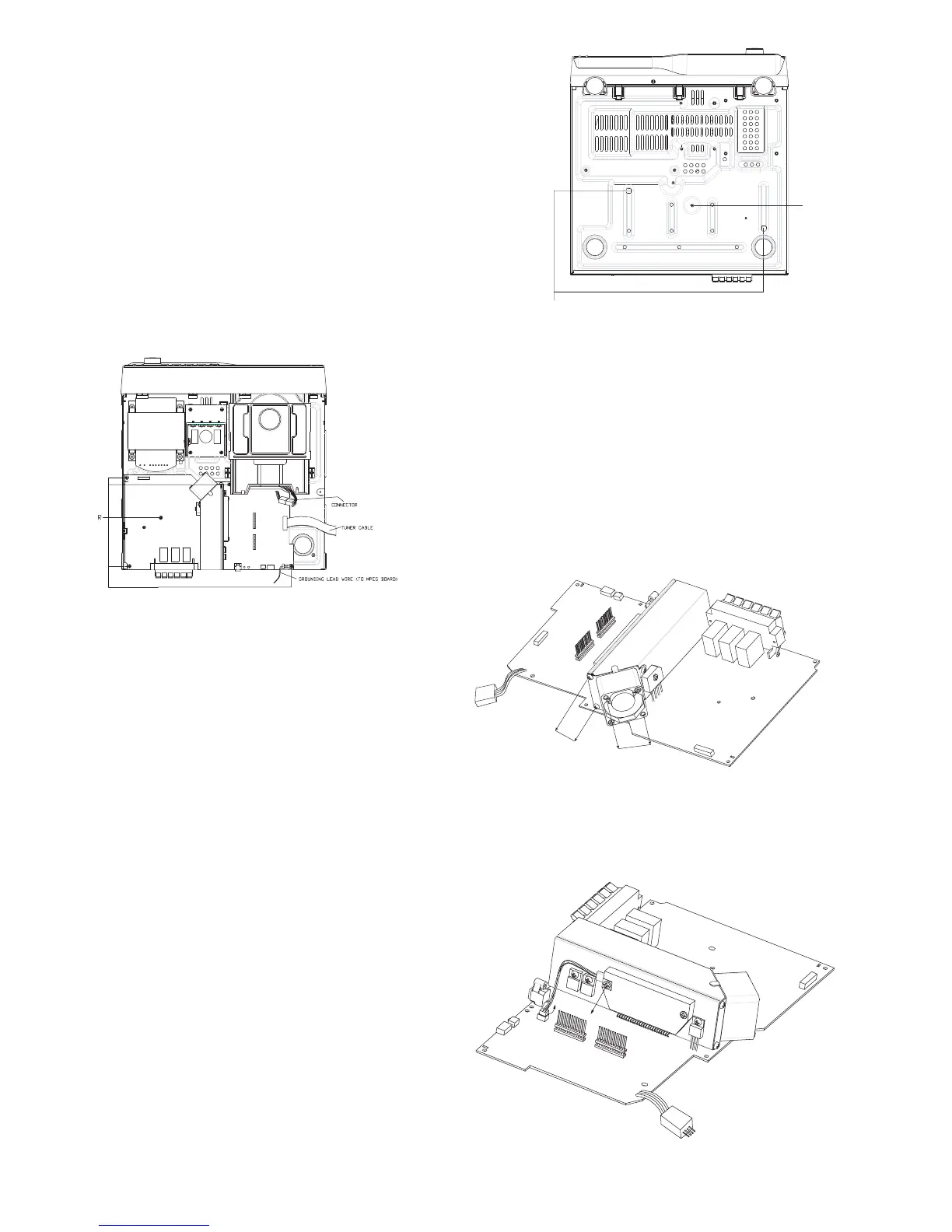
Removing the MAIN Board
( See Fig.6 & 7 )
[Caution] Main board may be taken out when the
mpeg board has been taken away.
1. Force the PCB spacer Q to exit the holes of main
board.
2. Unscrew the screw P.
3.Unscrew the screw R then you can remove the main
board with heat sink.
4.Untie or open connecters to power transformer,
PWB,AMP, DVD - mech.
Removing FAN
(See Fig.8)
1.Unscreew 3 screws R with HOLDER, pull
out connector from PWB, main.
2.Unscrew 2 screws S from HLDR.
Removing the Thermal - Regifer
(See Fig.9)
1.Unscreew the screws though power IC and
thermal- HOLDER.
2.Pull wire of thermal - register from PWB main.
P
Q
Fig. 6
Fig. 7
Fig. 9
Fig. 8
R
S
PULL



 To Next Page
 Loading...