31
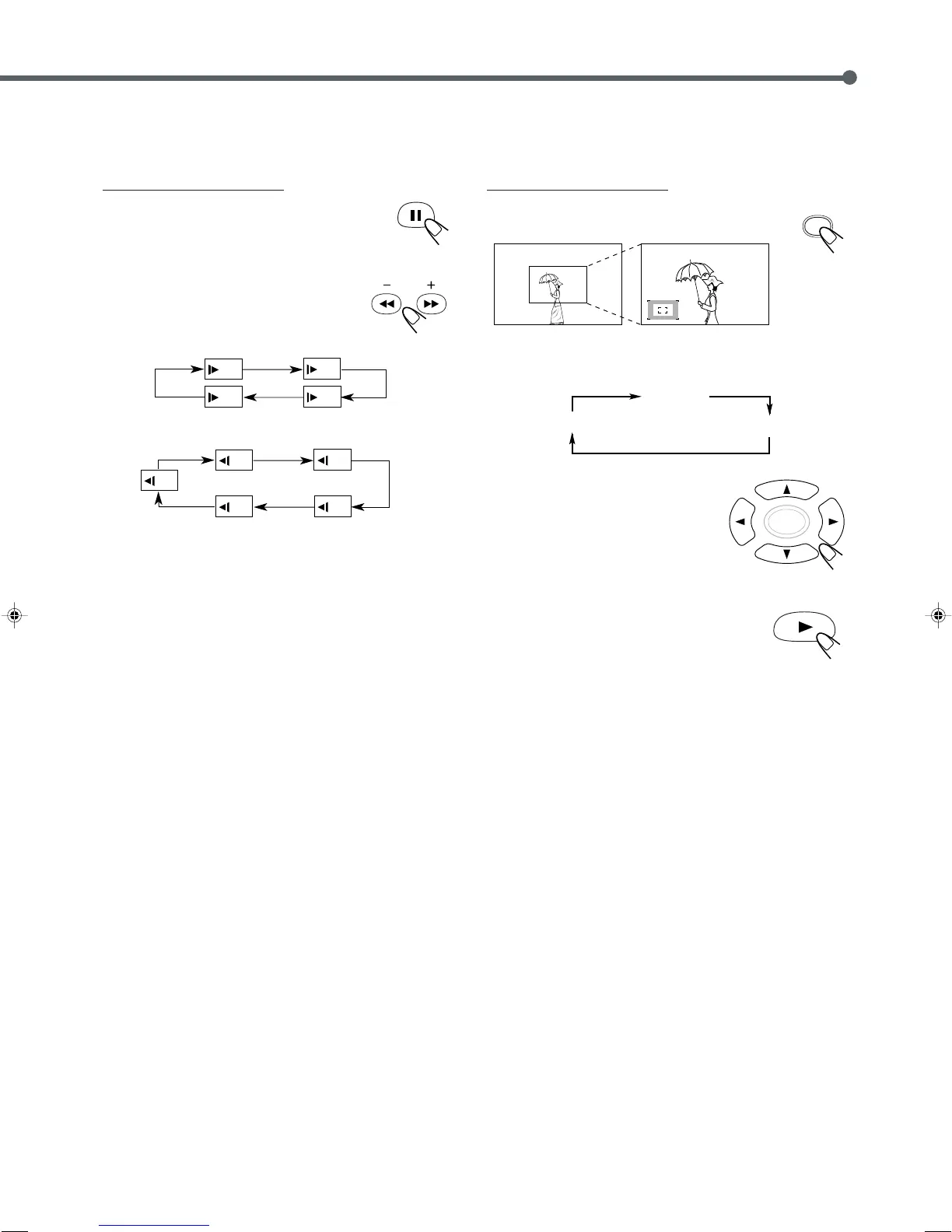
7 Slow Motion Playback
You can enjoy slow motion playback while playing a DVD.
From the remote control ONLY:
1
Press 8 at the point where you want to
start playback in slow-motion.
A still picture appears on the TV screen.
2
Press SLOW + or SLOW –.
• Each time you press the button, slow
motion speed changes as follows.
Forward:
Reverse:
7 Zoom
You can zoom on the picture while playing back a DVD.
From the remote control ONLY:
1
Press ZOOM.
The zoom indicator appears on the TV.
• Each time you press the button while the indicator appears, the
magnification changes as follows:
2
Press cursor 3/2/5/∞ to move
the portion you want to watch.
To cancel the zoom
Press 3.
Zoom in (12 steps)
No Zoom
Zoom out (12 steps)
EN22-31TH-A35[B].pm6 03.1.20, 11:24 AM31



 To Next Page