35
2
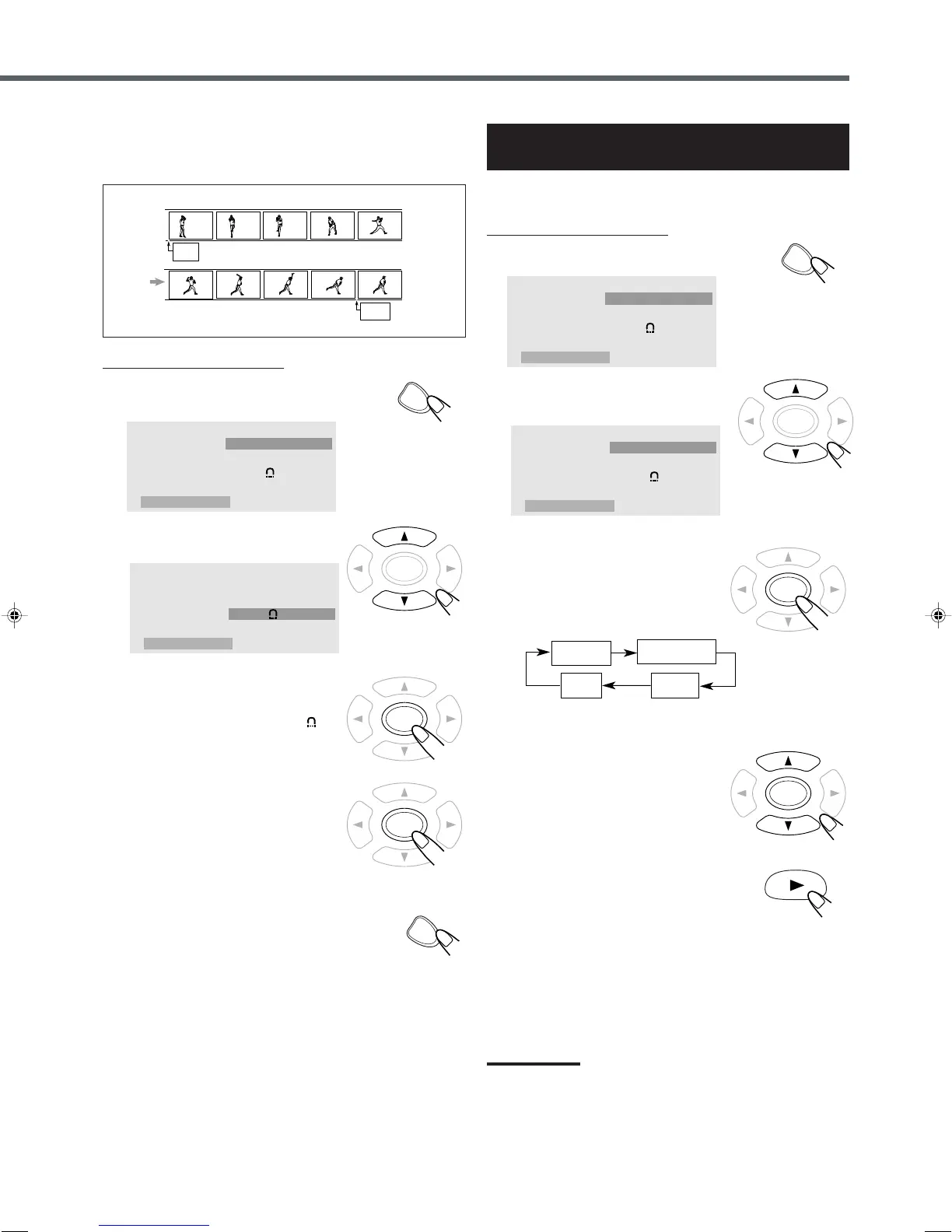
Press cursor 5/∞ to select
“Repeat A–B.”
3
Press ENTER to select the start
point.
“A–” appears on the display and “ A–”
appears on the TV.
4
Press ENTER again to select
the end point.
“A–” changes to “A–B”, then A–B repeat
begins.
The unit automatically locates point A
and starts repeated playback between
points A and B.
5
Press ON SCREEN again.
The on-screen menu disappears.
To cancel A–B Repeat
1) Press ENTER repeatedly to select “Off” in step
3
.
2) Press cursor 5/∞ to select “OK”, then press ENTER.
“A–B” disappears, and resume normal playback.
Example:
Play Mode
Mode
Repeat
Repeat A–B
OSD
Off
Off
Off
Off
OK
From the remote control ONLY:
1
Press ON SCREEN.
The on-screen menu appears on the TV.
Play Mode
Mode
Repeat
Repeat A–B
OSD
Off
Off
Off
Off
OK
7 A–B Repeat
While playing, you can also select a portion you want to repeat.
Playing Back Tracks in Random Order
— Shuffle Play
You can playback chapters in random order.
From the remote control ONLY:
1
Press ON SCREEN.
The on-screen menu appears on the TV.
2
Press cursor 5/∞ to select
“Mode.”
3
Press ENTER repeatedly to
select “Shuffle.”
• Each time you press the button, play
mode changes as follows:
Play Mode
Mode
Repeat
Repeat A–B
OSD
Off
Off
Off
Off
OK
* Appears when only VCD with PBC is loaded
4
Press cursor 5/∞ to select
“OK”, then press ENTER.
The on-screen menu disappears.
5
Press 3.
playback starts in random order.
To cancel shuffle play
1) Press ENTER repeatedly to select “Off” in step
3
.
2) Press cursor 5/∞ to select “OK”, then press ENTER.
Notes:
• When all tracks have been played once, shuffle play ends.
• The same track will not be played more than once during shuffle
play.
Play Mode
Mode
Repeat
Repeat A–B
OSD
Off
Off
Off
Off
OK
EN32-37TH-A35[B].pm6 03.1.20, 11:24 AM35



 To Next Page