36
English
1
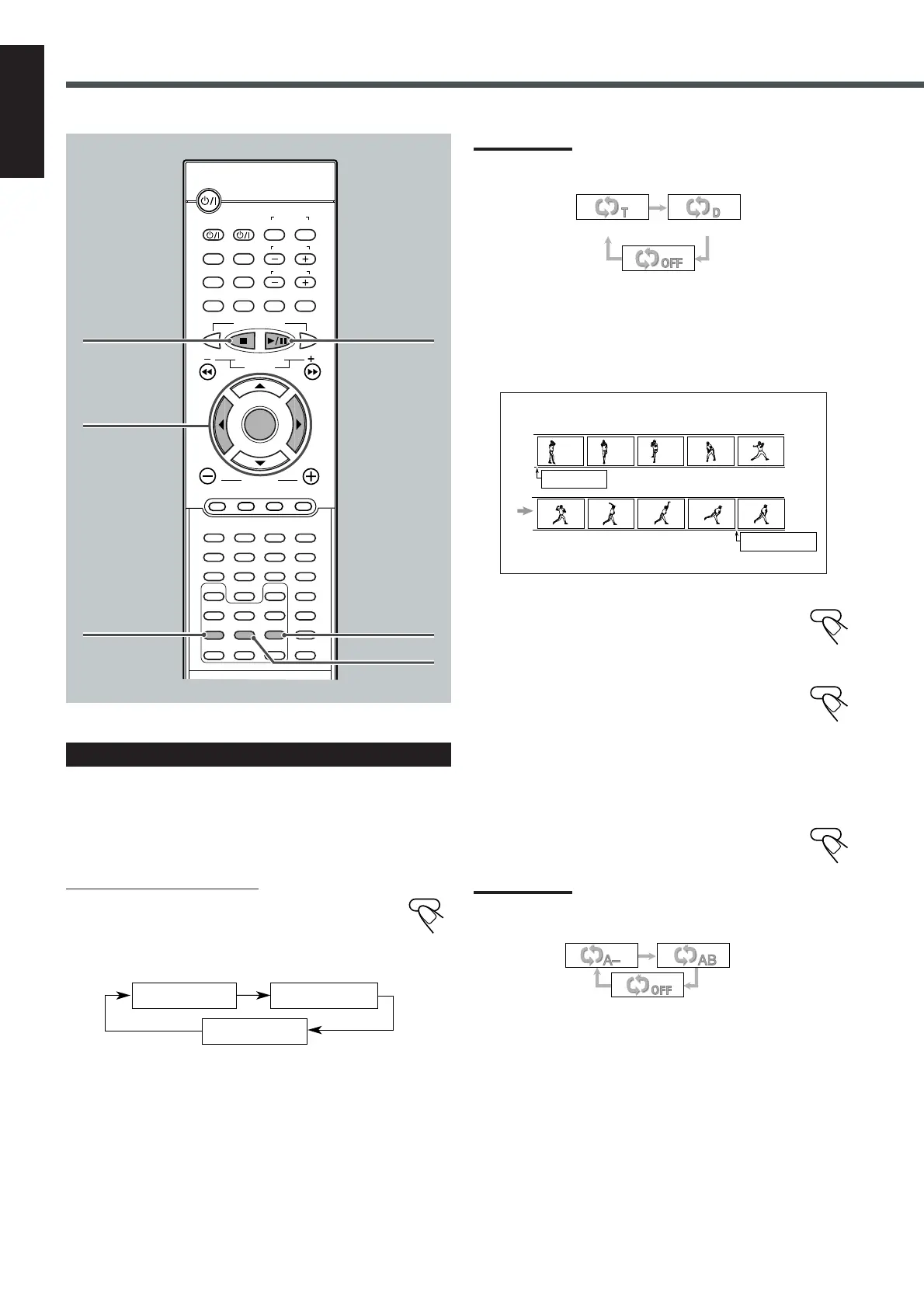
Press A–B REPEAT to select the start
point.
“REPEAT A” appears on the display.
2
Press A–B REPEAT again to select the
end point.
“REPEAT A” changes to “REPEAT A–B,” then
A–B Repeat begins.
The unit automatically locates point A and starts repeated
playback between points A and B.
To cancel A–B Repeat
Press A–B REPEAT again.
“REPEAT A–B” goes off from the display.
Note:
When the on-screen bar is shown on the TV screen, repeat mode
indication also changes as follows:
Example:
REPEAT A
REPEAT A–B
VCD/CD Playback
Repeating Playback
Repeat play cannot be used in the following cases:
• When you play back a VCD using the PBC function
• When you enjoy program play
7 Repeat Play
From the remote control ONLY:
Press REPEAT repeatedly.
The indication corresponding to the selected mode appears
on your TV.
• Each time you press the button, repeat mode changes as follows:
REPEAT:ONE : Current track will be repeated.
REPEAT:DISC : All the tracks will be repeated.
REPEAT OFF : Repeat play is canceled. (Normal play is
resumed.)
Note:
When the on-screen bar is shown on the screen, Repeat mode
indication also changes as follows:
7 A–B Repeat
While playing, you can also select a portion you want to repeat.
• An interval of more than 5 seconds is required between point A
and point B.
REPEAT
REPEAT OFF
REPEAT:ONE REPEAT:DISC
REPEAT:ONE REPEAT:DISC
REPEAT OFF
A-B REPEAT
A-B REPEAT
A-B REPEAT
2 3
ENTER
REPEAT
A–B REPEAT
DISPLAY
B.SEARCH
DOWN
REW
UP
FF
F.SEARCH
RETURN STEP TV/VIDEO
TV VOLUME
TV CHANNEL
SUBTITLE
TOP MENU
TV
STANDBY/ON
AUDIO
VCR OFF ON
VCR
CONTROL
TUNER PRESET
ENTER
VOLUME
AUDIO/
FM MODE
VCR CHANNEL
TUNING
DVD FM/AM AUX MUTING
REMAIN
PROGRAM
D.R.C
SETUP
CLEAR
REPEAT
ANGLE
SLOW
SEARCH
A-B REPEAT
NTSC/PAL
ZOOM
SLEEP
EFFECT
DSP MODE
TEST
PRO LOGIC
SETTING
SOUND
123
45
6
78
9
0
MENU
7
3/8
PROGRAM
EN34-39TH-A5[U]f.pm6 01.11.27, 10:3036



 To Next Page