EasyManua.ls Logo

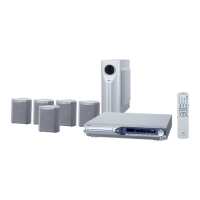
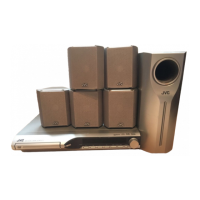
JVC TH-S33 - User Manual

JVC TH-S33
41 pages
Print Icon
To Next Page IconTo Next Page
Loading...
TH-S33
GVT0155-007A
[US/UN/UB/UG/UX/A/UW]
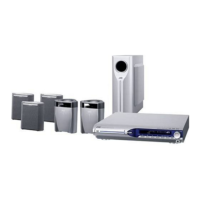
TH-S11
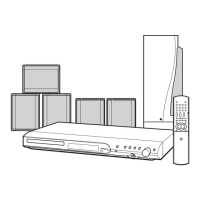
DVD DIGITAL CINEMA SYSTEM
INSTRUCTIONS
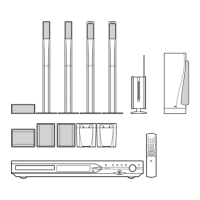
Consists of XV-THS33, SP-WS33, SP-THS33F,
SP-THS33C and SP-THS33S
Consists of XV-THS11, SP-WS11, SP-THS11F,
SP-THS11C and SP-THS11S
TH-S33-11[AU].book Page i Monday, April 4, 2005 2:54 PM

Table of Contents

Other manuals for JVC TH-S33

Questions and Answers

  • S
    Samantha MillerAug 15, 2025
    How to adjust picture to fit TV screen on JVC TH-S33 Home Theater System?
    • V
      vmorenoAug 15, 2025
      If the picture doesn't fit the TV screen on your JVC Home Theater System, the monitor type may not be set correctly. Set “MONITOR TYPE” properly.
  • J
    Jeremy NelsonAug 18, 2025
    Why JVC Home Theater System remote control not working?
    • M
      martinezmichaelAug 18, 2025
      If the remote control of your JVC Home Theater System isn't working, it might be due to exhausted batteries. Try replacing them. Also, ensure that direct sunlight isn't falling on the remote sensor, as this can interfere with its operation. Hide the remote sensor from direct sunlight.
  • R
    Robert LewisAug 21, 2025
    What to do if there is no sound from JVC TH-S33?
    • M
      Mark PetersenAug 21, 2025
      If you're not getting any sound from your JVC Home Theater System, the speaker cord might not be properly connected. Check the connection. Also, make sure that you have selected the correct source.
  • K
    Kristen WillisAug 25, 2025
    How to fix JVC Home Theater System when power does not come on?
    • H
      hayley07Aug 25, 2025
      If your JVC Home Theater System isn't powering on, the power cord might not be correctly connected. Ensure the power cord is properly connected.
  • M
    Melissa Martinez DDSAug 27, 2025
    What to do if no picture is displayed on TV screen from JVC TH-S33 Home Theater System?
    • T
      tjamesAug 27, 2025
      If no picture is displayed on the TV screen when using your JVC Home Theater System, check that the video cable is correctly connected. Also, verify that the disc you are using is playable.
  • T
    tracyrussellAug 30, 2025
    Why are the video and audio distorted on my JVC Home Theater System?
    • D
      Douglas LeeAug 30, 2025
      Distorted video and audio on your JVC Home Theater System can be caused by a scratched or dirty disc. Try replacing or cleaning the disc. Also, if a VCR is connected between the center unit and the TV, connect the center unit and TV directly.
  • Q
    qwalkerSep 2, 2025
    What to do if JVC TH-S33 remote control does not work as expected?
    • C
      Clarence CarrollSep 2, 2025
      If your JVC Home Theater System's remote control isn't working as expected, the remote control mode may not be set for the desired source. Before operation, press one of the source selecting buttons for the desired source.
  • G
    Gary DoughertySep 5, 2025
    Why JVC TH-S33 Home Theater System picture is blurred or divided?
    • K
      kylecarrilloSep 5, 2025
      If no picture is displayed, the picture is blurred, or the picture is divided into two parts when using your JVC Home Theater System, the scan mode may be set to “NTSC PRG” or “PAL PRG” though the center unit is connected to the TV which does not support the progressive video input. Change the scan mode to “PAL” or “NTSC.”
  • J
    Jesus PerezSep 8, 2025
    How to reduce noise when listening to broadcast on JVC TH-S33?
    • A
      amy38Sep 8, 2025
      If it's hard to listen to broadcast because of noise on your JVC Home Theater System, it might be due to disconnected antennas. Reconnect the antennas correctly and securely.
  • J
    Jessica JohnsonSep 12, 2025
    Why does my JVC TH-S33 suddenly turns off?
    • S
      Shelly DominguezSep 12, 2025
      If your JVC Home Theater System suddenly turns off, the playback level of the current source might be too high. Try playing back the source with a lower volume level.

Summary

Warnings, Cautions and Others

CAUTION

General safety warnings regarding electrical shock, fire, and proper usage.

IMPORTANT FOR LASER PRODUCTS

Specific safety instructions related to laser components within the system.

Introduction

Notes on handling

Guidelines for system installation, power cord usage, and preventing malfunctions.

Supplied accessories

A list of all components included with the main system unit.

About discs

Playable disc types

Lists all supported disc formats including DVD, VCD, CD, MP3, and JPEG.

Region code of DVD VIDEO

Explains DVD region coding and how it affects playback compatibility.

Index of parts and controls

Front panel (center unit)

Identifies and describes controls and indicators on the front of the main unit.

Rear panel (center unit)

Details the connection terminals and selectors located on the rear of the unit.

Setting the VOLTAGE SELECTOR

Instructions for setting the correct voltage for the unit based on region.

Connections

Connecting the FM and AM antennas

Step-by-step guide for properly connecting the FM and AM antennas.

Connecting the satellite (front, center, surround) speakers and the subwoofer

Instructions for assembling and connecting the speaker system components.

Connecting a TV

Guidance on how to connect the system to a television for viewing.

Basic operations

Turning the system on;off

Procedures for powering the system on and off using the remote or unit.

Selecting the source to play

How to choose the input source (DVD, FM/AM, AUX) for playback.

Adjusting the volume [VOLUME]

Method for controlling the audio output level of the system.

Playback

Basic playback

Steps for playing discs, including loading and starting playback.

Fast-forward;fast-reverse search

How to quickly scan through disc content during playback.

Skip to the beginning of a desired selection

Methods for navigating directly to specific tracks or chapters.

Advanced operations

Using the surround mode

Explains different surround sound modes and how to select them.

Playing from a specified position on a disc

Techniques to start playback from a specific title, chapter, or time.

Selecting the audio

Selecting the preferred audio language track from the disc.

Setting DVD preferences

Using the setup menus

General instructions for navigating the system's setup menus.

: Picture menu (PICTURE)

Settings related to video output and display modes like aspect ratio and source.

: Speaker setting menu (SPK. SETTING)

Adjusting speaker levels, delays, and subwoofer settings.

Tuner operations

Manual tuning

How to manually tune into AM and FM radio stations.

Preset tuning

Storing and recalling favorite radio stations for quick access.

References

Troubleshooting

Common problems and their solutions for issues like power, sound, and picture.

Specifications

Technical details and dimensions for the center unit and all speakers.

Mains (AC) Line Instruction

JVC TH-S33 Specifications

General IconGeneral
TypeHome Theater System
Total Power Output300W
DVD PlayerYes
HDMI Inputs1
USB PortYes
BluetoothYes
Supported MediaDVD, CD, USB
Audio formatsMP3, WMA, AAC
SubwooferYes
FM RadioYes
Remote ControlYes
Video formatsMPEG4
ConnectivityHDMI, USB
System TypeHome Theater
Speaker Configuration5.1 Channel

Related product manuals