No. 51921
TM-A101G
15
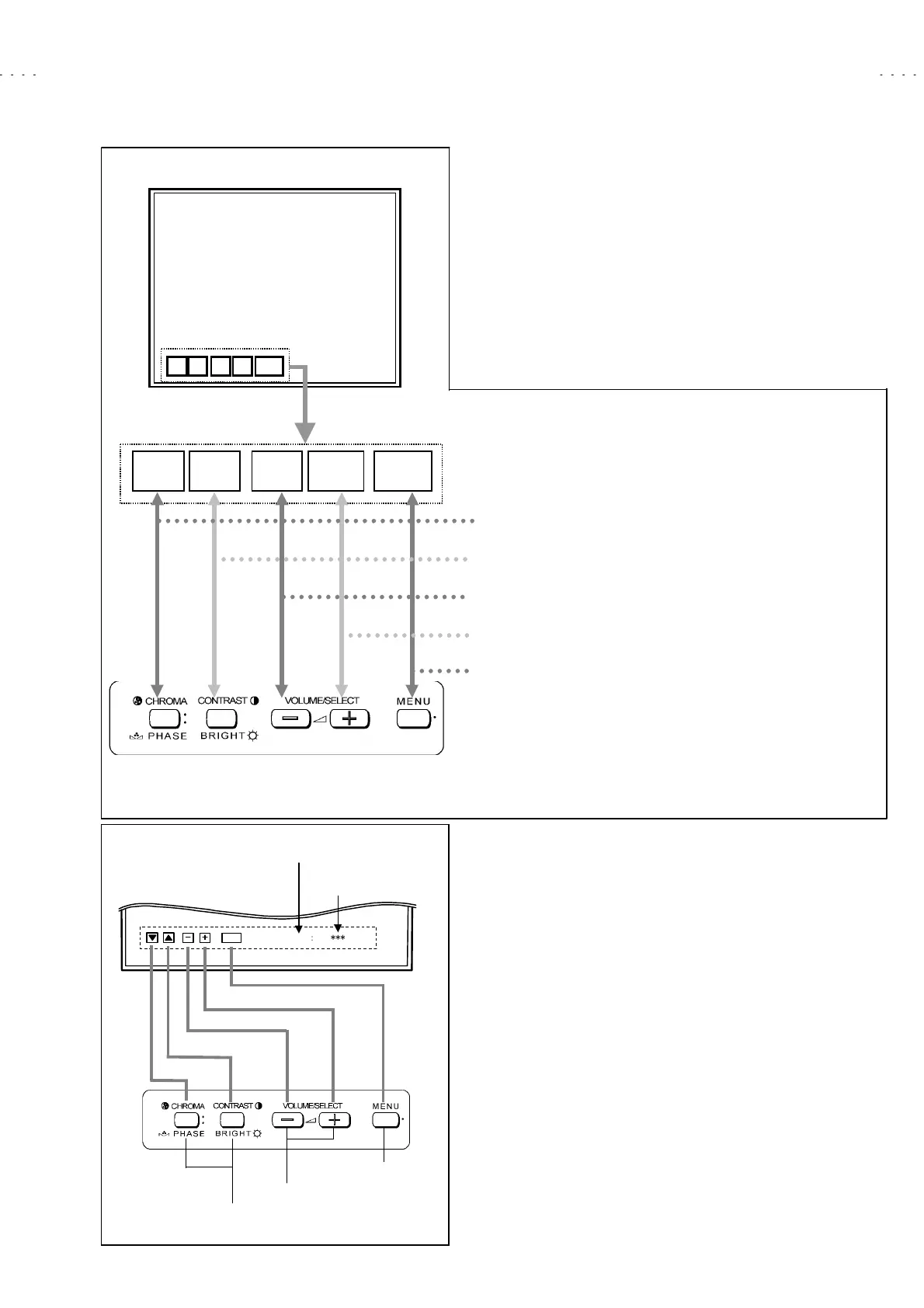
(2) OPERATION OF <BLOCK SELECT> SCREEN
While the SERVICE MENU <BLOCK SELECT> screen is displaying, in
accordance with the key control display (Function Display) at the lower side
of the screen, be able to operate the various items (Fig. 5).
< For example as following, explaining about SIGNAL BLOCK key
operations. >
(3) SELECT THE SERVICE NUMBER
Press the
CHROMA/PHASE
or
CONTRAST/BRIGHT
key to select the
service number.
(4) ADJUSTMENT DATA OPERATION
Press the
VOLUME/SELECT + (UP)
key to change the setting value in the
+ direction.
Press the
VOLUME/SELECT – (DOWN)
key to change the setting value in
the - direction.
(5) EXIT SERVICE MENU
When adjustments are completed, press
MENU
key then return to the
BLOCK SELECT screen. Again press
MENU
key then return to the normal
screen.
SIGNAL BLOCK
WHITE BALANCE BLOCK
DEFLECTION BLOCK
CONTROL BLOCK
< BLOCK SELECT >
SIG W/B DEF
CNTL
EXIT
CNTL
DEFW/B
SIG EXIT
< Function Display >
< Front Panel Key Arrangement >
SIGNAL BLOCK
]]]]]]]]]]]]]
Press
CHROMA/PHASE
key. Enter to
signal circuit adjustment mode.
WHITE BALANCE BLOCK
]]]]
Press
CONTRAST/BRIGHT
key. Enter
to white balance setting adjustment
DEFLECTION BLOCK
]]]]]]]]
Press
VOLUME/SELECT –(DOWN)
key.
Enter to deflection circuit adjustment
CONTROL BLOCK
]]]]]]]]]]
Press
VOLUME/SELECT +(UP)
key.
Enter to system whole setting mode.
EXIT
]]]]]]]]]]]]]]]]]]]]]]]
Press
MENU
key. Return to normal
screen mode.
Fig. 5
SERVICE MENU
EXIT
ʷ
ʝ
ʝ
ʝ
ʝ
ʝ
ʝ
ʧ
ʧ
ʧ
<
S01
>
Service number indication
Setting value indication
< Function display >
Service number select key
Data operate (inc/dec) key
< Front Panel Key Arrangement >
Fig. 6
Exit key








 To Next Page