INTRODUCTION
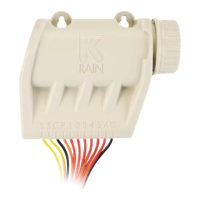
The BL-KR is a Bluetooth
®
and fully waterproof battery operated
irrigation controller. The BL-KR is ideal for isolated or remote valve
boxes where running power is expensive/difcult, eliminating long wire
runs to controller or expensive increase in wire gauge size due to
voltage drop issues.
STEP 1: APP DOWNLOAD
1. On your smartphone or tablet, go to the itunes App Store
or to the Goggle Play Store app.
2. Search for the K-Rain BL app in the search bar.
3. Download and install the K-Rain BL app.
4. Once installed, make sure Bluetooth
®
is enabled on your
smartphone or tablet.
STEP 2: PAIRING
1. Unscrew the cap on the BL-KR.
2. Plug the 9V Alkaline battery and screw
the cap back on the battery compartment.
3. Launch the K-Rain BL app.
4. Tap on the «Add a module» button,
or on the «+» button.
5. Choose your BL-KR from the list of
nearby controllers.
6. To nish the pairing of your BL-KR, follow the in-app instructions.


 To Next Page
 Loading...