Need help?
Do you have a question about the K-Rain 2000 Series and is the answer not in the manual?
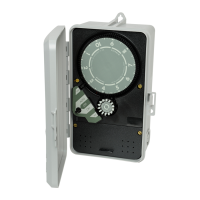
Program controller operation using timing pins in the 24-hour dial.
Program controller for two-week operation using 14 day locations.
Select manual ON, automatic AUTO, or OFF operation modes.
Fasteners securing the controller chassis to the enclosure.
Terminal strip for input and output electrical connections.
Align Day Wheel for day and Time Dial clockwise for correct time.
Turn Auto-Off-On switch to ON for manual operation.
Program daily operation by pushing pins on the 14-day wheel.
Insert timing pins into the 24-hour Time Dial for desired run times.
Program operating times for multiple zones using pin groups.
Turn Auto-Off-On switch to AUTO after programming.
Disconnect power, use appropriate wire, ground, and avoid trapping wires.
Remove cover, make connections to strip, then reinstall cover.
Illustrates power input, output, and ground for Model 2110.
Shows wiring for Model 2116 including pilot valve and dump.
Wiring diagrams for specific models with switch and clock motor.
Wiring diagrams for specific models with transformer and relay.
Addresses issues with timekeeping due to power or drive gear problems.
Diagnoses problems related to switch activation or wiring.
Troubleshoots lack of manual operation due to power or wiring.
Solves issues with automatic operation, programming, or switch adjustment.
 General
| Brand | K-Rain |
|---|---|
| Model | 2000 Series |
| Category | Controller |
| Language | English |

 To Next Page