5
PROGRAMMING
SET CURRENT TIME & CORRECT DAY
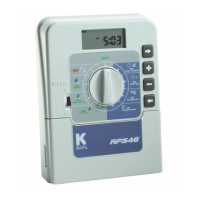
Turn the dial to Set Clock/Calendar position.
The hour will be flashing. Use or to adjust.
NOTE: AM / PM must be set correctly.
Press the button and the “minutes” will flash.
Use
or to adjust.
Press
and the “day of the week” will flash.
Use
or to set correct day.
SET CALENDAR (OPTIONAL)
NOTE:
The calendar only needs to be set when selecting ODD/EVEN day
watering in areas where water restrictions may require this feature.
Press button until the year, month & day are shown. The “year”
will be flashing. Use
or to adjust.
Press
button and the “month” will flash.
Use
or to adjust.
Press
and the “day” will flash. Use or to adjust.
TIP: To return to the clock, Press , or turn dial to another position.
Before proceeding, ensure your watering planner has been completed.
From this, you should be aware of which stations are allocated to
each program.
NOTE: Set one program at a time – this will ensure that all the values are
entered correctly.


 To Next Page