EasyManua.ls Logo

Kaiweets HT206D - Continuity Test

Kaiweets HT206D
27 pages
Print Icon
To Next Page IconTo Next Page
To Previous Page IconTo Previous Page
Loading...
Continuity
test-)
A
Do
not
enter
a
voltage
above
10
V!
Make
sure
that the
power
supply
to
the
circuit
is
disconnected
and
all
capacitors
are
discharged.
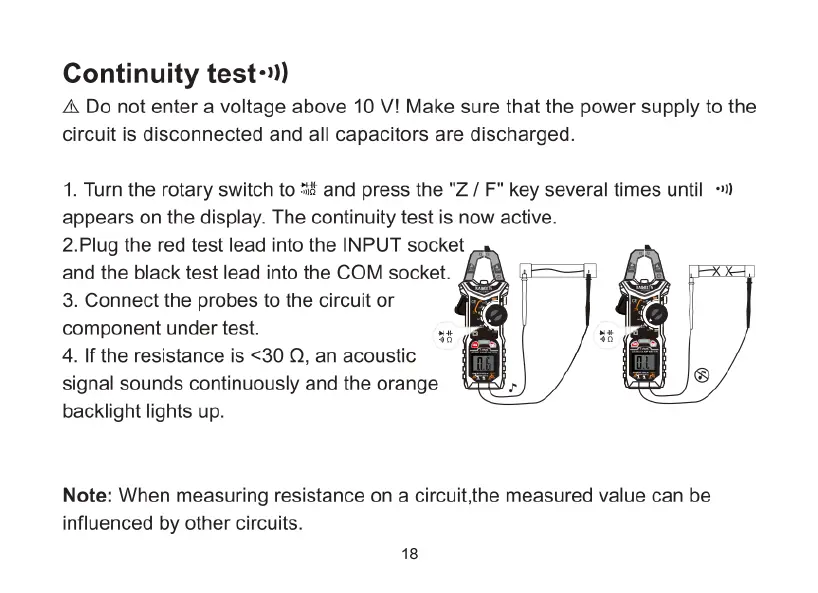
1.
Turn
the
rotary
switch
to
*i#
and
press
the
"Z
/
F"
key
several
times
until
)
appears
on the
display.
The
continuity
test
is
now
active.
2.Plug
the
red
test
lead
into
the
INPUT
socket
and
the
black
test
lead
into
the
COM
socket.
3.
Connect
the
probes
to
the
circuit
or
component
under
test.
4.
If
the
resistance
is
<30
Q,
an
acoustic
signal
sounds
continuously
and
the
orange
backlight
lights
up.
o
Note:
When
measuring
resistance
on
a
circuit,the
measured
value can
be
influenced
by
other
circuits.
18

Related product manuals