EasyManua.ls Logo

Kaiweets ST600X - Manual Non-contact AC Voltage Detection; Manual Live Wire Detection

Kaiweets ST600X
27 pages
Print Icon
To Next Page IconTo Next Page
To Previous Page IconTo Previous Page
Loading...
Non-contact
AC
Voltage
Detection
1)
Tum
on
&
Ready
to
use
(
look
at
page
8)
2)
Press
the
'3
*button
to”
NCVILIVE
"
setting,
*
-~
signal
will
be
displayed
on
the
screen.
Place
the
NCV
probe
closer
to
the
point
to
be
tested
gradually.
el
]
|
---H
Live
Wire
Detection
1)
Tum
on
&
Ready
to
use
(
look
at
page
8)
2)
Pressthe
'
*
button
to*
NCVILIVE
"
3)
Press
the
'
SEL
*
button
to*
LIVE
'
mode.
4)
Insert
the red
probe
into
the
*
"V
*
jack
and
remove
the
black
probe.
5)
Touch
the
object
with
the
test
lead
point.
6)
When
the
indicator
light
lights
up
that
means
the
measured
position
for
the
fire
line,
please
be
careful!
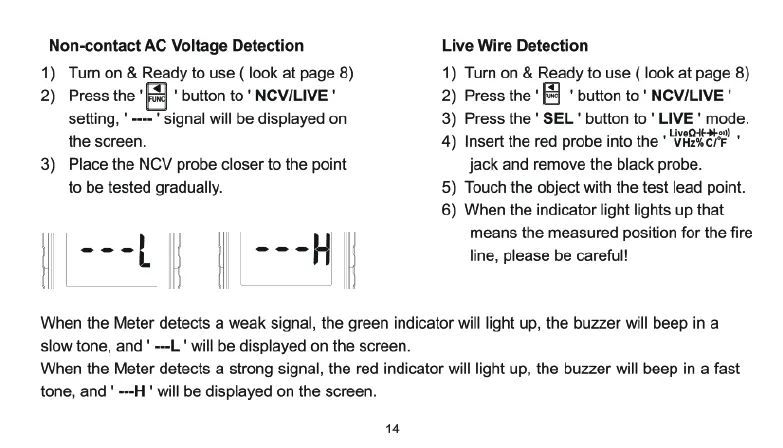
When
the
Meter
detects
a
weak
signal,
the
green
indicator
will
light
up,
the
buzzer
will
beep
in a
slow
tone,
and
'
---L
'
will
be
displayed
on
the
screen.
When
the
Meter
detects
a
strong
signal,
the
red
indicator
will
light
up,
the
buzzer
will
beep
in
a
fast
tone,
and
'
---H
'
will
be
displayed
on
the
screen.

Related product manuals